
Ever wonder why some online businesses thrive while others struggle to convert visitors into customers? The difference often lies in the payment experience. The convenience of a seamless checkout process isn't just a novelty anymore; it's expected.
According to a recent study by Baymard Institute in early 2025, the average cart abandonment rate sits at a staggering 70.19%, with complicated checkout processes and security being cited as a primary reason customers leave without completing their purchase.
In this blog, we'll walk you through everything you need to know about payment gateways—the technology powering online transactions worldwide. You'll discover how payment gateways work behind the scenes, the top options available for businesses of all sizes, and step-by-step integration instructions.
A payment gateway is a digital tool that processes and authorizes online payments between customers and businesses. Think of it as an online version of the card-reading devices you find in physical stores. When you make a purchase online, the payment gateway securely captures your payment information, sends it to the bank for approval, and ensures the transaction is completed smoothly.
It acts as an intermediary, securely transmitting the payment details between the customer, the merchant, and the financial institutions involved, making it possible to pay for goods and services electronically.
A payment gateway should provide several functions for a smooth, secure, and user-friendly experience for the business and its customers. Here’s a breakdown of the functionalities that a payment gateway should offer.
A reliable payment gateway enables businesses to accept payments in various currencies, making it ideal for international transactions.
They provide encrypted payment processing so that credit card details are securely transmitted. Features like PCI DSS compliance are integral to maintaining trust and protecting customer data.
Payment gateways offer a quick checkout process that integrates easily with your website. They support multiple payment methods, such as credit/debit cards, wallets, UPI, and more.
A payment gateway can automate recurring billing, where businesses can set up subscription plans and automatically charge customers on a regular schedule.
A versatile payment gateway integrates easily with popular e-commerce platforms such as WooCommerce, Shopify, Magento, and more.
Payment gateways offer detailed transaction reports and analytics that help track sales performance, identify trends, and manage finances.
A payment gateway makes it easier to manage refund requests and handle chargeback disputes when they arise.
Also Read: Understanding Chargeback Fraud: Insights and Prevention Strategies
Take the time to carefully evaluate your options when choosing a payment gateway. Assess your business’s current online payment requirements and consider how they may change in the future. Then, select a payment gateway that meets those needs and helps boost customer conversion and retention.
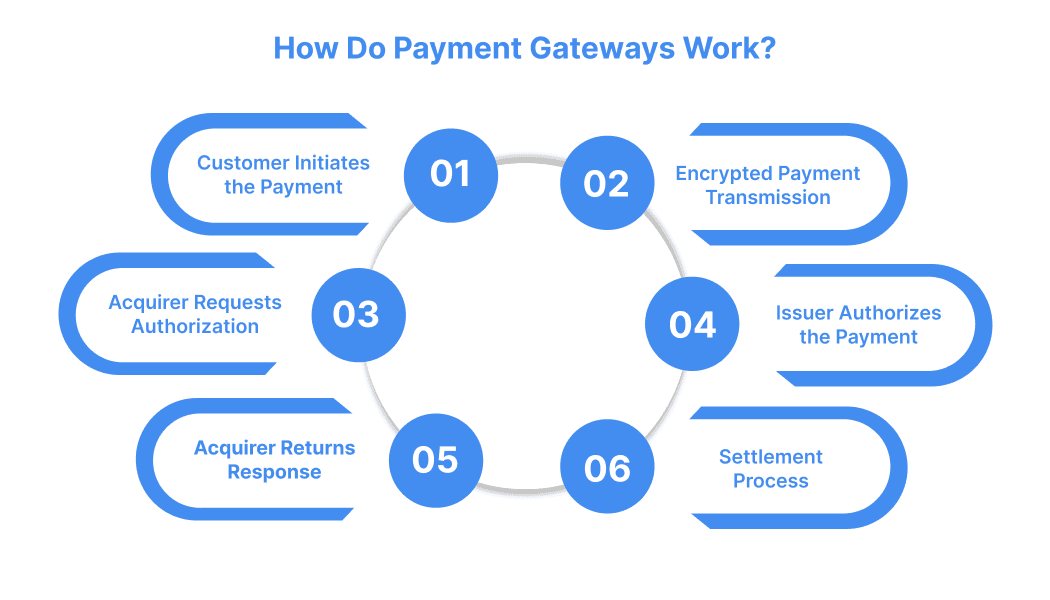
A payment gateway is an intermediary in the card payment process, facilitating secure transactions between the customer, the merchant, the acquiring bank, and the issuing bank.
The process begins when a customer selects products or services and proceeds to the merchant’s website or app checkout page. The customer enters payment information, such as the cardholder's name, card number, expiration date, and CVV code. This information is securely transmitted to the payment gateway for processing.
Once the payment information is received, the payment gateway encrypts the sensitive data to prevent unauthorised access. The encrypted data is then sent to the acquiring bank, which represents the merchant, for further processing.
The acquiring bank forwards the payment data to the card schemes (such as Visa or Mastercard). These card schemes serve as intermediaries, ensuring the payment information reaches the issuing bank for authorization.
The issuing bank (the customer’s bank) checks the validity of the transaction. It verifies whether the customer has sufficient funds, card validity, and fraud checks. If the transaction is approved, the issuer sends an authorization message to the acquiring bank via the card schemes.
Upon receiving authorization from the issuer, the acquiring bank sends the approval message to the payment gateway, which then relays it back to the merchant’s website or app. If the payment is approved, the customer is redirected to a confirmation page; if declined, they are prompted to enter a new payment method.
After the payment is authorized, the acquirer initiates the settlement process, where the payment amount is collected from the issuer (the customer’s bank) and transferred into the merchant's account.
This process may take a few business days, depending on the terms between the merchant and the payment service provider.
Throughout this process, the payment gateway ensures the transaction is secure, fast, and compliant with regulations like PCI DSS (Payment Card Industry Data Security Standard), minimizing the risk of fraud or data breaches.
Also Read: Choosing the Right Payment Gateway
When integrating a payment gateway into your website, choose the right integration method that aligns with your business model, technical capabilities, and compliance standards.
A hosted payment gateway allows a third-party service provider to manage the payment system for your business. You integrate this system into your website or app. When a customer makes a payment, the gateway processes the transaction securely on its servers and sends the status back to your site or app.
An API-hosted payment gateway processes payments through an API, keeping customers on your website during checkout. This type offers full customization, allowing you to control the design and manage transaction security. The gateway securely transmits payment data to the processor and sends the transaction status back to your website or app.
With a self-hosted payment gateway, you maintain full control over the payment process within your infrastructure. You manage everything from collecting payment details to transmitting data to the payment processor, ensuring a secure, customized, and accountable payment experience.
A local bank integration gateway connects your business with local banks to process online payments regionally. This solution is typically basic, lacking features like returns or recurring payments.
When a customer initiates a payment, the gateway routes the payment data to the bank, which processes it and sends the result back to your business.
In addition to the traditional integration methods, some payment gateways like Payglocal offer specialized flows to accommodate different merchant needs:
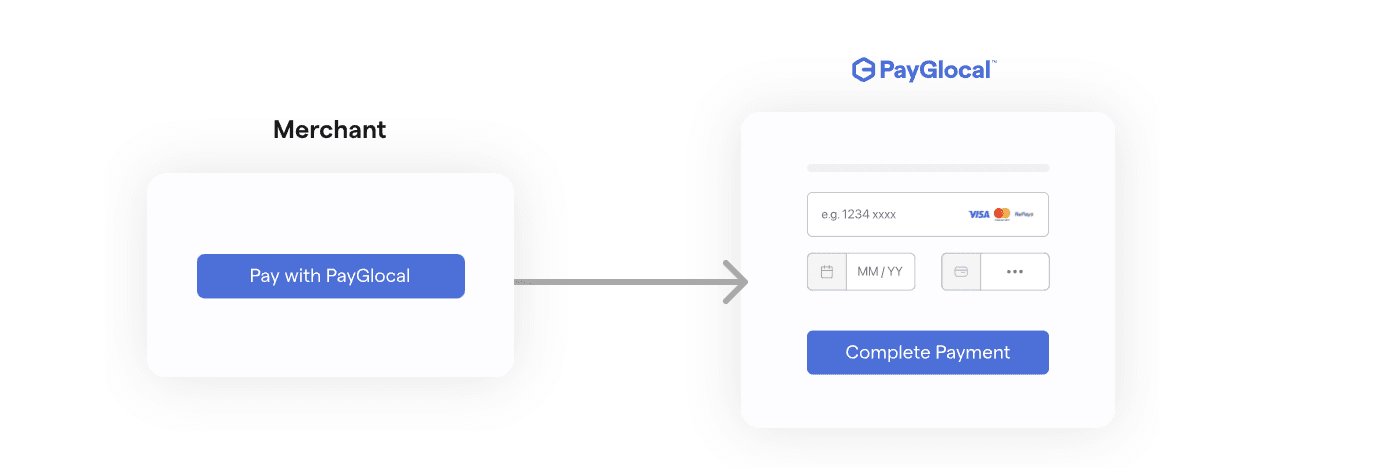
In this flow, the payment gateway collects the customer's card details. The merchant does not handle sensitive payment information, reducing their compliance burden. This method is ideal for merchants who do not want to manage PCI-DSS requirements.
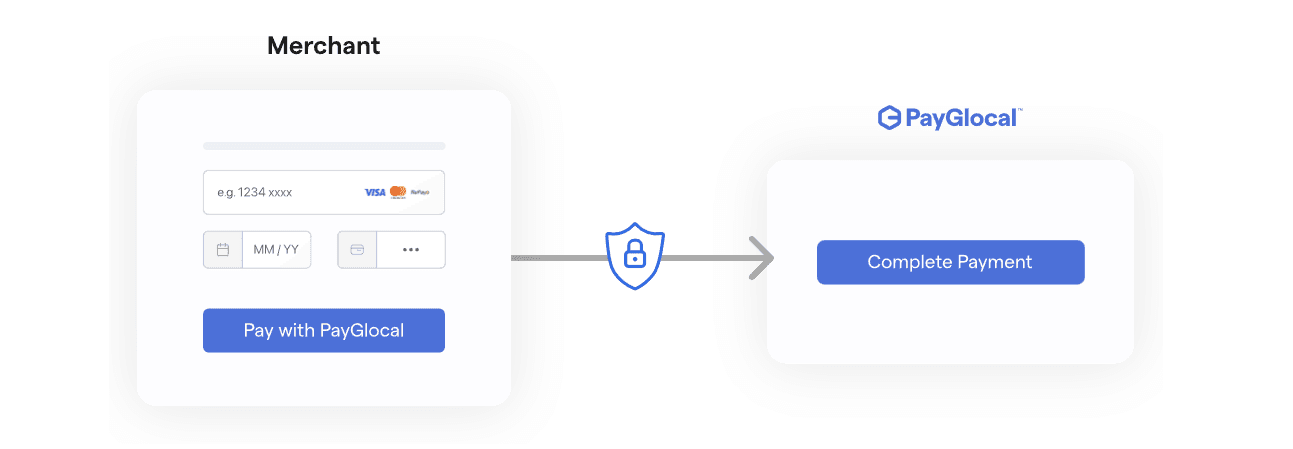
The merchant collects the card details and securely transmits them to the payment gateway. This method allows for a more customized payment experience but requires the merchant to manage compliance with security standards.
Once you have chosen the payment gateway integration method that fits your business needs, the next step is to understand the process of integration itself. This involves setting up the gateway, configuring your website, and performing thorough testing.
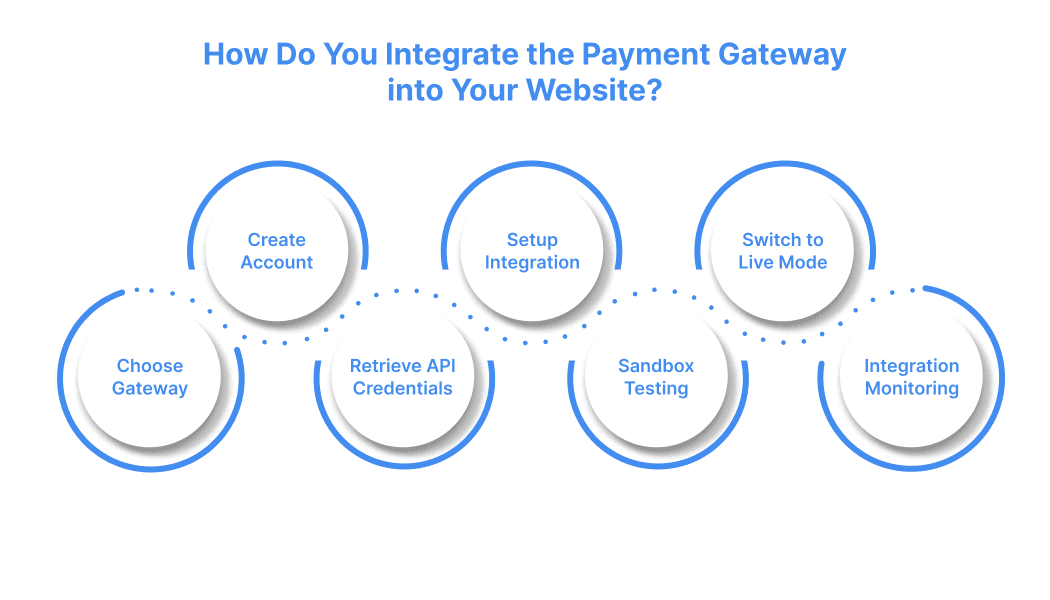
Integrating a payment gateway into your website is essential for processing online payments. It involves selecting the right provider, setting up the merchant account, and configuring your website to handle transactions. By following the proper steps, you can ensure a seamless payment experience for your customers.
The first step in integrating a payment gateway is selecting the right provider for your business. Choose a provider that aligns with your specific needs, taking into account factors such as multiple currencies, security, alternate payment methods, recurring billing, and integration.
Once you've selected a provider, sign up on their platform to create a merchant account. This account is where customer payments will be deposited into your business bank account. These accounts are certified for fraud protection and allow you to manage payment transactions securely between your website and the merchant account. The registration process is straightforward, requiring both business and personal information.
After successfully setting up your account, you’ll need to obtain API credentials to integrate payments into your website. These credentials include public and secret keys to authenticate your website’s interactions with the payment gateway.
At PayGlocal, we support the following secrets: API Keys, Asymmetric Keys (RSA Keys), PayGlocal Public CERTS (PayGlocal Common Certificates), Symmetric Keys (Shared Secrets).
Depending on the type of payment gateway you choose, this step involves creating a custom payment form and embedding the necessary HTML code into your website’s frontend and backend. This ensures that your website is set up to process payments securely.
Before going live, it's crucial to test your payment gateway integration. Start by using the sandbox environment, where you can simulate transactions to identify any issues. Manual testing should suffice for simple integrations, but automated testing may be necessary for larger, high-traffic sites to check performance during peak hours.
After testing and confirming that everything works correctly, you can switch your payment gateway to live mode. Be sure to disable sandbox mode and perform a test transaction in live conditions to confirm that payments are being processed smoothly.
Continuous monitoring of your payment system is essential for smooth operation. Use automated tools and e-commerce integrations to track transaction volumes, detect anomalies, and receive real-time alerts for suspicious activities.
Also Read: Xpress PayFlow for Shopify
Integrating a payment gateway is a key step in improving your website’s checkout experience, reducing abandoned carts, and boosting your revenue. Choosing the right payment gateway involves evaluating factors like security, transaction costs, and supported payment methods to ensure it meets your business’s needs.
To guarantee a smooth operation, thorough testing and continuous monitoring are crucial for maintaining security and functionality. With PayGlocal, you gain access to a reliable, secure payment solution that handles over 500M+ API requests per day, ensuring that your transactions are processed efficiently and securely, allowing you to focus on growing your business. Get Started Today!
According to a recent study by Baymard Institute in early 2025, the average cart abandonment rate sits at a staggering 70.19%, with complicated checkout processes and security being cited as a primary reason customers leave without completing their purchase.
In this blog, we'll walk you through everything you need to know about payment gateways—the technology powering online transactions worldwide. You'll discover how payment gateways work behind the scenes, the top options available for businesses of all sizes, and step-by-step integration instructions.
What is a Payment Gateway?
A payment gateway is a digital tool that processes and authorizes online payments between customers and businesses. Think of it as an online version of the card-reading devices you find in physical stores. When you make a purchase online, the payment gateway securely captures your payment information, sends it to the bank for approval, and ensures the transaction is completed smoothly.
It acts as an intermediary, securely transmitting the payment details between the customer, the merchant, and the financial institutions involved, making it possible to pay for goods and services electronically.
What are the Most Important Functions of a Payment Gateway?
A payment gateway should provide several functions for a smooth, secure, and user-friendly experience for the business and its customers. Here’s a breakdown of the functionalities that a payment gateway should offer.
Multi-currency Support
A reliable payment gateway enables businesses to accept payments in various currencies, making it ideal for international transactions.
Secure Payment Processing
They provide encrypted payment processing so that credit card details are securely transmitted. Features like PCI DSS compliance are integral to maintaining trust and protecting customer data.
Seamless User Experience
Payment gateways offer a quick checkout process that integrates easily with your website. They support multiple payment methods, such as credit/debit cards, wallets, UPI, and more.
Recurring Billing
A payment gateway can automate recurring billing, where businesses can set up subscription plans and automatically charge customers on a regular schedule.
Integration with E-commerce Platforms
A versatile payment gateway integrates easily with popular e-commerce platforms such as WooCommerce, Shopify, Magento, and more.
Transaction Reporting and Analytics
Payment gateways offer detailed transaction reports and analytics that help track sales performance, identify trends, and manage finances.
Refunds and Chargebacks Management
A payment gateway makes it easier to manage refund requests and handle chargeback disputes when they arise.
Also Read: Understanding Chargeback Fraud: Insights and Prevention Strategies
Take the time to carefully evaluate your options when choosing a payment gateway. Assess your business’s current online payment requirements and consider how they may change in the future. Then, select a payment gateway that meets those needs and helps boost customer conversion and retention.
How Do Payment Gateways Work?
A payment gateway is an intermediary in the card payment process, facilitating secure transactions between the customer, the merchant, the acquiring bank, and the issuing bank.
Customer Initiates the Payment
The process begins when a customer selects products or services and proceeds to the merchant’s website or app checkout page. The customer enters payment information, such as the cardholder's name, card number, expiration date, and CVV code. This information is securely transmitted to the payment gateway for processing.
Payment Gateway Encrypts and Transmits the Data
Once the payment information is received, the payment gateway encrypts the sensitive data to prevent unauthorised access. The encrypted data is then sent to the acquiring bank, which represents the merchant, for further processing.
Acquirer Sends Data to Card Schemes for Authorization
The acquiring bank forwards the payment data to the card schemes (such as Visa or Mastercard). These card schemes serve as intermediaries, ensuring the payment information reaches the issuing bank for authorization.
Issuer Authorizes the Payment
The issuing bank (the customer’s bank) checks the validity of the transaction. It verifies whether the customer has sufficient funds, card validity, and fraud checks. If the transaction is approved, the issuer sends an authorization message to the acquiring bank via the card schemes.
Acquirer Sends Response Back to the Merchant
Upon receiving authorization from the issuer, the acquiring bank sends the approval message to the payment gateway, which then relays it back to the merchant’s website or app. If the payment is approved, the customer is redirected to a confirmation page; if declined, they are prompted to enter a new payment method.
Settlement Process
After the payment is authorized, the acquirer initiates the settlement process, where the payment amount is collected from the issuer (the customer’s bank) and transferred into the merchant's account.
This process may take a few business days, depending on the terms between the merchant and the payment service provider.
Key Players in the Payment Process
- Customer (Cardholder): The person who initiates the purchase.
- Merchant: The business selling goods or services
- Issuer (Issuing Bank or Card Issuer): The bank or financial institution that issues the payment card and checks the customer’s account balance.
- Acquirer (Acquiring Bank): The financial institution that processes payments on behalf of the merchant and communicates with the card schemes and issuer.
- Payment Gateway: This technology facilitates secure payment data communication between the customer, merchant, and banks.
- Card Schemes: Major networks like Visa, Mastercard, American Express, and others that link the acquirer and issuer for payment processing.
Throughout this process, the payment gateway ensures the transaction is secure, fast, and compliant with regulations like PCI DSS (Payment Card Industry Data Security Standard), minimizing the risk of fraud or data breaches.
Also Read: Choosing the Right Payment Gateway
What Are the Different Types of Payment Gateway Integrations?
When integrating a payment gateway into your website, choose the right integration method that aligns with your business model, technical capabilities, and compliance standards.
Hosted Payment Gateway
A hosted payment gateway allows a third-party service provider to manage the payment system for your business. You integrate this system into your website or app. When a customer makes a payment, the gateway processes the transaction securely on its servers and sends the status back to your site or app.
API-Hosted Payment Gateway
An API-hosted payment gateway processes payments through an API, keeping customers on your website during checkout. This type offers full customization, allowing you to control the design and manage transaction security. The gateway securely transmits payment data to the processor and sends the transaction status back to your website or app.
Self-Hosted Payment Gateway
With a self-hosted payment gateway, you maintain full control over the payment process within your infrastructure. You manage everything from collecting payment details to transmitting data to the payment processor, ensuring a secure, customized, and accountable payment experience.
Local Bank Integration Gateway
A local bank integration gateway connects your business with local banks to process online payments regionally. This solution is typically basic, lacking features like returns or recurring payments.
When a customer initiates a payment, the gateway routes the payment data to the bank, which processes it and sends the result back to your business.
In addition to the traditional integration methods, some payment gateways like Payglocal offer specialized flows to accommodate different merchant needs:
PayCollect Flow:
In this flow, the payment gateway collects the customer's card details. The merchant does not handle sensitive payment information, reducing their compliance burden. This method is ideal for merchants who do not want to manage PCI-DSS requirements.
PayDirect Flow:
The merchant collects the card details and securely transmits them to the payment gateway. This method allows for a more customized payment experience but requires the merchant to manage compliance with security standards.
Once you have chosen the payment gateway integration method that fits your business needs, the next step is to understand the process of integration itself. This involves setting up the gateway, configuring your website, and performing thorough testing.
How Do You Integrate the Payment Gateway into Your Website?
Integrating a payment gateway into your website is essential for processing online payments. It involves selecting the right provider, setting up the merchant account, and configuring your website to handle transactions. By following the proper steps, you can ensure a seamless payment experience for your customers.
Step 1: Select a Payment Gateway
The first step in integrating a payment gateway is selecting the right provider for your business. Choose a provider that aligns with your specific needs, taking into account factors such as multiple currencies, security, alternate payment methods, recurring billing, and integration.
Step 2: Register and Create a Merchant Account
Once you've selected a provider, sign up on their platform to create a merchant account. This account is where customer payments will be deposited into your business bank account. These accounts are certified for fraud protection and allow you to manage payment transactions securely between your website and the merchant account. The registration process is straightforward, requiring both business and personal information.
Step 3: Retrieve API Credentials
After successfully setting up your account, you’ll need to obtain API credentials to integrate payments into your website. These credentials include public and secret keys to authenticate your website’s interactions with the payment gateway.
At PayGlocal, we support the following secrets: API Keys, Asymmetric Keys (RSA Keys), PayGlocal Public CERTS (PayGlocal Common Certificates), Symmetric Keys (Shared Secrets).
Step 4: Configure Your Website for Payment Integration
Depending on the type of payment gateway you choose, this step involves creating a custom payment form and embedding the necessary HTML code into your website’s frontend and backend. This ensures that your website is set up to process payments securely.
Step 5: Test the Integration in Sandbox Mode
Before going live, it's crucial to test your payment gateway integration. Start by using the sandbox environment, where you can simulate transactions to identify any issues. Manual testing should suffice for simple integrations, but automated testing may be necessary for larger, high-traffic sites to check performance during peak hours.
Step 6: Switch to Live Mode
After testing and confirming that everything works correctly, you can switch your payment gateway to live mode. Be sure to disable sandbox mode and perform a test transaction in live conditions to confirm that payments are being processed smoothly.
Step 7: Monitor and Track Your Integration
Continuous monitoring of your payment system is essential for smooth operation. Use automated tools and e-commerce integrations to track transaction volumes, detect anomalies, and receive real-time alerts for suspicious activities.
Also Read: Xpress PayFlow for Shopify
Conclusion
Integrating a payment gateway is a key step in improving your website’s checkout experience, reducing abandoned carts, and boosting your revenue. Choosing the right payment gateway involves evaluating factors like security, transaction costs, and supported payment methods to ensure it meets your business’s needs.
To guarantee a smooth operation, thorough testing and continuous monitoring are crucial for maintaining security and functionality. With PayGlocal, you gain access to a reliable, secure payment solution that handles over 500M+ API requests per day, ensuring that your transactions are processed efficiently and securely, allowing you to focus on growing your business. Get Started Today!