
You check your dashboard and see another batch of failed transactions. Most of them came from mobile devices. You find that the problem is not the demand, but that your checkout system was not built for how people actually pay on phones.
Mobile payment integration solves this by connecting your store to wallets, cards, and local methods your global buyers trust. Mobile commerce is growing at 18.97% yearly, and it is expected to reach up to $44.5 billion by 2035. So, it’s more important than ever to implement mobile payment integration the proper way.
This guide breaks down in detail what mobile payment integration is, the types that matter, and how to set it up. You will also know about what to look for in a provider and some of the best practices.
Mobile payment integration is the process of connecting your website or app to a payment system that lets customers pay using their phones. This covers mobile wallets like Apple Pay and Google Pay, in-app card payments, quick response (QR) code scans, and local methods popular in specific countries.
For instance, if you run a direct-to-consumer (D2C) brand shipping globally, mobile payment integration lets a buyer in Singapore tap Apple Pay at your checkout instead of entering card details manually. The payment goes through in seconds, and the experience feels native to their device.
It is not about adding a single "pay" button. It is about connecting your checkout to a payment gateway that handles encryption, currency acceptance, fraud checks, and bank communication. All of this happens behind the scenes while your customer sees a simple one-tap screen.
A slow or limited checkout is one of the top reasons buyers abandon their cart. If your global customers cannot pay the way they prefer on their phone, they will find a store where they can.
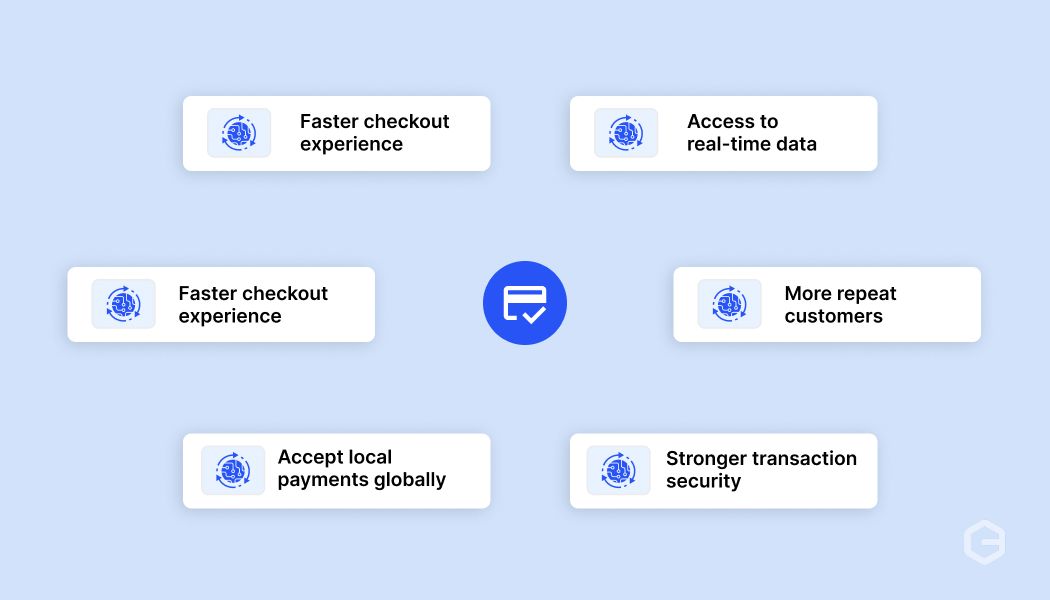
Here’s what mobile payment integration does for your business.
Tip: Track your cart abandonment rate before and after adding mobile payment options. The difference shows you exactly how much revenue you were losing.
The way you use mobile payments depends on your business model and your customers. Some of the most common uses across different industries include:
Note: If you sell to buyers in more than one country, make sure your mobile payment setup supports the payment methods popular in each market. One size does not fit all.
Most buyers do not think about the technology behind their payment. They just want it to work on their phone. Knowing the main types helps you decide which ones your checkout needs to support. Here’s a quick comparison of the most common types:
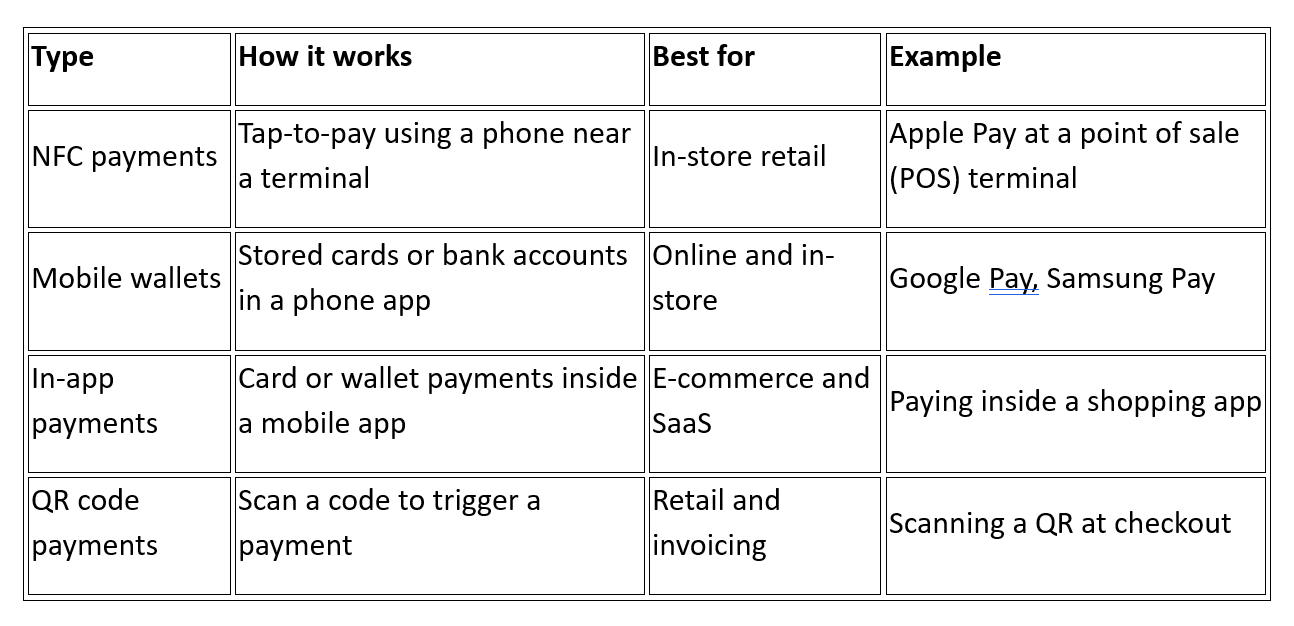
The right mix depends on where your buyers are and how they prefer to pay. For instance, if most of your customers shop from their phones, mobile wallets and in-app payments should be your priority. If you send invoices to global clients, QR code payments give them a fast way to pay without extra steps.
Tip: You do not need to support every type from day one. Start with the methods your top buyer markets use most, then add more as you grow into new regions.
Behind every one-tap payment, there are several steps happening in seconds. Most buyers never see this process, but it decides whether the payment goes through or fails. Here’s what happens when a customer pays on your mobile checkout:
This entire flow takes two to five seconds. The quality of your payment gateway decides how many of these transactions succeed, especially for international payments where card declines are more common.
Note: If your gateway does not send the right data to international card issuers, approval rates drop. Always ask your provider about their success rate on cross-border transactions before you sign up.
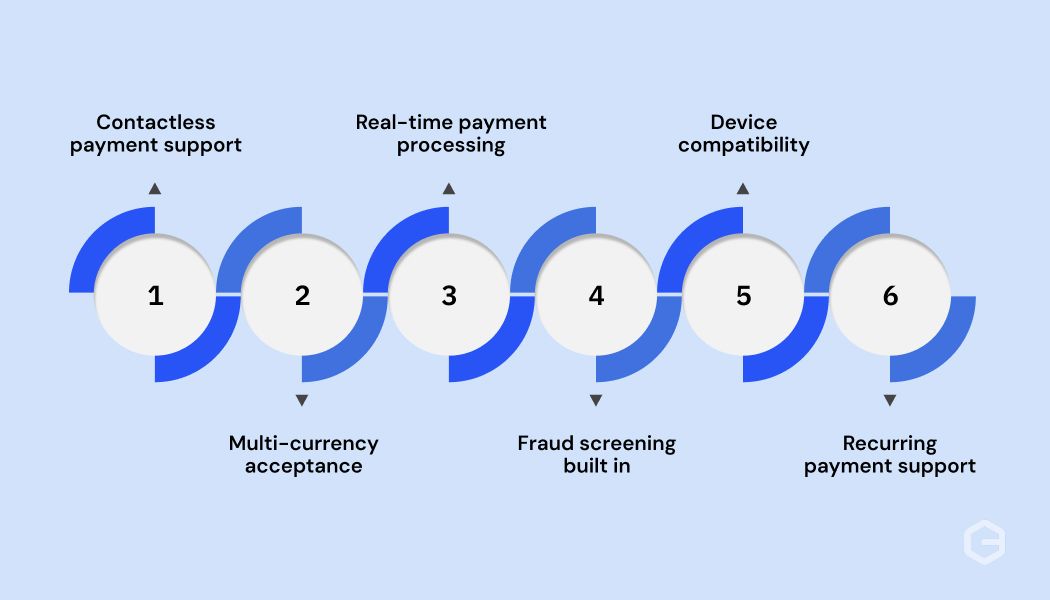
Choosing a mobile payment solution based only on pricing is a common mistake. The features it offers decide how well your checkout works, how safe your transactions are, and how easily you can grow.
Here are the features that matter most.
Tip: Before you commit to a provider, test their checkout on at least three devices and two browsers. What looks fine on one screen can break on another.
The setup process depends on your platform, your team's technical ability, and how much control you want over the checkout experience. Most providers offer more than one way to get started. Here are the steps most businesses follow.
Note: Start with the simplest integration method that fits your needs. You can always upgrade from a plugin to a full API setup as your business grows.
Picking the wrong provider costs you more than the monthly fee. It costs you failed transactions, lost customers, and hours spent fixing problems that should not exist.
Here is what to check before you commit.
Tip: Ask each provider for their approval rate on cross-border card payments. A difference of even a few percentage points adds up quickly at scale.
Even with a clear plan, you will run into operational challenges. Knowing them in advance helps you prepare instead of reacting after you lose sales. Here are the challenges businesses face most often.
Note: Most cross-border card declines happen because the gateway sends incomplete transaction data to the issuing bank. Ask your provider how their routing engine handles international issuers.
Getting mobile payments live is the first step. Keeping them running well is what protects your revenue long term. Here are the best practices that make the biggest difference.
The right combination depends on your business model and where your buyers are. Pick a setup where these practices fit naturally into your workflow rather than adding extra steps for your team.
Mobile payments are changing fast. The businesses that pay attention to where things are going will be ready when their buyers expect new options. Some of the trends shaping mobile payment integration over the next few years include:
The right time to set up your mobile payment integration is before your buyers start expecting it. Waiting until you notice lost sales puts you behind competitors who have already made the setup.
Cross-border payments come with real friction. Declined cards, limited payment options, and slow settlement cycles cost you revenue and buyer trust. For businesses selling to global customers, these problems grow with every new market you enter.
PayGlocal is built to solve these problems from one platform. Here’s how it helps your mobile payment integration.
PayGlocal handles the complexity of cross-border mobile payments so you can focus on selling. You pay only when you transact, with clear pricing and zero platform fees.
Mobile payment integration is how your global customers expect to pay. From choosing the right types to picking a provider with strong approval rates and local payment support, every decision affects your revenue.
The businesses growing fastest are the ones removing friction from checkout today. Get started with PayGlocal today and give your global buyers the mobile payment experience they already expect. The longer you wait, the more completed orders go to competitors who have already made the switch.
Mobile payment integration solves this by connecting your store to wallets, cards, and local methods your global buyers trust. Mobile commerce is growing at 18.97% yearly, and it is expected to reach up to $44.5 billion by 2035. So, it’s more important than ever to implement mobile payment integration the proper way.
This guide breaks down in detail what mobile payment integration is, the types that matter, and how to set it up. You will also know about what to look for in a provider and some of the best practices.
Key takeaways
- Mobile payment integration defined: It connects your website or app to the payment methods customers use on their phones, like wallets, cards, and local options.
- Why it matters now: Buyers across markets expect one-tap payments from their phones. A checkout that does not support this loses sales quietly.
- Types to know: Near field communication (NFC), mobile wallets, in-app payments, and QR code payments each serve different buyer habits and markets.
- Industry uses: E-commerce, software as a service (SaaS), travel, and services exporters all benefit from mobile payment integration in different ways.
- Choosing a provider matters: Look for multi-currency support, local payment methods, high approval rates, and simple integration options. PayGlocal offers all of these solutions.
What is mobile payment integration?
Mobile payment integration is the process of connecting your website or app to a payment system that lets customers pay using their phones. This covers mobile wallets like Apple Pay and Google Pay, in-app card payments, quick response (QR) code scans, and local methods popular in specific countries.
For instance, if you run a direct-to-consumer (D2C) brand shipping globally, mobile payment integration lets a buyer in Singapore tap Apple Pay at your checkout instead of entering card details manually. The payment goes through in seconds, and the experience feels native to their device.
It is not about adding a single "pay" button. It is about connecting your checkout to a payment gateway that handles encryption, currency acceptance, fraud checks, and bank communication. All of this happens behind the scenes while your customer sees a simple one-tap screen.
Why does mobile payment integration matter for your business?
A slow or limited checkout is one of the top reasons buyers abandon their cart. If your global customers cannot pay the way they prefer on their phone, they will find a store where they can.
Here’s what mobile payment integration does for your business.
- Faster checkout experience: One-tap payments through wallets and saved cards reduce the time between "add to cart" and "order confirmed." Fewer steps mean fewer drop-offs.
- Higher approval rates: Payment gateways built for mobile route transactions through the best path for each card and country. The result is more successful transactions and fewer payment failures.
- Global reach with local payment methods: Offering wallets and payment methods that buyers already trust in their country builds confidence. A customer in Germany paying with a method they recognize is more likely to complete the purchase.
- Better security for every transaction: Mobile payments use tokenization (replacing real card numbers with a unique code) and biometric checks like Face ID or fingerprint scans. This protects your buyer's data and reduces fraud risk for your business.
- More repeat customers: A smooth mobile payment experience makes buyers come back. When the first purchase is easy, the second one is even easier because their details are already saved.
- Access to real-time data: Most mobile payment providers give you dashboards showing transaction status, approval rates, and settlement timelines. This helps you spot issues quickly and make better decisions.
Tip: Track your cart abandonment rate before and after adding mobile payment options. The difference shows you exactly how much revenue you were losing.
How do businesses use mobile payment integration?
The way you use mobile payments depends on your business model and your customers. Some of the most common uses across different industries include:
- E-commerce and D2C brands: Online stores selling globally need checkout pages that support wallets, cards, and local payment methods on mobile screens. For instance, an Indian fashion brand selling to buyers in the US and UK needs Apple Pay, Google Pay, and card payments that work on both iOS and Android.
- SaaS and subscription businesses: Companies that charge recurring fees need mobile payment integration that supports standing instructions on international cards. A buyer signs up once, and the system charges their card each month without them doing anything.
- Travel and hospitality: Travel companies sell to customers across time zones who often book from their phones. Mobile payment integration with multi-currency support lets a traveler in the UAE pay in United Arab Emirates dirham (AED) without worrying about conversion surprises.
- Services exporters: Freelancers and agencies sending invoices to global clients can use payment links that open on mobile. The client taps the link, picks their preferred method, and pays in their local currency.
Note: If you sell to buyers in more than one country, make sure your mobile payment setup supports the payment methods popular in each market. One size does not fit all.
What are the common types of mobile payments?
Most buyers do not think about the technology behind their payment. They just want it to work on their phone. Knowing the main types helps you decide which ones your checkout needs to support. Here’s a quick comparison of the most common types:
The right mix depends on where your buyers are and how they prefer to pay. For instance, if most of your customers shop from their phones, mobile wallets and in-app payments should be your priority. If you send invoices to global clients, QR code payments give them a fast way to pay without extra steps.
Tip: You do not need to support every type from day one. Start with the methods your top buyer markets use most, then add more as you grow into new regions.
How does mobile payment integration work?
Behind every one-tap payment, there are several steps happening in seconds. Most buyers never see this process, but it decides whether the payment goes through or fails. Here’s what happens when a customer pays on your mobile checkout:
- Step 1: Customer picks a payment method. The buyer selects their card, wallet, or local payment option on your checkout page or app.
- Step 2: The payment gateway encrypts the data. The gateway collects the payment details, encrypts them, and sends them securely to the payment processor. The actual card number is never shared in plain text during the transaction.
- Step 3: Processor checks with the bank. The processor routes the request to the buyer's bank or card network. The bank checks for sufficient funds, verifies the identity through biometric or two-factor checks, and runs fraud signals.
- Step 4: Confirmation is sent back. If approved, the confirmation travels back through the processor and gateway to your checkout. The buyer sees "payment successful," and you see the order in your dashboard.
This entire flow takes two to five seconds. The quality of your payment gateway decides how many of these transactions succeed, especially for international payments where card declines are more common.
Note: If your gateway does not send the right data to international card issuers, approval rates drop. Always ask your provider about their success rate on cross-border transactions before you sign up.
What features should a mobile payment solution include?
Choosing a mobile payment solution based only on pricing is a common mistake. The features it offers decide how well your checkout works, how safe your transactions are, and how easily you can grow.
Here are the features that matter most.
- Contactless payment support: Your solution should accept NFC-based wallets like Apple Pay and Google Pay. These are the fastest-growing payment methods globally, and buyers expect them at checkout.
- Multi-currency acceptance: If you sell to buyers in different countries, your payment solution should accept their local currencies. This removes the confusion of seeing unfamiliar amounts and builds trust at the point of payment. Look for providers that support multi-currency collection directly.
- Real-time payment processing: Transactions should confirm in seconds. Delays during checkout cause buyers to refresh, retry, or leave. A payment solution with real-time processing keeps the experience smooth.
- Fraud screening built in: Every transaction should pass through automated fraud checks before it reaches the bank. Good fraud screening catches suspicious activity without blocking real customers. This matters especially for cross-border payments where chargeback risks are higher.
- Device compatibility: Your checkout must work the same way on iPhones, Android phones, tablets, and desktop browsers. If the payment screen breaks on any device, you lose that buyer.
- Recurring payment support: If your business model includes subscriptions or repeat billing, your payment solution should handle standing instructions on international cards. Your buyer approves once, and you charge them on schedule without extra steps.
Tip: Before you commit to a provider, test their checkout on at least three devices and two browsers. What looks fine on one screen can break on another.
How do you set up mobile payment integration?
The setup process depends on your platform, your team's technical ability, and how much control you want over the checkout experience. Most providers offer more than one way to get started. Here are the steps most businesses follow.
- Step 1: Create your account. Sign up with your payment provider and complete the onboarding process. Most providers ask for business details and verification documents.
- Step 2: Configure your payment methods. Choose which cards, wallets, and local methods you want to accept based on your target markets.
- Step 3: Add the integration to your site or app. This is where you pick your method. You can use an API for full control over your checkout, install a ready-made plugin for Shopify, WooCommerce, or other platforms to go live without writing code, or use no-code payment links to collect payments over email or chat.
- Step 4: Test in a practice environment. Run test transactions to check that every payment method, currency, and device works correctly before accepting real money. Every good provider gives you a test mode for this.
- Step 5: Go live. Switch to live mode and check if your first few transactions are processing correctly.
Note: Start with the simplest integration method that fits your needs. You can always upgrade from a plugin to a full API setup as your business grows.
How to choose the right mobile payment integration provider
Picking the wrong provider costs you more than the monthly fee. It costs you failed transactions, lost customers, and hours spent fixing problems that should not exist.
Here is what to check before you commit.
- Supported payment methods: Make sure the provider supports wallets, cards, and local methods your target markets use. If you sell to buyers in the UK, the US, and the Middle East, you need Apple Pay, Google Pay, and region-specific options.
- Multi-currency acceptance: Your checkout should accept payments in your buyer's local currency. This builds trust and reduces cart abandonment. Look for providers that support multi-currency accounts so you can collect in the currency your customer prefers.
- Security features: Tokenization, end-to-end encryption, and fraud screening are non-negotiable. Ask how the provider handles suspicious transactions without blocking real customers.
- Pricing transparency: Look for clear fee structures with no hidden charges. Compare transaction fees across providers and check if there are setup or monthly fees.
- Approval rate track record: A provider with high approval rates on international cards saves you from silent revenue loss. This is especially important for cross-border businesses where card declines are more frequent.
Tip: Ask each provider for their approval rate on cross-border card payments. A difference of even a few percentage points adds up quickly at scale.
What are the common challenges with mobile payment integration?
Even with a clear plan, you will run into operational challenges. Knowing them in advance helps you prepare instead of reacting after you lose sales. Here are the challenges businesses face most often.
- Cross-border card declines: International card payments fail more often than domestic ones. The buyer's bank may flag the transaction as suspicious, or your gateway may not send the right data to the issuing bank. This is the biggest challenge for global businesses.
- Managing fraud without blocking real buyers: Fraud screening that is too aggressive declines real customers. Screening that is too loose lets fraudulent transactions through. Finding the right balance takes ongoing adjustment, not a one-time setup.
- Supporting different payment methods across markets: Buyers in the UK prefer cards and Apple Pay. Buyers in Southeast Asia lean toward wallets and bank transfers. Each market has its own preferences, and your checkout needs to match.
- Keeping up with changing payment methods: New wallets, new card networks, and new local methods launch regularly. If your provider does not add support for these, your checkout falls behind what buyers expect.
Note: Most cross-border card declines happen because the gateway sends incomplete transaction data to the issuing bank. Ask your provider how their routing engine handles international issuers.
What are the best practices for mobile payment integration?
Getting mobile payments live is the first step. Keeping them running well is what protects your revenue long term. Here are the best practices that make the biggest difference.
- Monitor approval rates weekly: Check your payment success rate every week. If approvals drop, something in your routing or gateway configuration needs attention. Catching this early saves revenue you would otherwise lose silently.
- Review failed transactions for patterns: Not all failures are the same. Group them by country, card type, or payment method. If one region shows a spike in declines, the issue is likely with how your gateway communicates with issuers in that market.
- Update payment methods based on buyer data: After a few months of live data, check which payment methods your buyers use most. Remove options nobody picks and add methods that are trending in your top markets. This keeps your checkout relevant and clean.
- Optimize checkout speed on mobile: Use your analytics to check how long your payment page takes to load on mobile devices. If it is over a few seconds, work with your provider to reduce page weight. Faster load times lead directly to fewer abandoned carts.
- Track settlement timelines: Find out how long it takes for funds to reach your account after a successful transaction. If settlement delays grow, raise it with your provider early. Consistent cash flow depends on predictable settlements.
The right combination depends on your business model and where your buyers are. Pick a setup where these practices fit naturally into your workflow rather than adding extra steps for your team.
How is mobile payment integration changing?
Mobile payments are changing fast. The businesses that pay attention to where things are going will be ready when their buyers expect new options. Some of the trends shaping mobile payment integration over the next few years include:
- Biometric payments are growing: Face recognition and fingerprint scans are replacing passwords and one-time passwords (OTPs) at checkout. This makes payments faster and harder to fake. More wallets and card networks now support biometric verification by default.
- Contactless payments are becoming the default: Tap-to-pay is moving from a convenience to an expectation. More buyers use NFC-enabled phones for everyday purchases, and they expect the same experience when buying online from international stores.
- Payment orchestration is getting smarter: Modern payment gateways use real-time data to route each transaction through the path most likely to succeed. The result is higher approval rates and fewer silent declines, especially on international transactions.
- Embedded payments in apps are rising: More businesses are building payment flows directly into their mobile apps instead of redirecting to external pages. This keeps the buyer inside the app and reduces friction at the final step.
The right time to set up your mobile payment integration is before your buyers start expecting it. Waiting until you notice lost sales puts you behind competitors who have already made the setup.
Power your mobile checkout for global buyers with PayGlocal
Cross-border payments come with real friction. Declined cards, limited payment options, and slow settlement cycles cost you revenue and buyer trust. For businesses selling to global customers, these problems grow with every new market you enter.
PayGlocal is built to solve these problems from one platform. Here’s how it helps your mobile payment integration.
- Dynamic checkout: Higher completion rates at checkout, because your buyers see a payment page that adapts to their location and preferred method automatically.
- Card payments: More revenue from every campaign, powered by enriched transaction data that gets international cards approved on the first attempt.
- 40+ global payment methods: Fewer drop-offs at the last step, since buyers across 180+ countries can pay with Apple Pay, Google Pay, and the local wallets they already trust.
- Multi-currency accounts: Transparent collection in 33+ currencies into local accounts in USD, GBP, EUR, and CAD, so your buyers pay in the currency they know.
- Recurring payments: Consistent subscription revenue with standing instructions on international cards, where your buyers approve once, and the system handles the rest.
PayGlocal handles the complexity of cross-border mobile payments so you can focus on selling. You pay only when you transact, with clear pricing and zero platform fees.
Final thoughts
Mobile payment integration is how your global customers expect to pay. From choosing the right types to picking a provider with strong approval rates and local payment support, every decision affects your revenue.
The businesses growing fastest are the ones removing friction from checkout today. Get started with PayGlocal today and give your global buyers the mobile payment experience they already expect. The longer you wait, the more completed orders go to competitors who have already made the switch.