
You’re making a payment, and then the worst happens.
The screen flashes: “Transaction failed. Please try again.” Seconds later, your phone buzzes with a debit SMS. The money has been debited from your account, but the receiver hasn’t received your payment.
What next?
It’s a frustratingly common scenario. Whether you're using UPI, a credit card, net banking, or even making an international payment, failures like these can disrupt not just transactions but also cash flow.
So why does this happen? Where does the money go? And more importantly, how do you avoid such situations? Let’s explore more about it.
Payment failed, but the amount debited describes situations where your payment doesn't reach the intended recipient, yet money is deducted from your account. This leaves you with reduced funds and an incomplete transaction.
For instance, when you pay ₹25,000 to a supplier through UPI and see "transaction failed" while your bank balance drops by the same amount.
The debited money isn't lost permanently. It typically sits in a temporary state while payment systems determine whether to complete the transaction or reverse the funds back to your account.
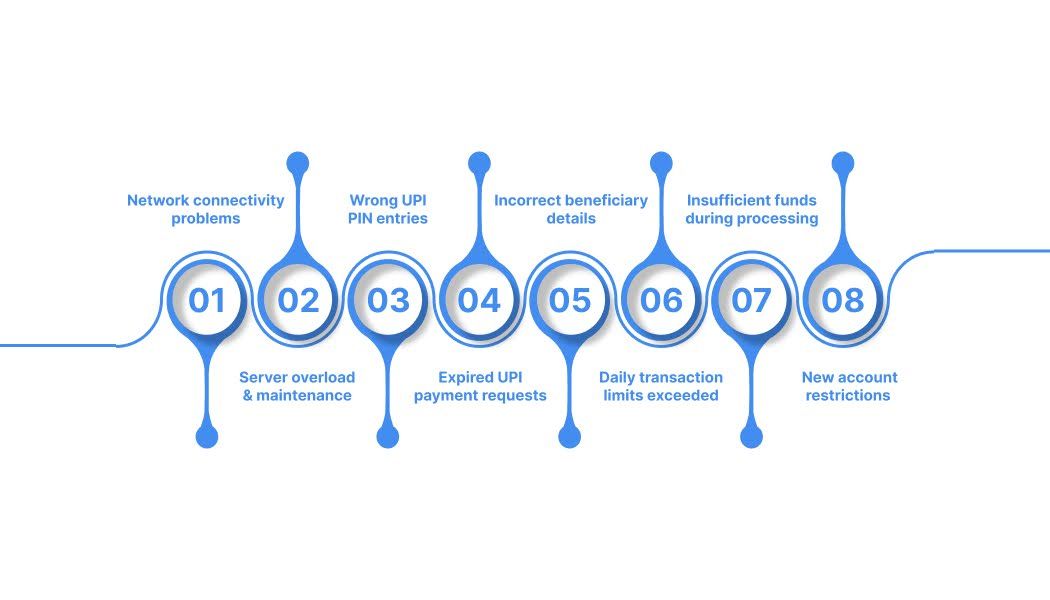
Knowing the reasons behind these situations helps you identify and prevent these issues before they impact your business operations.
A poor internet connection during payment processing can result in incomplete transaction cycles. When your connection drops after initiating payment but before receiving confirmation, systems may debit your account while marking the transaction as failed.
This happens frequently in areas with unstable internet or during peak usage hours when network congestion slows data transmission. Mobile payments are particularly vulnerable since cellular networks can experience sudden signal drops.
Payment gateway servers struggle during high-traffic periods, leading to processing delays and failures. Festival seasons, salary days, and end-of-month periods typically see increased server loads that cause transaction timeouts.
Scheduled maintenance by banks or payment providers can interrupt ongoing transactions. Emergency maintenance during system outages also contributes to payment failures where debits occur, but confirmations fail to reach users.
Entering incorrect UPI PINs multiple times can trigger account locks or transaction failures. In some cases, the initial authentication processes the debit before the system recognizes the PIN error and cancels the transaction.
This is particularly common when users haven't updated their UPI apps or when fingerprint authentication fails repeatedly, forcing manual PIN entries that may be entered incorrectly under time pressure.
UPI payment requests typically expire within 3-10 minutes of generation. Users who attempt payments after this window may see debits processed while the transaction ultimately fails due to expired authorization.
Additionally, sending payments to inactive or closed UPI IDs causes immediate failures, but initial processing may still debit funds before the system recognizes the invalid recipient.
Wrong account numbers, IFSC codes, or UPI IDs lead to automatic transaction blocks by banking systems. The verification process may occur after initial debits, causing funds to be held in limbo until manual intervention resolves the discrepancy.
This often happens with international payment processing, where additional verification layers check recipient information after domestic processing completes.
Most banks impose daily limits on UPI transactions, typically around ₹1 lakh or 20 transactions per day. Exceeding these limits triggers automatic blocks, but some systems process debits before checking limits.
Business accounts often have higher limits, but users may unknowingly hit personal account restrictions when processing multiple payments in quick succession.
Account balances can change between payment initiation and final processing due to other transactions, automatic debits, or holds placed by banks. This timing mismatch causes initial debits, while final verification fails due to insufficient funds.
Credit card payments face similar issues when available credit limits change during transaction processing due to simultaneous purchases or interest charges.
Recently opened accounts or newly reset UPI PINs often have temporary restrictions limiting transaction amounts or frequencies. These "cooling off" periods may allow initial debits while blocking final transaction completion.
Banks implement these measures to prevent fraud on new accounts, but they can surprise legitimate users who aren't aware of the restrictions.
Taking the right steps immediately after payment failure helps ensure quick resolution and protects your business interests.
Capture screenshots of the failed transaction, including error messages, transaction reference numbers, and your account balance showing the debit. Save all SMS notifications, email confirmations, and app notifications related to the payment.
Create a simple record with the transaction date, amount, recipient details, and reference number. This documentation becomes crucial if you need to escalate the issue later.
Verify the payment status in your bank app, UPI app, and any third-party payment platforms you used. Sometimes, different systems show varying status updates, and one may indicate successful processing while another shows failure.
Contact the intended recipient to confirm whether they received any funds. This helps determine if the issue is a display error or an actual payment failure.
Most payment systems automatically reverse failed transactions within 1-5 business days. UPI peer-to-peer transfers typically reverse within 1 business day, while merchant payments may take up to 5 business days.
Monitor your account for refund credits during this timeframe. Patience during this period often resolves the issue without requiring additional action.
Contact your bank or payment app's customer support only after the official reversal time frame expires. For UPI transfers, wait until the next business day; for merchant payments, wait until the fifth business day.
Provide complete transaction details, including reference numbers, exact amounts, transaction dates, and recipient information when contacting support. Clear, organized information helps support teams locate and resolve your case faster.
Most payment apps offer built-in dispute resolution tools that can resolve issues faster than traditional customer support channels. Google Pay, PhonePe, and other major apps have dedicated sections for reporting failed transactions.
These tools often connect directly to automated systems that can process refunds without human intervention, leading to faster resolution times than manual complaint processes.
Maintain regular contact with support teams without being overly aggressive. Follow up every 2-3 business days if you don't receive updates on your case status.
Keep detailed records of all support interactions, including agent names, case numbers, and promised resolution timelines. This information helps when escalating to senior support levels if needed.
Smart prevention strategies protect your transactions from payment disruptions and keep cash flow steady. The right approach combines a reliable payment infrastructure with proven transaction practices.
Payment failures cost Indian businesses significant revenue through lost transactions, delayed settlements, and administrative overhead in resolving disputes. Traditional banking infrastructure often lacks the sophisticated technology needed to prevent these issues consistently.
PayGlocal addresses these challenges with enterprise-grade payment technology specifically designed for Indian businesses operating internationally.
Here's how PayGlocal eliminates common payment failure causes:
PayGlocal's technology prevents the vast majority of payment failures before they occur, while providing rapid resolution for any issues that do arise.
Payment failures can create unnecessary cash flow disruptions for businesses, but understanding the causes and solutions helps you handle these situations effectively. Most issues resolve automatically within a few business days, while proper documentation and follow-up procedures ensure faster resolution when needed.
For businesses handling international payments, specialized platforms like PayGlocal offer significantly higher success rates and better support than traditional banking channels.
Take control of your payment reliability today by implementing preventive measures and choosing payment providers that prioritize transaction success. Get started with a more reliable payment solution to protect your business from costly payment failures.
The screen flashes: “Transaction failed. Please try again.” Seconds later, your phone buzzes with a debit SMS. The money has been debited from your account, but the receiver hasn’t received your payment.
What next?
It’s a frustratingly common scenario. Whether you're using UPI, a credit card, net banking, or even making an international payment, failures like these can disrupt not just transactions but also cash flow.
So why does this happen? Where does the money go? And more importantly, how do you avoid such situations? Let’s explore more about it.
Key Takeaways:
- Technical causes: Wrong UPI PINs, expired requests, network issues, and exceeded limits are the main reasons payments fail after debiting amounts.
- Quick resolution: Most failed payments auto-reverse within 1-5 business days, but you can speed up the process with proper documentation.
- Prevention strategies: Using reliable payment platforms and following best practices significantly reduces payment failure risks.
- Better solutions: Modern platforms like PayGlocal offer advanced technology to prevent payment failures and ensure smooth international transactions.
What does payment failed but amount debited mean?
Payment failed, but the amount debited describes situations where your payment doesn't reach the intended recipient, yet money is deducted from your account. This leaves you with reduced funds and an incomplete transaction.
For instance, when you pay ₹25,000 to a supplier through UPI and see "transaction failed" while your bank balance drops by the same amount.
The debited money isn't lost permanently. It typically sits in a temporary state while payment systems determine whether to complete the transaction or reverse the funds back to your account.
Why do payment failures with amount debits happen?
Knowing the reasons behind these situations helps you identify and prevent these issues before they impact your business operations.
1. Network connectivity problems
A poor internet connection during payment processing can result in incomplete transaction cycles. When your connection drops after initiating payment but before receiving confirmation, systems may debit your account while marking the transaction as failed.
This happens frequently in areas with unstable internet or during peak usage hours when network congestion slows data transmission. Mobile payments are particularly vulnerable since cellular networks can experience sudden signal drops.
2. Server overload and maintenance
Payment gateway servers struggle during high-traffic periods, leading to processing delays and failures. Festival seasons, salary days, and end-of-month periods typically see increased server loads that cause transaction timeouts.
Scheduled maintenance by banks or payment providers can interrupt ongoing transactions. Emergency maintenance during system outages also contributes to payment failures where debits occur, but confirmations fail to reach users.
3. Wrong UPI PIN entries
Entering incorrect UPI PINs multiple times can trigger account locks or transaction failures. In some cases, the initial authentication processes the debit before the system recognizes the PIN error and cancels the transaction.
This is particularly common when users haven't updated their UPI apps or when fingerprint authentication fails repeatedly, forcing manual PIN entries that may be entered incorrectly under time pressure.
4. Expired UPI payment requests
UPI payment requests typically expire within 3-10 minutes of generation. Users who attempt payments after this window may see debits processed while the transaction ultimately fails due to expired authorization.
Additionally, sending payments to inactive or closed UPI IDs causes immediate failures, but initial processing may still debit funds before the system recognizes the invalid recipient.
5. Incorrect beneficiary details
Wrong account numbers, IFSC codes, or UPI IDs lead to automatic transaction blocks by banking systems. The verification process may occur after initial debits, causing funds to be held in limbo until manual intervention resolves the discrepancy.
This often happens with international payment processing, where additional verification layers check recipient information after domestic processing completes.
6. Daily transaction limits exceeded
Most banks impose daily limits on UPI transactions, typically around ₹1 lakh or 20 transactions per day. Exceeding these limits triggers automatic blocks, but some systems process debits before checking limits.
Business accounts often have higher limits, but users may unknowingly hit personal account restrictions when processing multiple payments in quick succession.
7. Insufficient funds during processing
Account balances can change between payment initiation and final processing due to other transactions, automatic debits, or holds placed by banks. This timing mismatch causes initial debits, while final verification fails due to insufficient funds.
Credit card payments face similar issues when available credit limits change during transaction processing due to simultaneous purchases or interest charges.
8. New account restrictions
Recently opened accounts or newly reset UPI PINs often have temporary restrictions limiting transaction amounts or frequencies. These "cooling off" periods may allow initial debits while blocking final transaction completion.
Banks implement these measures to prevent fraud on new accounts, but they can surprise legitimate users who aren't aware of the restrictions.
What to do when a payment fails but the amount is debited?
Taking the right steps immediately after payment failure helps ensure quick resolution and protects your business interests.
1. Document everything immediately
Capture screenshots of the failed transaction, including error messages, transaction reference numbers, and your account balance showing the debit. Save all SMS notifications, email confirmations, and app notifications related to the payment.
Create a simple record with the transaction date, amount, recipient details, and reference number. This documentation becomes crucial if you need to escalate the issue later.
2. Check transaction status across platforms
Verify the payment status in your bank app, UPI app, and any third-party payment platforms you used. Sometimes, different systems show varying status updates, and one may indicate successful processing while another shows failure.
Contact the intended recipient to confirm whether they received any funds. This helps determine if the issue is a display error or an actual payment failure.
3. Wait for auto-reversal timeframes
Most payment systems automatically reverse failed transactions within 1-5 business days. UPI peer-to-peer transfers typically reverse within 1 business day, while merchant payments may take up to 5 business days.
Monitor your account for refund credits during this timeframe. Patience during this period often resolves the issue without requiring additional action.
4. Contact customer support strategically
Contact your bank or payment app's customer support only after the official reversal time frame expires. For UPI transfers, wait until the next business day; for merchant payments, wait until the fifth business day.
Provide complete transaction details, including reference numbers, exact amounts, transaction dates, and recipient information when contacting support. Clear, organized information helps support teams locate and resolve your case faster.
5. Use built-in dispute tools
Most payment apps offer built-in dispute resolution tools that can resolve issues faster than traditional customer support channels. Google Pay, PhonePe, and other major apps have dedicated sections for reporting failed transactions.
These tools often connect directly to automated systems that can process refunds without human intervention, leading to faster resolution times than manual complaint processes.
6. Follow up systematically
Maintain regular contact with support teams without being overly aggressive. Follow up every 2-3 business days if you don't receive updates on your case status.
Keep detailed records of all support interactions, including agent names, case numbers, and promised resolution timelines. This information helps when escalating to senior support levels if needed.
How to prevent payment failures in the future?
Smart prevention strategies protect your transactions from payment disruptions and keep cash flow steady. The right approach combines a reliable payment infrastructure with proven transaction practices.
- Choose proven payment providers: Research uptime statistics, customer reviews, and technical infrastructure before committing to any payment platform.
- Verify recipient details twice: Double-check account numbers, UPI IDs, IFSC codes, and beneficiary names to prevent automatic transaction blocks.
- Process payments during off-peak hours: Early mornings and late evenings see lower server loads and higher success rates than busy periods.
- Maintain stable internet connections: Avoid switching between Wi-Fi and mobile data during transactions to prevent connection interruptions.
- Keep payment apps updated: Use the latest software versions to ensure compatibility with current payment infrastructure and security protocols.
- Use saved beneficiary lists: Reduce manual entry errors by saving frequently used recipient details in your payment apps.
How does PayGlocal solve payment failure challenges?
Payment failures cost Indian businesses significant revenue through lost transactions, delayed settlements, and administrative overhead in resolving disputes. Traditional banking infrastructure often lacks the sophisticated technology needed to prevent these issues consistently.
PayGlocal addresses these challenges with enterprise-grade payment technology specifically designed for Indian businesses operating internationally.
Here's how PayGlocal eliminates common payment failure causes:
- Real-time transaction monitoring: Instant status updates and proactive failure detection prevent uncertainty and enable immediate corrective action when issues arise.
- Multi-currency account infrastructure: Local receiving accounts in major currencies eliminate cross-border complexity that commonly causes payment failures and delays.
- Global payment methods support: Multiple payment options, including local payment methods, reduce dependency on single channels that may experience failures.
- Recurring payment capabilities: Automated subscription and billing systems ensure consistent revenue flow without manual payment processing risks.
- Card payment optimization: Advanced card processing technology maximizes approval rates and minimizes transaction failures for international payments.
PayGlocal's technology prevents the vast majority of payment failures before they occur, while providing rapid resolution for any issues that do arise.
Final thoughts
Payment failures can create unnecessary cash flow disruptions for businesses, but understanding the causes and solutions helps you handle these situations effectively. Most issues resolve automatically within a few business days, while proper documentation and follow-up procedures ensure faster resolution when needed.
For businesses handling international payments, specialized platforms like PayGlocal offer significantly higher success rates and better support than traditional banking channels.
Take control of your payment reliability today by implementing preventive measures and choosing payment providers that prioritize transaction success. Get started with a more reliable payment solution to protect your business from costly payment failures.