
The digital payment market is projected to reach US$20.09 trillion by the end of 2025, powering the global e-commerce ecosystem that never sleeps. Behind each successful online transaction stands the “payment gateway” and “payment processor”. This secure digital bridge connects merchants, customers, and financial institutions, helping your money move safely from point A to point B with just a few clicks.
Without a strong payment gateway, the $6 trillion e-commerce industry would halt. In this blog, we'll explore exactly how payment gateways function, assess the security measures protecting your financial data, and provide insights for businesses looking to implement the right payment solution for their needs.
A payment gateway is a technology that facilitates online transactions by securely transmitting payment information between a business (merchant) and the financial institutions involved in the transaction. It acts as an intermediary that securely processes payments from customers through various methods such as credit/debit cards, bank transfers, and digital wallets.
For Example, PayPal and Payglocal are well-known examples of a payment gateway. When a customer purchases a product online, Payglocal processes the payment by encrypting the customer's payment details, sending them to the payment processor, and confirming the transaction with the merchant once the payment is authorized.
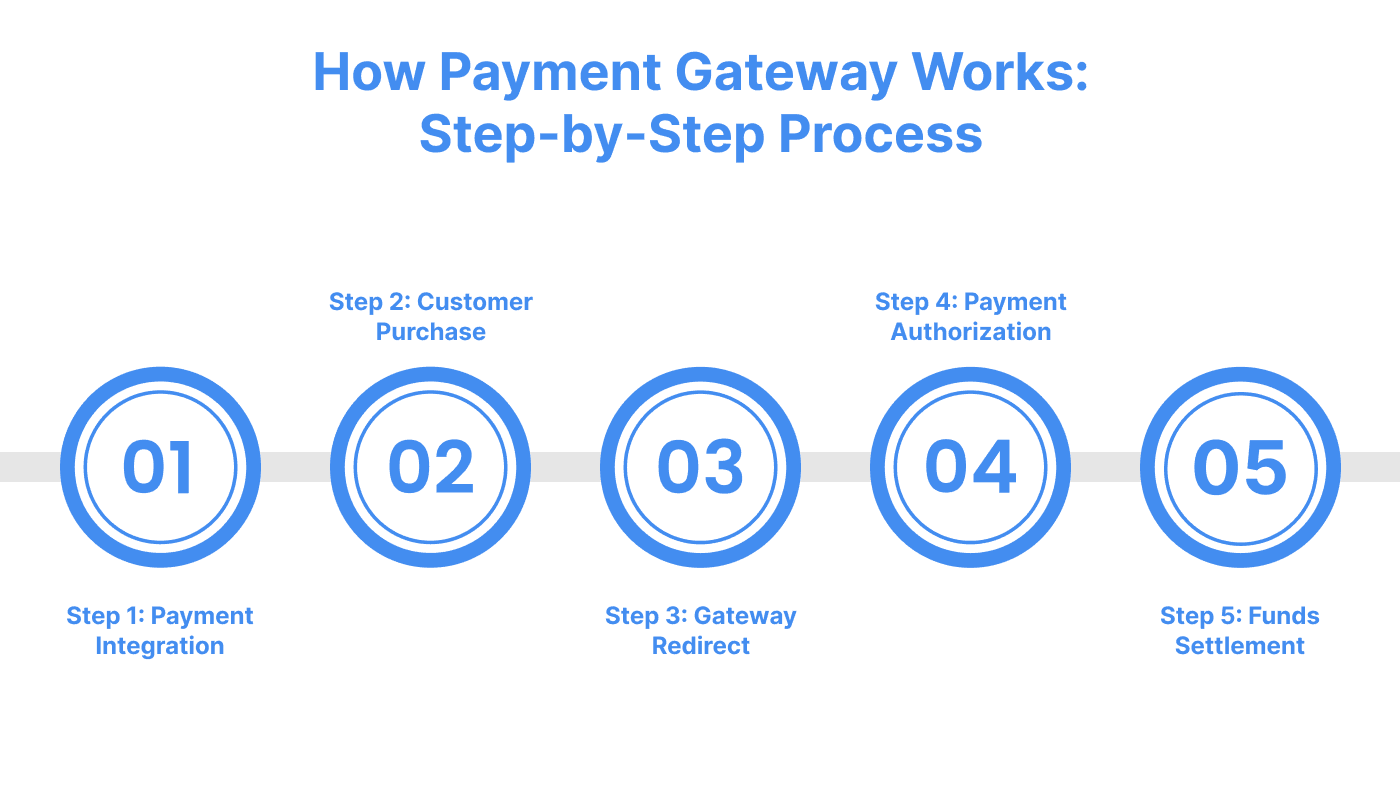
This step-by-step process explains how the payment gateway and processor work together to handle payment transactions securely, efficiently, and quickly, benefiting both merchants and customers.
After setting up your online store, integrate a payment gateway and processor. The payment gateway handles the secure transmission of payment information, while the payment processor ensures the transaction is completed and funds are transferred from the customer's bank to the merchant.
To integrate, select a service provider offering gateway and processor capabilities (e.g., Payglocal, Stripe). Depending on your needs, you can customize the integration to accept multiple payment methods.
For example, Payglocal provides:
The customer selects their desired items and proceeds to checkout. The payment gateway collects payment details, such as card information or UPI ID, which is securely transmitted to the payment processor. The payment processor then verifies the details and processes the payment request.
After reviewing the order, the customer is redirected to the payment gateway. Here, they input their payment details.
The acquiring bank verifies the transaction’s authenticity through the payment processor, checking the customer’s identity, bank details, and other parameters.
This entire process occurs behind the scenes, with only the transaction outcome displayed to the customer.
After the transaction is approved, the payment processor facilitates the settlement by transferring funds from the customer’s bank to the merchant’s account. The acquiring bank, through the processor, ensures that the merchant receives the payment within a few business days. The customer gets a confirmation that their order has been placed successfully.
The payment processor manages the technical connections between the payment gateway, the acquiring bank, and the issuing bank. It ensures that payment transactions are securely validated and routed. Together, the payment gateway and payment processor work in tandem, in handling online payments.
Explore: Understanding Chargeback Fraud: Insights and Prevention Strategies
As e-commerce and digital transactions continue to rise rapidly, the need to protect sensitive financial data has never been more critical. With cybercrime rising, payment card fraud will cost over $362 billion globally by 2028.
Here are some of the most important security measures that payment gateways implement to protect financial data:
The Payment Card Industry Data Security Standard (PCI DSS) outlines a set of security regulations designed for businesses that handle credit and debit card transactions to protect customer information. Adhering to PCI DSS guidelines guarantees a secure environment for online payments, reducing the risk of fraud and card theft.
Understanding PCI DSS is essential for businesses accepting online payments. It helps them select reliable payment partners and ensures compliance with industry standards.
Secure Socket Layer (SSL) technology establishes a secure connection between the customer’s browser and the payment provider’s system. It encrypts data during transmission, ensuring that sensitive information remains protected. Web browsers universally support SSL.
If a website directly handles transactions, SSL implementation is crucial. However, suppose a website redirects customers to a payment gateway’s secure checkout page. In that case, the SSL link from the gateway will secure the connection, and the website itself does not need SSL.
Tokenization is a vital security practice in online payments that replaces sensitive information like credit card numbers with unique tokens. These tokens identify transactions and authorize future payments without exposing actual card details.
By tokenizing payment information at the point of sale or during processing, merchants and payment processors do not store sensitive data like the full primary account number (PAN). Even if a data breach occurs, the tokens are useless to attackers, protecting customer data. Tokens can be reused for future transactions without requiring customers to re-enter their card details.
Data encryption is the fundamental mechanism payment gateways use to protect sensitive transaction data. When a customer enters their payment information, the gateway encrypts it using AES encryption with a 256-bit key strength and the GCM (Galois/Counter Mode) algorithm, ensuring the data is in a secure format that only authorized parties can access with a secret key.
A payment gateway utilizing Zero Trust might require each login attempt, transaction request, and API call to be authenticated and authorized before proceeding. Even after an initial login, the system will continuously evaluate the session and request re-authentication if suspicious behavior is detected (e.g., sudden changes in IP address, transaction volume, or geographic location).
These measures ensure that the payment gateway safeguards sensitive information, providing both businesses and customers with peace of mind when conducting online transactions.
Also Read: Stay Ahead of Fraud: Understanding Liability Shift in Card Payments
A payment gateway ensures online transactions are processed securely and efficiently. However, the payment processor plays an equally significant role in completing the transaction by managing the actual movement of funds.
* Encryption: When a customer enters payment details during checkout, the payment gateway encrypts this sensitive information, shielding from unauthorized access as it travels from the customer’s device, through the business server, and to the financial institution.
* Connection with Payment Processor: The payment gateway bridges the business’s checkout page and the payment processor. While the gateway securely collects and transmits payment details, the processor handles the financial transaction.
* Authorization: Once the payment gateway encrypts and forwards the payment details, it sends them to the business's acquiring bank. The acquiring bank, in turn, forwards this information to the issuing bank or payment processor.
* Data Collection and Reporting: Payment gateways also offer businesses transaction data, such as transaction history, refund tracking, and other analytics, to assess trends and optimize payment operations.
* Fraud Detection and Prevention: To minimize the risk of fraud, payment gateways incorporate advanced security features such as fraud-detection algorithms, address verification systems (AVS), and CVV checks.
Understanding the crucial role a payment gateway plays in securely processing transactions makes it clear that integrating one is key to smooth business operations. This is especially true when considering the various technical steps in connecting the gateway to the rest of your e-commerce ecosystem.
A payment gateway can either be hosted or integrated directly into your website. With an integrated payment system, all payment data is processed on your site, allowing the customer to complete their order without leaving the page.
For example, let’s explore how Stripe’s payment gateway works when integrated into your website.
1. Sign Up and Obtain API Keys: Create a Stripe account on their website. Provide your business details and set up a bank account for payouts. After account creation, navigate to the "Developers" section in the Stripe Dashboard to generate your API keys.
2. Install Stripe Libraries: To begin the integration, install the relevant Stripe libraries for your programming language (e.g., JavaScript, Python, Ruby). This will allow your website to communicate with Stripe’s servers securely. Detailed installation instructions are available in Stripe’s developer documentation.
3. Integrate Stripe Frontend and Backend
Secure Payment Details Collection: Use Stripe’s pre-built UI components or custom elements to capture sensitive payment details. These components ensure that the payment data is never stored on your server, providing security during checkout.
Submit Payment Information to Your Server: After submitting the form, send the encrypted payment details to your server securely over HTTPS using JavaScript or AJAX.
Process Payments on Server Side: Once your server receives the payment details, use Stripe’s API to process payments by creating payment intents or charges. Ensure sensitive data is handled securely.
Handle Payment Response: After Stripe processes the payment, your server will receive a response. Update your database and display the payment outcome to the user, informing them whether the transaction was successful or failed.
Error Handling and Edge Cases: Implement error handling for scenarios like declined payments or expired cards, ensuring a smooth user experience even when issues arise.
Test Integration in Sandbox Mode: Before going live, test the integration thoroughly using Stripe's sandbox environment to simulate different transaction scenarios and ensure everything works smoothly.
Go Live: Once confident in your integration, switch to live mode by replacing your test API keys with live ones. You are now ready to accept real payments.
While Stripe is an excellent choice for payment gateway integration, Payglocal can be a great complement as your payment processor and payment gateway. Payglocal supports global payment methods, offers competitive pricing, and enhances your ability to accept payments in 33+ currencies with ease.
By integrating Payglocal as your processor, you can provide payment experiences in 20+ local payment methods for international and domestic cards, fraud prevention, and lower transaction fees. Plus, Payglocal’s expertise in regional compliance ensures your payments are secure and optimized for global markets.
Payment gateways and payment processors work together to complete online transactions smoothly and securely. When a customer enters their payment details on a website, the payment gateway encrypts this information and sends it to the payment processor.
The processor then communicates with the customer’s bank to verify funds and approve or decline the transaction. Once approved, the processor facilitates the transfer of funds to the merchant’s account and sends the response back through the gateway, informing the customer of the transaction status.
For example, when a payment gateway like Stripe integrates with a payment processor such as PayGlocal, merchants benefit from reduced downtime and lower costs by adding alternative payment methods.
Stripe’s gateway handles customer payment details, offers a frictionless checkout with multiple payment options, and uses AI to optimize payment methods for higher conversion.
Meanwhile, PayGlocal processes transactions, manages compliance and fraud detection, and ensures fast settlement, especially for local and cross-border payments.
If you are using Stripe’s customizable checkout, you can quickly accept payments worldwide, while PayGlocal makes sure that those payments are securely processed and settled in your preferred currency.
Interactions between a payment gateway like Stripe and a payment processor like PayGlocal are vital for ensuring seamless and efficient transactions. While Stripe focuses on offering an optimized payment flow, managing customer payment details, and improving conversion rates, PayGlocal ensures the secure processing of transactions, compliance, and swift settlement, especially for cross-border payments.
Together, these services create a robust solution for businesses looking to accept payments worldwide with ease and security.
PayGlocal is your one-stop solution for managing local and international payment needs. Start simplifying your payment processing today.
Without a strong payment gateway, the $6 trillion e-commerce industry would halt. In this blog, we'll explore exactly how payment gateways function, assess the security measures protecting your financial data, and provide insights for businesses looking to implement the right payment solution for their needs.
What is a Payment Gateway?
A payment gateway is a technology that facilitates online transactions by securely transmitting payment information between a business (merchant) and the financial institutions involved in the transaction. It acts as an intermediary that securely processes payments from customers through various methods such as credit/debit cards, bank transfers, and digital wallets.
For Example, PayPal and Payglocal are well-known examples of a payment gateway. When a customer purchases a product online, Payglocal processes the payment by encrypting the customer's payment details, sending them to the payment processor, and confirming the transaction with the merchant once the payment is authorized.
How Payment Gateway Works: Step-by-Step Process
This step-by-step process explains how the payment gateway and processor work together to handle payment transactions securely, efficiently, and quickly, benefiting both merchants and customers.
Step 1: Integrating a Payment Gateway and Processor
After setting up your online store, integrate a payment gateway and processor. The payment gateway handles the secure transmission of payment information, while the payment processor ensures the transaction is completed and funds are transferred from the customer's bank to the merchant.
To integrate, select a service provider offering gateway and processor capabilities (e.g., Payglocal, Stripe). Depending on your needs, you can customize the integration to accept multiple payment methods.
For example, Payglocal provides:
- API Integration: For custom websites and apps, offering full flexibility.
- Plugin Integration: Suitable for platforms like Shopify, Opencart, and Magento.
- No-Code links: A unique Payment link generated at the GCC Dashboard, which can be shared with your customers to complete payments to purchase products or services.
Step 2: Customer Makes a Purchase
The customer selects their desired items and proceeds to checkout. The payment gateway collects payment details, such as card information or UPI ID, which is securely transmitted to the payment processor. The payment processor then verifies the details and processes the payment request.
Step 3: Redirect to Payment Gateway
After reviewing the order, the customer is redirected to the payment gateway. Here, they input their payment details.
- Data Encryption and Fraud Prevention: The payment gateway encrypts the entered data, ensuring security, while the payment processor conducts fraud checks/compliance and ensures the transaction's legitimacy.
- Transaction Processing: The payment processor sends transaction details to the acquiring bank. This bank contacts the card provider (Visa, Mastercard, etc.), which then communicates with the issuing bank for authorization.
Step 4: Authorization and Bank Response
The acquiring bank verifies the transaction’s authenticity through the payment processor, checking the customer’s identity, bank details, and other parameters.
- Issuing Bank Response: The issuing bank confirms whether the transaction is approved or declined. The payment processor communicates this response to the gateway.
- Customer Notification: The gateway informs the customer of the status if it is approved, then a confirmation message appears with order details, and if declined, the customer is prompted to retry using a different payment method.
This entire process occurs behind the scenes, with only the transaction outcome displayed to the customer.
Step 5: Funds Settlement
After the transaction is approved, the payment processor facilitates the settlement by transferring funds from the customer’s bank to the merchant’s account. The acquiring bank, through the processor, ensures that the merchant receives the payment within a few business days. The customer gets a confirmation that their order has been placed successfully.
The payment processor manages the technical connections between the payment gateway, the acquiring bank, and the issuing bank. It ensures that payment transactions are securely validated and routed. Together, the payment gateway and payment processor work in tandem, in handling online payments.
Explore: Understanding Chargeback Fraud: Insights and Prevention Strategies
What are the Top Payment Gateway Security Measures to Protect Your Online Transactions?
As e-commerce and digital transactions continue to rise rapidly, the need to protect sensitive financial data has never been more critical. With cybercrime rising, payment card fraud will cost over $362 billion globally by 2028.
Here are some of the most important security measures that payment gateways implement to protect financial data:
PCI DSS Compliance
The Payment Card Industry Data Security Standard (PCI DSS) outlines a set of security regulations designed for businesses that handle credit and debit card transactions to protect customer information. Adhering to PCI DSS guidelines guarantees a secure environment for online payments, reducing the risk of fraud and card theft.
Understanding PCI DSS is essential for businesses accepting online payments. It helps them select reliable payment partners and ensures compliance with industry standards.
SSL – Secure Socket Layer
Secure Socket Layer (SSL) technology establishes a secure connection between the customer’s browser and the payment provider’s system. It encrypts data during transmission, ensuring that sensitive information remains protected. Web browsers universally support SSL.
If a website directly handles transactions, SSL implementation is crucial. However, suppose a website redirects customers to a payment gateway’s secure checkout page. In that case, the SSL link from the gateway will secure the connection, and the website itself does not need SSL.
Tokenization
Tokenization is a vital security practice in online payments that replaces sensitive information like credit card numbers with unique tokens. These tokens identify transactions and authorize future payments without exposing actual card details.
By tokenizing payment information at the point of sale or during processing, merchants and payment processors do not store sensitive data like the full primary account number (PAN). Even if a data breach occurs, the tokens are useless to attackers, protecting customer data. Tokens can be reused for future transactions without requiring customers to re-enter their card details.
Data Encryption
Data encryption is the fundamental mechanism payment gateways use to protect sensitive transaction data. When a customer enters their payment information, the gateway encrypts it using AES encryption with a 256-bit key strength and the GCM (Galois/Counter Mode) algorithm, ensuring the data is in a secure format that only authorized parties can access with a secret key.
Zero-Trust Architecture
A payment gateway utilizing Zero Trust might require each login attempt, transaction request, and API call to be authenticated and authorized before proceeding. Even after an initial login, the system will continuously evaluate the session and request re-authentication if suspicious behavior is detected (e.g., sudden changes in IP address, transaction volume, or geographic location).
These measures ensure that the payment gateway safeguards sensitive information, providing both businesses and customers with peace of mind when conducting online transactions.
Also Read: Stay Ahead of Fraud: Understanding Liability Shift in Card Payments
What is the Role of a Payment Gateway in Transactions?
A payment gateway ensures online transactions are processed securely and efficiently. However, the payment processor plays an equally significant role in completing the transaction by managing the actual movement of funds.
* Encryption: When a customer enters payment details during checkout, the payment gateway encrypts this sensitive information, shielding from unauthorized access as it travels from the customer’s device, through the business server, and to the financial institution.
* Connection with Payment Processor: The payment gateway bridges the business’s checkout page and the payment processor. While the gateway securely collects and transmits payment details, the processor handles the financial transaction.
* Authorization: Once the payment gateway encrypts and forwards the payment details, it sends them to the business's acquiring bank. The acquiring bank, in turn, forwards this information to the issuing bank or payment processor.
* Data Collection and Reporting: Payment gateways also offer businesses transaction data, such as transaction history, refund tracking, and other analytics, to assess trends and optimize payment operations.
* Fraud Detection and Prevention: To minimize the risk of fraud, payment gateways incorporate advanced security features such as fraud-detection algorithms, address verification systems (AVS), and CVV checks.
Understanding the crucial role a payment gateway plays in securely processing transactions makes it clear that integrating one is key to smooth business operations. This is especially true when considering the various technical steps in connecting the gateway to the rest of your e-commerce ecosystem.
How to Integrate a Payment Gateway on Your Website?
A payment gateway can either be hosted or integrated directly into your website. With an integrated payment system, all payment data is processed on your site, allowing the customer to complete their order without leaving the page.
For example, let’s explore how Stripe’s payment gateway works when integrated into your website.
1. Sign Up and Obtain API Keys: Create a Stripe account on their website. Provide your business details and set up a bank account for payouts. After account creation, navigate to the "Developers" section in the Stripe Dashboard to generate your API keys.
2. Install Stripe Libraries: To begin the integration, install the relevant Stripe libraries for your programming language (e.g., JavaScript, Python, Ruby). This will allow your website to communicate with Stripe’s servers securely. Detailed installation instructions are available in Stripe’s developer documentation.
3. Integrate Stripe Frontend and Backend
- Frontend: If using platforms like WordPress, integrate via plugins such as WooCommerce. Add a payment form using Stripe.js for custom sites to handle user card details securely.
- Backend: Set up a server-side endpoint to handle payment requests using your secret API key. This is where payment intents are created and processed.
Secure Payment Details Collection: Use Stripe’s pre-built UI components or custom elements to capture sensitive payment details. These components ensure that the payment data is never stored on your server, providing security during checkout.
Submit Payment Information to Your Server: After submitting the form, send the encrypted payment details to your server securely over HTTPS using JavaScript or AJAX.
Process Payments on Server Side: Once your server receives the payment details, use Stripe’s API to process payments by creating payment intents or charges. Ensure sensitive data is handled securely.
Handle Payment Response: After Stripe processes the payment, your server will receive a response. Update your database and display the payment outcome to the user, informing them whether the transaction was successful or failed.
Error Handling and Edge Cases: Implement error handling for scenarios like declined payments or expired cards, ensuring a smooth user experience even when issues arise.
Test Integration in Sandbox Mode: Before going live, test the integration thoroughly using Stripe's sandbox environment to simulate different transaction scenarios and ensure everything works smoothly.
Go Live: Once confident in your integration, switch to live mode by replacing your test API keys with live ones. You are now ready to accept real payments.
While Stripe is an excellent choice for payment gateway integration, Payglocal can be a great complement as your payment processor and payment gateway. Payglocal supports global payment methods, offers competitive pricing, and enhances your ability to accept payments in 33+ currencies with ease.
By integrating Payglocal as your processor, you can provide payment experiences in 20+ local payment methods for international and domestic cards, fraud prevention, and lower transaction fees. Plus, Payglocal’s expertise in regional compliance ensures your payments are secure and optimized for global markets.
How Payment Gateways and Payment Processors Work Together?
Payment gateways and payment processors work together to complete online transactions smoothly and securely. When a customer enters their payment details on a website, the payment gateway encrypts this information and sends it to the payment processor.
The processor then communicates with the customer’s bank to verify funds and approve or decline the transaction. Once approved, the processor facilitates the transfer of funds to the merchant’s account and sends the response back through the gateway, informing the customer of the transaction status.
For example, when a payment gateway like Stripe integrates with a payment processor such as PayGlocal, merchants benefit from reduced downtime and lower costs by adding alternative payment methods.
Stripe’s gateway handles customer payment details, offers a frictionless checkout with multiple payment options, and uses AI to optimize payment methods for higher conversion.
Meanwhile, PayGlocal processes transactions, manages compliance and fraud detection, and ensures fast settlement, especially for local and cross-border payments.
If you are using Stripe’s customizable checkout, you can quickly accept payments worldwide, while PayGlocal makes sure that those payments are securely processed and settled in your preferred currency.
Conclusion
Interactions between a payment gateway like Stripe and a payment processor like PayGlocal are vital for ensuring seamless and efficient transactions. While Stripe focuses on offering an optimized payment flow, managing customer payment details, and improving conversion rates, PayGlocal ensures the secure processing of transactions, compliance, and swift settlement, especially for cross-border payments.
Together, these services create a robust solution for businesses looking to accept payments worldwide with ease and security.
PayGlocal is your one-stop solution for managing local and international payment needs. Start simplifying your payment processing today.