
Digital payment transactions are growing rapidly in India, with 40% of all transactions now happening digitally. In fact, in the last 6 financial years (from 2019-2020 to 2024-2025), over 65,000 crore digital transactions have occurred in India.
A payment ID is an essential element of every digital transaction. Whether you're a freelancer getting paid from overseas clients or a business managing hundreds of transactions, knowing about payment IDs can save you hours of confusion and help you track payments easily.
In this guide, we cover everything you need to know about payment IDs, from basic definitions to step-by-step tracking methods, so you can handle your business payments effectively.
A payment ID is a unique identifier assigned to every financial transaction. This code helps payment systems, banks, and businesses track individual transactions from start to finish.
Payment systems generate these IDs automatically when you initiate a transaction. For example, when you transfer money through UPI (Unified Payments Interface), you get a 12-digit UTR (Unique Transaction Reference) number. When you receive an international wire transfer, you get an alphanumeric reference code.
The format varies by payment method and provider. Different platforms create payment IDs with specific formats to handle their transaction processing requirements efficiently.
Payment IDs serve as the foundation of transaction tracking across various payment systems. Each system has its own format and structure designed to handle specific transaction types efficiently.
Here's how different payment systems handle payment IDs:
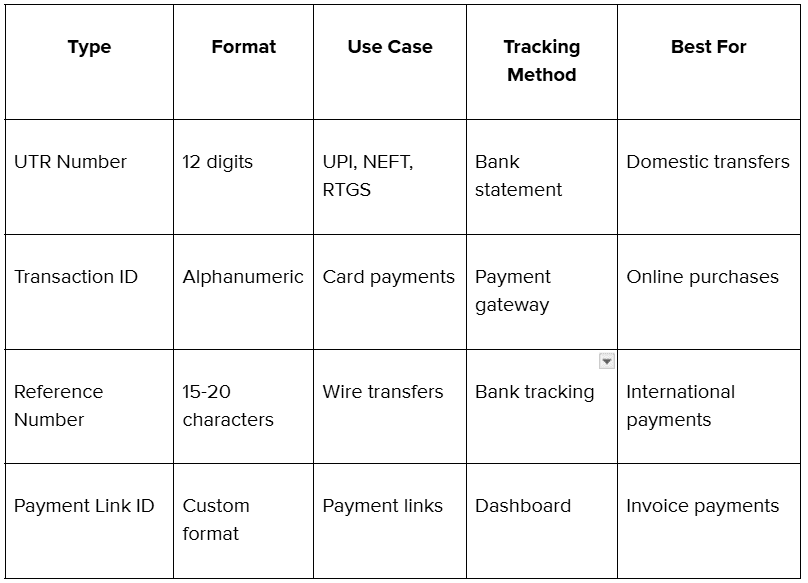
Payment IDs can be of various types based on the mode of payment. Here’s a complete breakdown of common payment IDs you’ll see in most financial transactions:
Each payment system creates IDs with specific characteristics designed for their processing requirements.
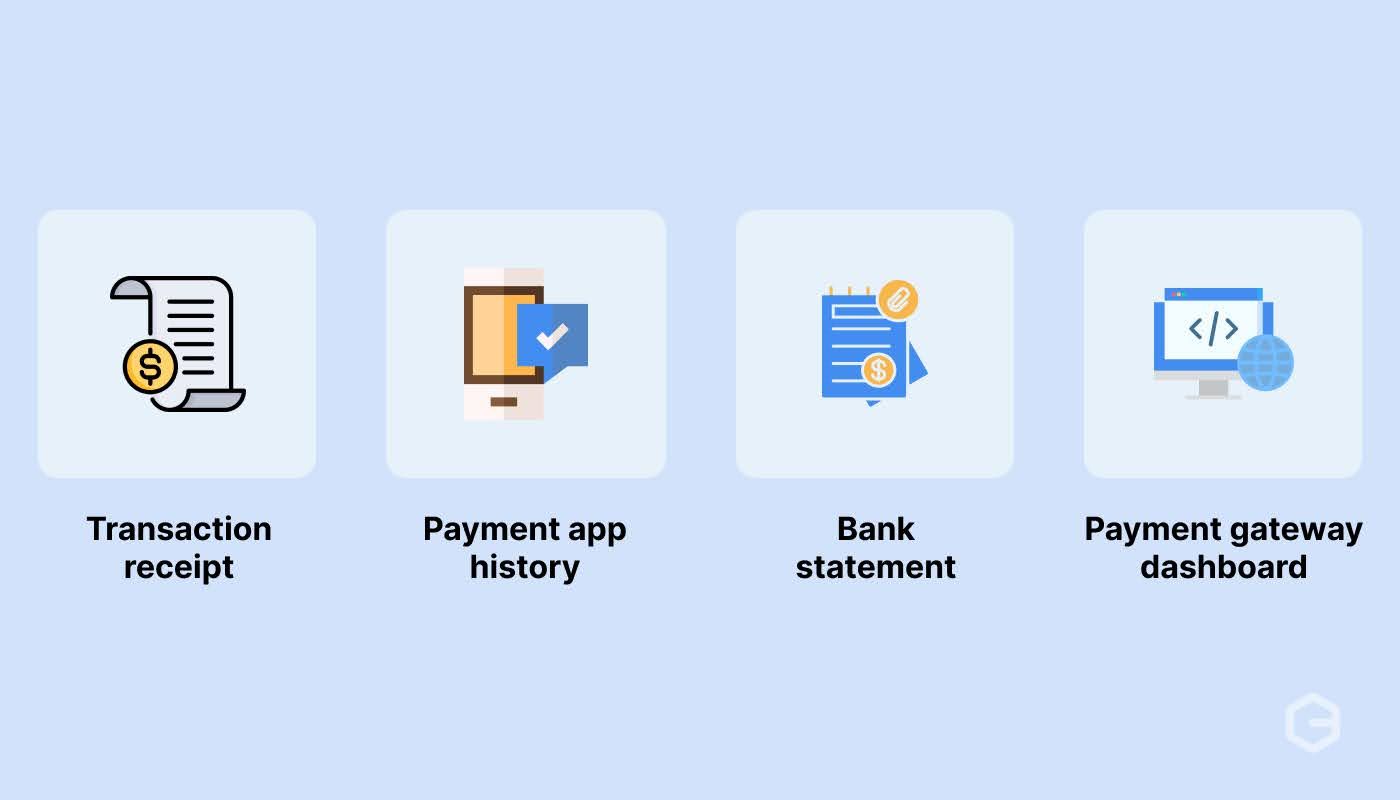
UPI systems generate 12-digit UTR codes for every transaction. For example, when you pay through PhonePe or Google Pay, you receive a UTR number. This number appears in your transaction history and bank statement, making it easy to track payments. You can find your UTR number in your payment app's transaction history or by checking your bank statement.
International transfers use longer alphanumeric codes that include routing information and compliance data, while card payment platforms generate transaction IDs that connect customer orders with payment confirmations. These help businesses match successful payments with specific orders and handle refunds efficiently.
Payment IDs serve as the foundation for efficient financial management, especially for businesses handling multiple transactions daily. They solve critical operational challenges that can otherwise consume significant time and resources.
Tracking payments effectively requires knowing where to find payment IDs and how different platforms handle transaction monitoring. Here's a systematic approach to payment tracking:
Step 1: Locate your payment ID: Check your payment confirmation email, app notification, or transaction receipt. Most platforms send immediate confirmation with the payment ID.
Step 2: Access the tracking platform: Visit your payment provider's website or app. Look for "Track Payment," "Transaction Status," or "Payment History" sections.
Step 3: Enter the payment ID: Input the complete payment ID without spaces or special characters. Check the details for accuracy and to avoid tracking errors.
Step 4: Review payment status: Check if the payment shows as "Pending," "Processing," "Completed," or "Failed." Note any additional information provided.
Step 5: Document for records: Save screenshots or download transaction details for your business records, especially for international payments requiring compliance documentation.
Step 6: Contact support if needed: If tracking shows unusual status or delays, contact customer support with your payment ID for faster resolution.
Different payment methods offer varying levels of tracking detail. Bank transfers typically provide basic status updates, while modern payment platforms offer real-time tracking with detailed transaction flows.
Payment IDs contain encoded information that helps payment systems process and track transactions efficiently. Payment IDs typically include:
Even with proper payment IDs, businesses often face tracking challenges that can disrupt operations and customer relationships. Learning about these issues helps you choose better payment solutions and troubleshoot problems effectively.
Inconsistent formats: Different payment platforms use different ID formats, making it difficult to maintain consistent records across multiple payment methods.
Managing multiple payment IDs across different platforms creates unnecessary complexity for growing businesses. International transactions add another layer of confusion with compliance requirements and currency conversions.
PayGlocal removes this complexity by providing a unified payment management system designed specifically for businesses dealing with international transactions. Whether you're a freelancer receiving payments from global clients or an exporter managing multiple currencies, PayGlocal simplifies the entire process.
Here's how PayGlocal improves global payment management:
PayGlocal helps businesses maintain professional payment operations while reducing administrative overhead and ensuring compliance with international regulations.
Payment IDs serve as the foundation for modern business transaction management, providing clarity and control over your payment operations. Different payment IDs and tracking methods help businesses maintain accurate records and resolve issues quickly.
For businesses dealing with international clients, having a reliable payment system with clear tracking becomes even more critical. The complexity of cross-border payments, compliance requirements, and currency conversions requires solutions designed specifically for global operations. PayGlocal provides the payment infrastructure that growing businesses need with complete end-to-end tracking, automatic compliance documentation, and transparent pricing.
Ready to explore a fast and reliable way to manage all your international payments? Get started with PayGlocal today.
A payment ID is an essential element of every digital transaction. Whether you're a freelancer getting paid from overseas clients or a business managing hundreds of transactions, knowing about payment IDs can save you hours of confusion and help you track payments easily.
In this guide, we cover everything you need to know about payment IDs, from basic definitions to step-by-step tracking methods, so you can handle your business payments effectively.
Key Takeaways:
- Unique identification: Payment IDs are unique codes that identify specific transactions, making tracking and reconciliation easier for businesses.
- Multiple formats: Different payment systems use various formats - from 12-digit UTR numbers in PhonePe to alphanumeric codes in international transfers.
- Essential for business: Payment IDs help with customer support, dispute resolution, and maintaining accurate financial records.
- Fast and reliable payment platform: PayGlocal offers a complete payment platform for international businesses with multi-currency accounts, easy payment status tracking, and instant compliance documentation.
What is a payment ID?
A payment ID is a unique identifier assigned to every financial transaction. This code helps payment systems, banks, and businesses track individual transactions from start to finish.
Payment systems generate these IDs automatically when you initiate a transaction. For example, when you transfer money through UPI (Unified Payments Interface), you get a 12-digit UTR (Unique Transaction Reference) number. When you receive an international wire transfer, you get an alphanumeric reference code.
The format varies by payment method and provider. Different platforms create payment IDs with specific formats to handle their transaction processing requirements efficiently.
How do payment IDs work in different systems?
Payment IDs serve as the foundation of transaction tracking across various payment systems. Each system has its own format and structure designed to handle specific transaction types efficiently.
Here's how different payment systems handle payment IDs:
- UPI transactions: In UPI transactions, you get 12-digit UTR numbers that banks use for inter-bank settlement. These numbers help track money movement between different bank accounts and payment apps.
- International wire transfers: In wire transfers, you’ll find alphanumeric codes that include bank routing information and transaction details. These IDs help track payments across different countries and currencies.
- Credit card payments: In card payment systems, you get transaction IDs that include merchant information, card network details, and timestamp data. These help with dispute resolution and chargeback management.
- Digital wallets: The digital wallet generates unique reference numbers for each transaction, linking wallet accounts to bank accounts or cards used for funding.
- Payment platforms: Different payment platforms like PayGlocal, Razorpay, and PayPal create order-specific payment IDs that connect customer purchases with payment confirmations, helping businesses match orders with successful payments.
What are the different types of payment IDs?
Payment IDs can be of various types based on the mode of payment. Here’s a complete breakdown of common payment IDs you’ll see in most financial transactions:
Where to find the payment ID of a transaction?
Each payment system creates IDs with specific characteristics designed for their processing requirements.
UPI systems generate 12-digit UTR codes for every transaction. For example, when you pay through PhonePe or Google Pay, you receive a UTR number. This number appears in your transaction history and bank statement, making it easy to track payments. You can find your UTR number in your payment app's transaction history or by checking your bank statement.
International transfers use longer alphanumeric codes that include routing information and compliance data, while card payment platforms generate transaction IDs that connect customer orders with payment confirmations. These help businesses match successful payments with specific orders and handle refunds efficiently.
Why are payment IDs important for businesses?
Payment IDs serve as the foundation for efficient financial management, especially for businesses handling multiple transactions daily. They solve critical operational challenges that can otherwise consume significant time and resources.
- Customer support efficiency: When customers report payment issues, payment IDs help support teams locate transactions instantly instead of searching through hundreds of records manually.
- Accurate reconciliation: Finance teams use payment IDs to match bank deposits with invoices, ensuring accurate accounting and identifying missing payments quickly.
- Dispute resolution: Payment IDs provide clear evidence during chargebacks or payment disputes, helping businesses present facts and resolve issues faster.
- Compliance documentation: Tax authorities and auditors often require transaction-level details. Payment IDs help businesses provide accurate documentation for compliance requirements.
- Cash flow tracking: Businesses can monitor payment timing and identify delays using payment IDs, helping improve cash flow management and client communication.
How to track payments using payment IDs?
Tracking payments effectively requires knowing where to find payment IDs and how different platforms handle transaction monitoring. Here's a systematic approach to payment tracking:
Step 1: Locate your payment ID: Check your payment confirmation email, app notification, or transaction receipt. Most platforms send immediate confirmation with the payment ID.
Step 2: Access the tracking platform: Visit your payment provider's website or app. Look for "Track Payment," "Transaction Status," or "Payment History" sections.
Step 3: Enter the payment ID: Input the complete payment ID without spaces or special characters. Check the details for accuracy and to avoid tracking errors.
Step 4: Review payment status: Check if the payment shows as "Pending," "Processing," "Completed," or "Failed." Note any additional information provided.
Step 5: Document for records: Save screenshots or download transaction details for your business records, especially for international payments requiring compliance documentation.
Step 6: Contact support if needed: If tracking shows unusual status or delays, contact customer support with your payment ID for faster resolution.
Different payment methods offer varying levels of tracking detail. Bank transfers typically provide basic status updates, while modern payment platforms offer real-time tracking with detailed transaction flows.
What information does a payment ID show?
Payment IDs contain encoded information that helps payment systems process and track transactions efficiently. Payment IDs typically include:
- Transaction timestamp: When the payment was initiated and processed.
- Payment method: Whether it was a card payment, bank transfer, or digital wallet transaction.
- Currency and amount: Transaction value and currency used.
- Merchant information: Business details for payment processing.
- Bank routing data: Information for inter-bank transaction processing.
What are some common challenges with payment ID tracking?
Even with proper payment IDs, businesses often face tracking challenges that can disrupt operations and customer relationships. Learning about these issues helps you choose better payment solutions and troubleshoot problems effectively.
- Missing payment IDs: Some payment methods don't provide immediate confirmation or clear payment IDs. This creates confusion when trying to track transactions or resolve customer queries.
Inconsistent formats: Different payment platforms use different ID formats, making it difficult to maintain consistent records across multiple payment methods.
- Delayed updates: Some systems take hours or days to update payment status, creating uncertainty for businesses and customers waiting for confirmation.
- Limited tracking information: Basic payment systems provide minimal tracking details, making it hard to identify the exact stage of payment processing or reasons for delays.
- Cross-border complications: International payments often involve multiple intermediary banks, each generating their own reference numbers, creating confusion about which ID to use for tracking.
- Integration challenges: Businesses using multiple payment platforms struggle to consolidate payment data and maintain unified tracking systems.
Manage and track global payments faster with PayGlocal
Managing multiple payment IDs across different platforms creates unnecessary complexity for growing businesses. International transactions add another layer of confusion with compliance requirements and currency conversions.
PayGlocal removes this complexity by providing a unified payment management system designed specifically for businesses dealing with international transactions. Whether you're a freelancer receiving payments from global clients or an exporter managing multiple currencies, PayGlocal simplifies the entire process.
Here's how PayGlocal improves global payment management:
- One platform management: Track all international payments from one platform, regardless of currency or payment method used by your clients.
- Instant compliance docs: Receive automatic FIRA generation and compliance documentation for seamless record-keeping.
- Multi-currency support: Handle payments in 33+ currencies with clear tracking and transparent conversion rates.
- Track payment status: Get immediate updates on payment status changes with detailed information about each transaction stage.
- Zero setup costs: Start accepting international payments without upfront fees or monthly charges - pay only when you transact.
PayGlocal helps businesses maintain professional payment operations while reducing administrative overhead and ensuring compliance with international regulations.
Final thoughts
Payment IDs serve as the foundation for modern business transaction management, providing clarity and control over your payment operations. Different payment IDs and tracking methods help businesses maintain accurate records and resolve issues quickly.
For businesses dealing with international clients, having a reliable payment system with clear tracking becomes even more critical. The complexity of cross-border payments, compliance requirements, and currency conversions requires solutions designed specifically for global operations. PayGlocal provides the payment infrastructure that growing businesses need with complete end-to-end tracking, automatic compliance documentation, and transparent pricing.
Ready to explore a fast and reliable way to manage all your international payments? Get started with PayGlocal today.