
India’s export sector has been growing rapidly in recent years. According to the latest data, in the financial year 2024-2025, total exports were around $820.93 billion, which is a 5.50% growth over its previous financial year’s 2023-2024 total exports of $778.13 billion.
If you’re importing or exporting products from India, you are required to have an IEC (Importer Exporter Code) to ensure better compliance. But getting your IEC code is just the first step. You also need to make sure it's properly registered and active across all government systems. This is where checking your IEC BIN status becomes crucial.
In this guide, we cover everything you need to know about IEC BIN status verification, from the step-by-step checking process to knowing what each status means for your business processes.
IEC BIN status refers to the current registration and acceptance status of your IEC (Importer Exporter Code) within India's trade facilitation systems. BIN stands for Business Identification Number, a 10-digit alphanumeric code assigned to each IEC holder for tracking import and export activities.
Your IEC goes through multiple stages after application. First, the Directorate General of Foreign Trade (DGFT) processes and approves your application. Then, this approval gets transmitted to ICEGATE (Indian Customs Electronic Gateway), where customs authorities can access your details for clearance procedures. The status check shows you exactly where your IEC stands in this process.
Checking your IEC BIN status involves verifying your code's status at the official DGFT systems. Here's the latest and complete step-by-step process to check your IEC BIN status:
Your IEC can display various status types depending on where it stands in the approval and transmission process. Here's what each status means:
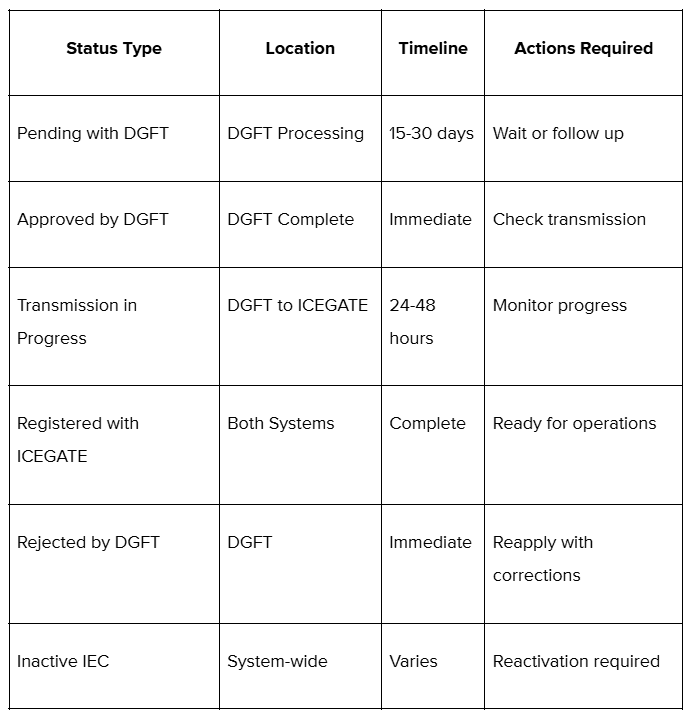
Let's see what each one means for business operations.
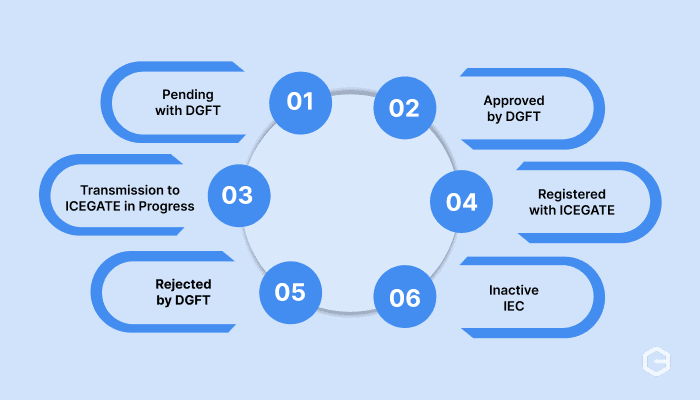
Your IEC application is still under review at DGFT headquarters. This typically happens within the first few days after application submission. You cannot proceed with any import/export activities during this stage.
DGFT has processed and approved your IEC application. However, the approval hasn't been transmitted to ICEGATE yet. You have a valid IEC number, but cannot use it for customs clearance.
Your approved IEC is being transmitted from DGFT to the ICEGATE system. This usually takes 24-48 hours. Customs authorities cannot access your details during this phase.
Your IEC has been successfully transmitted and accepted by ICEGATE. This is the complete active status you need for all import/export operations, customs clearance, and compliance requirements.
Your IEC application was rejected due to incomplete documentation or other issues. You'll need to reapply with corrected information and documents.
Your previously active IEC has been suspended or cancelled due to non-compliance, expired documentation, or other regulatory issues. Reactivation requires specific procedures with DGFT.
Verifying your IEC BIN status serves multiple critical business purposes beyond basic compliance requirements.
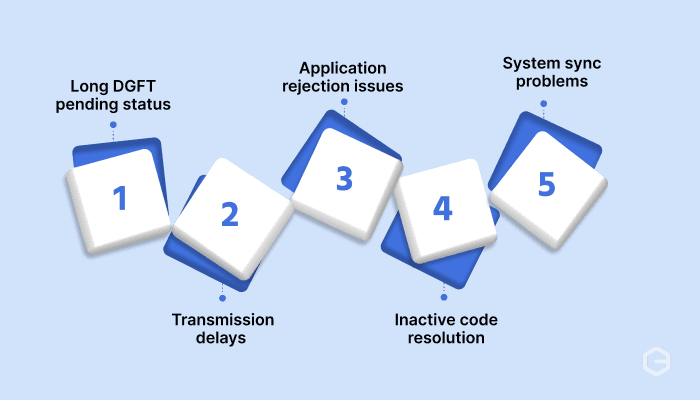
Different status issues require specific resolution approaches depending on the underlying problem.
Checking your IEC status is just one piece of building a smooth international business operation. Once your IEC is verified and active, the next challenge becomes collecting payments from global customers efficiently and compliantly.
Traditional export payment methods involve lengthy bank processes, high conversion costs, and complex compliance documentation. Many exporters struggle with delayed payments, unclear fund tracking, and manual FIRC generation for each transaction.
PayGlocal simplifies your entire export payment collection with purpose-built solutions for Indian businesses:
Multi-currency accounts: Accept payments in USD (US Dollar), GBP (Great Britain Pound), EUR (Euro), and CAD (Canadian Dollar) with local account details that build customer trust and reduce payment friction.
One platform management: Handle all your international payment operations from a single dashboard with complete payment reporting for better business control.
Instant FIRC generation: Automatically receive FIRC (Foreign Inward Remittance Certificate) in your inbox after settlement, removing manual paperwork and compliance delays.
Real-time payment tracking: Monitor every payment from initiation to settlement with transparent status updates and instant notifications throughout the process.
Zero setup costs: Start collecting international payments immediately with no platform fees, setup charges, or monthly commitments. You pay only when you do transactions.
PayGlocal makes complex international payment collection into a simple, efficient process. With multi-currency accounts, automated compliance documentations, and complete payment management, you can focus on growing your export business, while PayGlocal handles the complex payment processes seamlessly.
IEC BIN status verification is a critical compliance requirement that impacts every aspect of your international business operations. Regular status checks help you identify and resolve issues before they disrupt customs clearance, marketplace registrations, or payment collection.
Once your IEC is verified and active, partnering with payment solutions like PayGlocal for international payment collection ensures your export business runs efficiently from compliance to cash flow.
Ready to collect payments faster and more effectively? Get started with PayGlocal today and join the growing number of businesses that prioritize effective international payment management.
If you’re importing or exporting products from India, you are required to have an IEC (Importer Exporter Code) to ensure better compliance. But getting your IEC code is just the first step. You also need to make sure it's properly registered and active across all government systems. This is where checking your IEC BIN status becomes crucial.
In this guide, we cover everything you need to know about IEC BIN status verification, from the step-by-step checking process to knowing what each status means for your business processes.
Key Takeaways:
- Quick verification process: You can check your IEC BIN (Business Identification Number) status online easily using your IEC number and basic business details.
- Multiple status types exist: Your IEC can have different statuses like "Registered with ICEGATE," "Pending with DGFT," or "Transmission in Progress," each requiring different actions.
- Status impacts operations: An incorrect or pending status can block customs clearance, marketplace registrations, and payment collection setup.
- PayGlocal simplifies the entire process: Once your IEC is verified, PayGlocal helps you collect international payments seamlessly with instant FIRC (Foreign Inward Remittance Certificate) generation and multi-currency support.
What is the IEC BIN status?
IEC BIN status refers to the current registration and acceptance status of your IEC (Importer Exporter Code) within India's trade facilitation systems. BIN stands for Business Identification Number, a 10-digit alphanumeric code assigned to each IEC holder for tracking import and export activities.
Your IEC goes through multiple stages after application. First, the Directorate General of Foreign Trade (DGFT) processes and approves your application. Then, this approval gets transmitted to ICEGATE (Indian Customs Electronic Gateway), where customs authorities can access your details for clearance procedures. The status check shows you exactly where your IEC stands in this process.
How to check the IEC BIN status online?
Checking your IEC BIN status involves verifying your code's status at the official DGFT systems. Here's the latest and complete step-by-step process to check your IEC BIN status:
- Visit the DGFT website: Go to the official DGFT portal, log in with your account details, or register if you don’t have an account.
- Navigate to Services and “View IEC Related Details”: Once your account is created, navigate to Services from the main navigation menu, and then click on “View IEC Related Details.”
- Access the “View any IEC”: Then, click on “View any IEC,” and a form will open up asking you to fill in your IEC Code, Firm Name, and the captcha code. Once all details are filled successfully, click on the “View IEC” button to finally open the IEC status page.
- Review your IEC details on the IEC status page: The system will show your IEC status, including approval date and other related details.
What are the different IEC status types?
Your IEC can display various status types depending on where it stands in the approval and transmission process. Here's what each status means:
Let's see what each one means for business operations.
1. Pending with DGFT
Your IEC application is still under review at DGFT headquarters. This typically happens within the first few days after application submission. You cannot proceed with any import/export activities during this stage.
2. Approved by DGFT
DGFT has processed and approved your IEC application. However, the approval hasn't been transmitted to ICEGATE yet. You have a valid IEC number, but cannot use it for customs clearance.
3. Transmission to ICEGATE in Progress
Your approved IEC is being transmitted from DGFT to the ICEGATE system. This usually takes 24-48 hours. Customs authorities cannot access your details during this phase.
4. Registered with ICEGATE
Your IEC has been successfully transmitted and accepted by ICEGATE. This is the complete active status you need for all import/export operations, customs clearance, and compliance requirements.
5. Rejected by DGFT
Your IEC application was rejected due to incomplete documentation or other issues. You'll need to reapply with corrected information and documents.
6. Inactive IEC
Your previously active IEC has been suspended or cancelled due to non-compliance, expired documentation, or other regulatory issues. Reactivation requires specific procedures with DGFT.
Why is IEC status verification important?
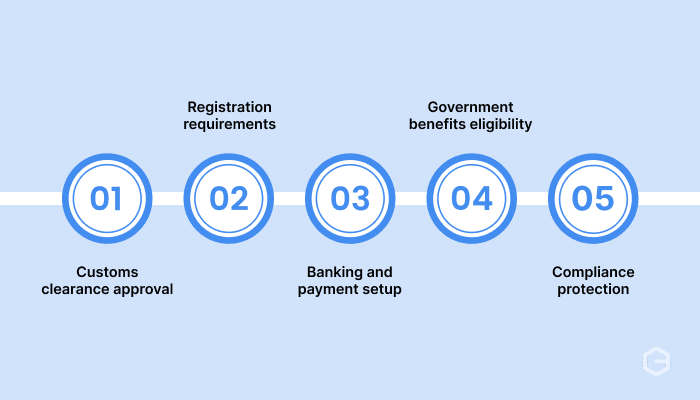
Verifying your IEC BIN status serves multiple critical business purposes beyond basic compliance requirements.
- Customs clearance approval: Customs authorities check your IEC status in real-time during import/export clearance for immediate processing without delays.
- Marketplace registration requirements: Major B2B platforms and export marketplaces verify IEC status during seller onboarding before approving accounts.
- Banking and payment setup: Banks verify your IEC status when setting up international payment collection or opening foreign currency accounts.
- Government benefits eligibility: Export promotion schemes and duty drawback claims require an active IEC status for benefit access.
- Audit and compliance protection: Regular status verification helps identify and resolve issues before they become compliance problems during audits.
What should you do if your IEC status shows problems?
Different status issues require specific resolution approaches depending on the underlying problem.
- Long DGFT pending status: Contact DGFT customer service with your application reference number if the status shows "Pending with DGFT" for more than 15 working days.
- Extended transmission delays: File a query through ICEGATE's helpdesk system with your IEC number if the "Transmission in Progress" status lasts more than a week.
- Application rejection issues: Review rejection reasons in your DGFT account and resubmit the application with corrected documentation when the status shows "Rejected".
- Inactive code resolution: Submit reactivation application with updated documents and compliance certificates for suspended IEC codes.
- System sync problems: Contact both DGFT and ICEGATE support if your status differs between the two systems for extended periods.
Manage all your export payments easily in one platform
Checking your IEC status is just one piece of building a smooth international business operation. Once your IEC is verified and active, the next challenge becomes collecting payments from global customers efficiently and compliantly.
Traditional export payment methods involve lengthy bank processes, high conversion costs, and complex compliance documentation. Many exporters struggle with delayed payments, unclear fund tracking, and manual FIRC generation for each transaction.
PayGlocal simplifies your entire export payment collection with purpose-built solutions for Indian businesses:
Multi-currency accounts: Accept payments in USD (US Dollar), GBP (Great Britain Pound), EUR (Euro), and CAD (Canadian Dollar) with local account details that build customer trust and reduce payment friction.
One platform management: Handle all your international payment operations from a single dashboard with complete payment reporting for better business control.
Instant FIRC generation: Automatically receive FIRC (Foreign Inward Remittance Certificate) in your inbox after settlement, removing manual paperwork and compliance delays.
Real-time payment tracking: Monitor every payment from initiation to settlement with transparent status updates and instant notifications throughout the process.
Zero setup costs: Start collecting international payments immediately with no platform fees, setup charges, or monthly commitments. You pay only when you do transactions.
PayGlocal makes complex international payment collection into a simple, efficient process. With multi-currency accounts, automated compliance documentations, and complete payment management, you can focus on growing your export business, while PayGlocal handles the complex payment processes seamlessly.
Final thoughts
IEC BIN status verification is a critical compliance requirement that impacts every aspect of your international business operations. Regular status checks help you identify and resolve issues before they disrupt customs clearance, marketplace registrations, or payment collection.
Once your IEC is verified and active, partnering with payment solutions like PayGlocal for international payment collection ensures your export business runs efficiently from compliance to cash flow.
Ready to collect payments faster and more effectively? Get started with PayGlocal today and join the growing number of businesses that prioritize effective international payment management.