
Building a payment system for your website means dealing with complex APIs, security protocols, and endless documentation. Gateway providers offer dozens of integration options, but finding the right approach can be a time-consuming process.
Adding payment methods directly to your website's source code gives you complete control over the customer experience and transaction flow. This approach removes third-party redirects, reduces payment failures, and lets you customize every aspect of the checkout process for your global customers.
In this guide, we break down the complete process of integrating payment methods into your website. Explore different global payment options, and find out how to set up payments without getting overwhelmed by technical complexity.
Adding a payment method to your website source code means embedding the technical components that allow customers to complete transactions directly on your site.
The integration process involves both frontend elements (forms, buttons, user interface) and backend processing (API calls, transaction handling, security).
The key difference between integrating payment methods through code instead of plugins is control and customization. Code integration gives you complete flexibility over the user experience, while plugins offer faster setup with limited customization options.
Payment processing occurs across the main components, including your website's frontend, backend servers, and payment gateways. Once you know how these parts work, it becomes easier to build payments correctly and resolve issues when they arise.
Here's how each component works together:
Integrating payments requires careful planning and systematic implementation. Begin with a test environment to prevent costly mistakes and ensure everything functions properly before processing real transactions. Here's a breakdown of the complete integration process:
Popular payment gateway options include Stripe, Razorpay, PayPal, and PayGlocal. Each gateway offers different features, so consider your specific needs. Look for currency support (especially if selling globally), card types accepted, settlement timeframes, and developer documentation quality.
Consider currencies, card types, global reach, and settlement options. If you're targeting international customers, ensure your gateway supports their local currencies and payment methods.
Setting up your payment gateway account requires business verification, bank account details, and identity documentation. The approval process typically takes 1-7 days, depending on your business type and location.
Once approved, you'll access your dashboard to generate two types of API keys. Test keys (also called sandbox keys) let you build and test your integration without processing real money. Live keys handle actual customer transactions and real payments.
This step involves adding payment forms and buttons to your website's user interface. Most payment gateways offer JavaScript libraries that generate secure form fields that match your site's design.
The typical flow starts when customers click your payment button. They fill out the secure form fields, which generate an encrypted token. Your website then sends this token to your server for processing, ensuring sensitive card data never touches your systems directly.
Server-side processing is essential for security and compliance. Your backend validates payments, applies business logic, and communicates with payment gateways using private API keys.
This layer handles critical functions, such as amount validation, customer verification, and transaction processing. Always validate payment amounts and customer data on your server to prevent tampering or fraud attempts.
Testing is crucial for preventing costly mistakes and ensuring smooth customer experiences. All major gateways provide test environments with special card numbers that simulate different scenarios.
Start by testing successful payments, then proceed to error scenarios, such as declined cards, insufficient funds, and network timeouts. Don't forget to test on mobile devices and different browsers to ensure compatibility.
Create a comprehensive checklist covering all possible scenarios. This includes successful payments, various types of failures, and edge cases such as network interruptions. Thorough testing prevents issues when real customers start using your payment system.
Payment transaction processing types vary significantly, so test different scenarios thoroughly.
Different payment gateways stand out for specific regions and uses. Here's a comparison of popular options for businesses selling internationally:
Tip: Consider your target market when choosing a payment gateway. European customers expect local payment methods, such as SEPA (Single Euro Payments Area). Asian markets prefer digital wallets and bank transfers. North American customers mainly use credit cards and PayPal.
Global payments come with hidden friction: currency limitations, failed card payments, and compliance hurdles. PayGlocal is built to simplify integration for growing businesses, whether you use code, plugins, or no-code flows.
PayGlocal solves the most common challenges developers face when building global payment systems. Traditional gateways require complex currency handling, separate compliance management, and multiple integrations for different markets.
PayGlocal offers three distinct integration paths to match your technical requirements and timeline. You can choose based on your development resources and customization needs.
Getting started with PayGlocal is straightforward and designed to get you accepting payments quickly. The process involves setting up an account, selecting your integration method, and testing before going live.
Here's the complete integration process:
Check out our quick start guide for further details on the complete integration and setup process.
Here's why developers and businesses building global-ready platforms choose PayGlocal:
Built-in compliance: Automatically receive FIRA without paperwork.
Whether you're coding a service platform or launching an e-commerce store, PayGlocal lets you get paid globally in a secure and efficient way.
Adding payment methods to your website source code doesn't have to be overwhelming. Choose your gateway, set up test credentials, implement frontend forms, handle backend processing, and test thoroughly before going live.
Focus on security from day one. Use tokenization, validate all inputs server-side, and never store sensitive payment data. The key to successful payment integration is starting simple and testing properly.
Ready to accept global payments? PayGlocal offers developer-friendly APIs and comprehensive documentation to help you integrate payments quickly and securely. Get started today.
Adding payment methods directly to your website's source code gives you complete control over the customer experience and transaction flow. This approach removes third-party redirects, reduces payment failures, and lets you customize every aspect of the checkout process for your global customers.
In this guide, we break down the complete process of integrating payment methods into your website. Explore different global payment options, and find out how to set up payments without getting overwhelmed by technical complexity.
Key Takeaways:
- Payment integration requires coordination: Frontend forms capture customer data, backend servers process transactions, and payment gateway APIs handle the actual money movement with tokenization for security.
- Implementation process: Choose your gateway, create an account and get credentials, embed frontend code, handle server-side processing, and test thoroughly before going live.
- Security through tokenization: PCI-DSS (Payment Card Industry Data Security Standard) compliance becomes manageable when you use encrypted tokens instead of handling raw card data.
- PayGlocal offers flexible integration: PayGlocal provides API, plugin, and no-code options with automatic FIRA (Foreign Inward Remittance Advice) generation and transparent pricing.
What does it mean to add a payment method in the website source code?
Adding a payment method to your website source code means embedding the technical components that allow customers to complete transactions directly on your site.
The integration process involves both frontend elements (forms, buttons, user interface) and backend processing (API calls, transaction handling, security).
The key difference between integrating payment methods through code instead of plugins is control and customization. Code integration gives you complete flexibility over the user experience, while plugins offer faster setup with limited customization options.
How do payment methods work?
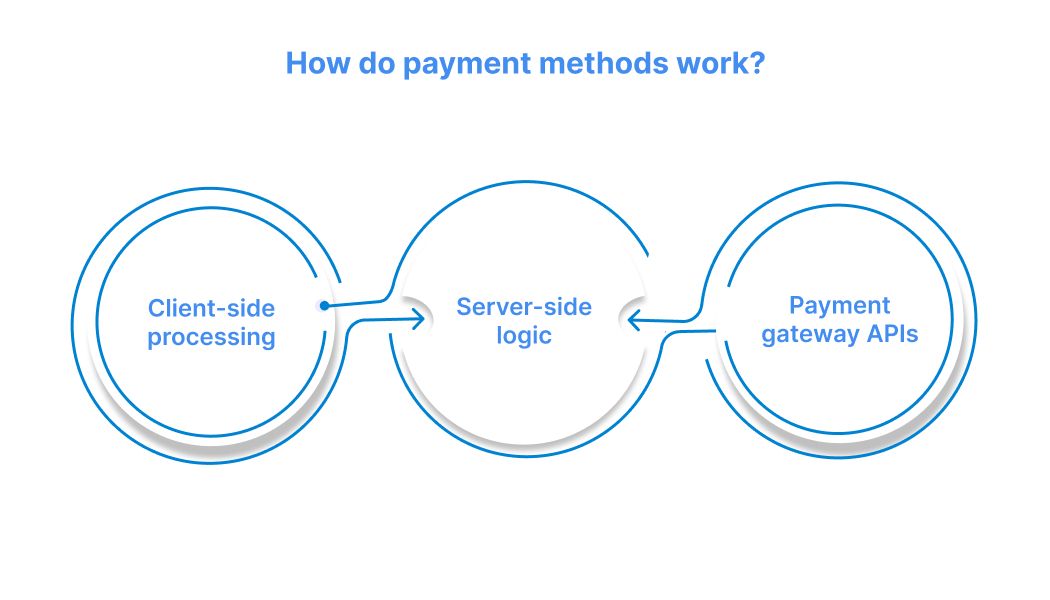
Payment processing occurs across the main components, including your website's frontend, backend servers, and payment gateways. Once you know how these parts work, it becomes easier to build payments correctly and resolve issues when they arise.
Here's how each component works together:
- Client-side processing: Your website's frontend captures customer payment details through secure forms. Modern implementations use payment tokenization so sensitive card information never touches your servers directly.
- Server-side logic: Your backend receives encrypted tokens from the frontend and makes authenticated API calls to payment gateways. This layer handles business logic like pricing calculations and customer record updates.
- Payment gateway APIs: These connect your application to the banking network and handle card authentication, fraud detection, currency conversion, and settlement. Gateways return transaction status and reference numbers.
How to integrate a payment method into the website source code?
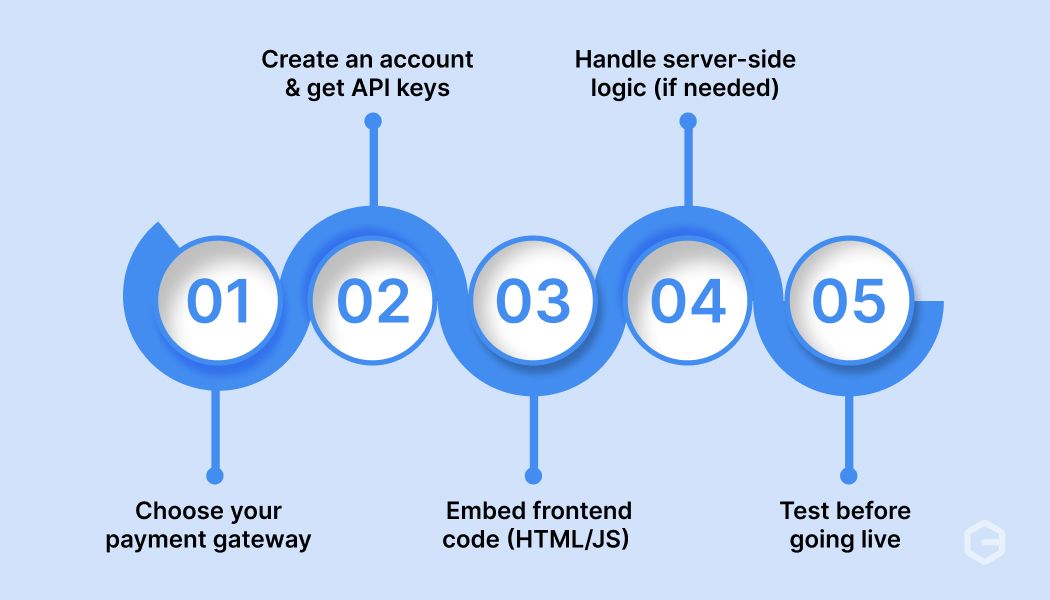
Integrating payments requires careful planning and systematic implementation. Begin with a test environment to prevent costly mistakes and ensure everything functions properly before processing real transactions. Here's a breakdown of the complete integration process:
Step 1: Choose your payment gateway
Popular payment gateway options include Stripe, Razorpay, PayPal, and PayGlocal. Each gateway offers different features, so consider your specific needs. Look for currency support (especially if selling globally), card types accepted, settlement timeframes, and developer documentation quality.
Consider currencies, card types, global reach, and settlement options. If you're targeting international customers, ensure your gateway supports their local currencies and payment methods.
Step 2: Create an account and get API keys
Setting up your payment gateway account requires business verification, bank account details, and identity documentation. The approval process typically takes 1-7 days, depending on your business type and location.
Once approved, you'll access your dashboard to generate two types of API keys. Test keys (also called sandbox keys) let you build and test your integration without processing real money. Live keys handle actual customer transactions and real payments.
Step 3: Embed frontend code (HTML/JS)
This step involves adding payment forms and buttons to your website's user interface. Most payment gateways offer JavaScript libraries that generate secure form fields that match your site's design.
The typical flow starts when customers click your payment button. They fill out the secure form fields, which generate an encrypted token. Your website then sends this token to your server for processing, ensuring sensitive card data never touches your systems directly.
Step 4: Handle server-side logic (if needed)
Server-side processing is essential for security and compliance. Your backend validates payments, applies business logic, and communicates with payment gateways using private API keys.
This layer handles critical functions, such as amount validation, customer verification, and transaction processing. Always validate payment amounts and customer data on your server to prevent tampering or fraud attempts.
Step 5: Test before going live
Testing is crucial for preventing costly mistakes and ensuring smooth customer experiences. All major gateways provide test environments with special card numbers that simulate different scenarios.
Start by testing successful payments, then proceed to error scenarios, such as declined cards, insufficient funds, and network timeouts. Don't forget to test on mobile devices and different browsers to ensure compatibility.
Create a comprehensive checklist covering all possible scenarios. This includes successful payments, various types of failures, and edge cases such as network interruptions. Thorough testing prevents issues when real customers start using your payment system.
Payment transaction processing types vary significantly, so test different scenarios thoroughly.
What are the best payment methods to embed globally?
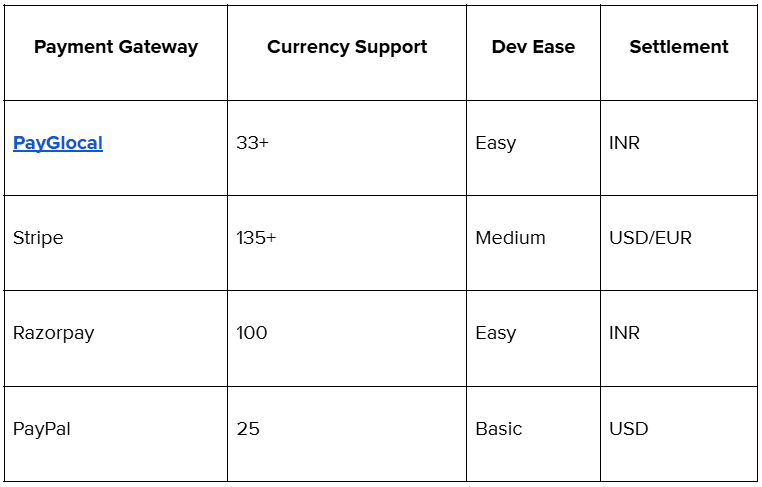
Different payment gateways stand out for specific regions and uses. Here's a comparison of popular options for businesses selling internationally:
Tip: Consider your target market when choosing a payment gateway. European customers expect local payment methods, such as SEPA (Single Euro Payments Area). Asian markets prefer digital wallets and bank transfers. North American customers mainly use credit cards and PayPal.
Accept global payments without complexity using PayGlocal
Global payments come with hidden friction: currency limitations, failed card payments, and compliance hurdles. PayGlocal is built to simplify integration for growing businesses, whether you use code, plugins, or no-code flows.
PayGlocal solves the most common challenges developers face when building global payment systems. Traditional gateways require complex currency handling, separate compliance management, and multiple integrations for different markets.
What are the different integration options you get with PayGlocal?
PayGlocal offers three distinct integration paths to match your technical requirements and timeline. You can choose based on your development resources and customization needs.
- API integration: The API integration path gives you complete control over the payment experience. You get comprehensive documentation, SDKs for popular programming languages, and webhook support for real-time updates. This option is ideal when you require custom payment flows or wish to maintain your exact branding throughout the checkout process.
- Plugin: Plugin integrations provide the middle ground between customization and speed. PayGlocal supports major e-commerce platforms like WooCommerce, Shopify, and Magento. Simply install the plugin, add your credentials, and start accepting payments within hours. These plugins handle the technical complexity while giving you basic customization options.
- No-code: The no-code solutions let you accept payments immediately without any development work. Payment links work perfectly for service providers, freelancers, and businesses selling digital products. Create a payment link, share it with customers, and get paid directly into your account.
How to integrate PayGlocal?
Getting started with PayGlocal is straightforward and designed to get you accepting payments quickly. The process involves setting up an account, selecting your integration method, and testing before going live.
Here's the complete integration process:
- Get your PayGlocal MID: Contact the sales team to get onboarded and receive your Merchant ID. This process includes business verification and gives you access to the GCC Dashboard for managing your account.
- Choose your integration type: Select from API integration for custom solutions, plugin integration for popular e-commerce platforms, or no-code payment links for immediate setup without development work.
- Download your credentials: Based on your chosen integration type, download the appropriate API key for PayCollect flows or RSA key for PayDirect flows from your GCC Dashboard.
- Implement and configure: Follow the specific documentation for your chosen integration method. API users get comprehensive guides, plugin users install and configure through their platform, and no-code users create payment links directly.
- Test thoroughly: Use the provided test environment and test cards to ensure your integration works correctly before processing real transactions with live credentials.
Check out our quick start guide for further details on the complete integration and setup process.
Why choose PayGlocal for global payments?
Here's why developers and businesses building global-ready platforms choose PayGlocal:
- Seamless integration: Choose from API, plugin, or no-code options to fit your tech stack.
- Collect in 33+ currencies: Accept USD, EUR, GBP, CAD & more, settle in INR.
- Track your money: Real-time dashboards and smart alerts on payment status.
Built-in compliance: Automatically receive FIRA without paperwork.
- No setup or platform fees: Pay only when you transact, no hidden costs in international payments.
Whether you're coding a service platform or launching an e-commerce store, PayGlocal lets you get paid globally in a secure and efficient way.
Final thoughts
Adding payment methods to your website source code doesn't have to be overwhelming. Choose your gateway, set up test credentials, implement frontend forms, handle backend processing, and test thoroughly before going live.
Focus on security from day one. Use tokenization, validate all inputs server-side, and never store sensitive payment data. The key to successful payment integration is starting simple and testing properly.
Ready to accept global payments? PayGlocal offers developer-friendly APIs and comprehensive documentation to help you integrate payments quickly and securely. Get started today.