

Selling internationally is no longer just about reaching customers in more countries. It is about giving every buyer a shopping experience that feels local. A multi-currency online store lets customers browse, pay, and complete checkout in the currency they already use, removing confusion, reducing cart abandonment, and increasing payment success. This guide explains how a multi-currency online store works, why your payment gateway matters as much as your storefront, and how to build a checkout experience that converts more global buyers into paying customers.
TL;DR
- A multi-currency online store shows each buyer prices in their own currency, accepts payment in it, and settles the money to you in INR, so more international carts convert.
- The catch most sellers miss: your store platform and your payment gateway must support the same currencies. Display without matching gateway support creates double-conversion surprises at checkout.
- With PayGlocal, you collect in 130+ global currencies from 180+ countries, keep approval rates high with intelligent routing, and get FIRC generated automatically on every settlement.
India's exports reached $778.21 billion in 2023-24, up from $466.22 billion a decade earlier. More Indian businesses are selling globally than ever, yet currency confusion still quietly costs them conversions at checkout.
When an international customer sees prices only in rupees, they hesitate. They wonder if the price is fair, worry about hidden conversion fees, and often abandon the cart. A multi-currency online store removes that friction by letting each customer see prices and pay in the currency they already use.
This guide covers what a multi-currency online store is, how the store and the payment gateway work together, how to choose a solution, and how to set it up without the double-conversion traps that catch most sellers. If you want the broader payments view rather than the store setup, our guide on how to collect payments in multiple currencies covers that angle.
A multi-currency online store is an e-commerce setup that displays prices, accepts payments, and settles transactions across several foreign currencies. A visitor from Canada sees prices in CAD; a customer in Germany sees EUR. The store detects the buyer's location and shows the currency they recognise.
The important part is that this goes beyond display. A true multi-currency store lets the customer actually pay in their own currency through your gateway. Whether a US buyer pays $29.99 or a UK shopper pays £24.99, the system handles the conversion and settles the INR equivalent to you, along with the export documentation you need.
Display alone is cosmetic. Display plus matching gateway acceptance is what converts.
International customers expect to shop in their own currency, and many simply leave when they cannot. Currency familiarity directly affects whether a visitor becomes a customer, so treating it as a nice-to-have costs real revenue.
Here is what a multi-currency store gives you:
Beyond the storefront, multi-currency acceptance helps you manage international revenue: you know exactly what you collect in each currency, track performance by region, and get proper documentation for every transaction. For Indian exporters that documentation matters, because you need a Foreign Inward Remittance Certificate (FIRC) for each international payment.
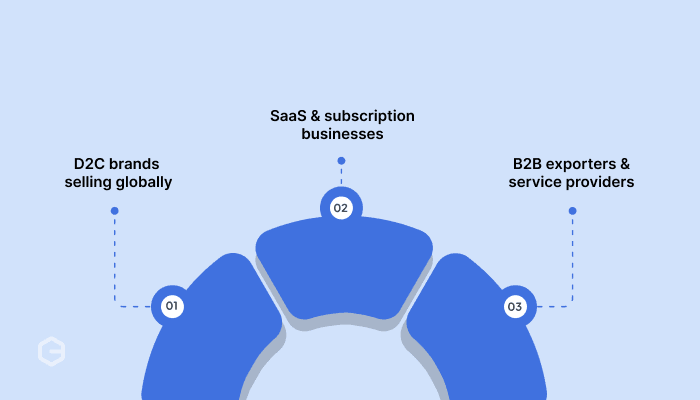
How you implement multi-currency depends on your model. A subscription business needs different features from a one-time product store. These examples show what each looks like in practice.
D2C brands selling globally. An Indian skincare brand shows AUD 45 to Australian buyers, £24 to UK buyers, and $32 to US buyers. Each price is set for that market, not auto-converted. Customers pay in their currency, and the brand receives INR settlements with FIRC, so compliance stays simple.
SaaS and subscription businesses. A project management tool charges $49/month in the US, €45/month in Europe, and £39/month in the UK, priced to each market's purchasing power. Customers pay the same amount monthly in their currency while the company receives predictable INR revenue with automated documentation.
B2B exporters and service providers. A digital marketing agency sends invoices in the client's currency. A Canadian client gets an invoice for CAD 5,000, pays through their preferred method, and the agency receives INR. Payment links handle collection without building a full store.
A multi-currency store is really a partnership between two systems: your e-commerce platform handles what the customer sees, and your payment gateway handles what the customer actually pays. Most problems come from these two falling out of sync.
Here is the full flow:
The trap to remember: your platform might display 50 currencies while your gateway only processes 10. Choose a store setup where platform and gateway agree on currency support, or buyers will see one currency and get charged in another.
Your platform sets your options. A custom store gives you full control over which payment provider you use; a platform-based store often restricts which gateways integrate cleanly. Start by checking what your current setup actually supports, then weigh these:
Platform-native solutions work well when their currency coverage matches your markets and you want tight integration. Third-party gateways give you broader currency support and more control, at the cost of some integration effort.
Your gateway has to actually accept and process the currencies your store displays. Verify the currencies the gateway supports, not only the ones the platform can show. This single check prevents most double-conversion problems.
If you sell mainly to the US, UK, EU, and Canada, you need solid USD, GBP, EUR, and CAD support plus the ability to settle everything in INR. Match coverage to where your buyers actually are, not to a headline count.
Check how and when you get paid. Some providers settle each currency separately, creating multiple payouts and more reconciliation work. Others consolidate everything into one INR settlement, which is usually easier for cash flow and accounting.
A failed payment costs the whole sale, not just a fee, so weight approval rate heavily. Look for intelligent routing and ask the provider for a real approval-rate figure rather than a marketing line.
Indian exporters need FIRC for every international transaction. Confirm the solution generates FIRC automatically on settlement and provides reports formatted for tax filing. Automating this saves real time at tax season and keeps you audit-ready.
Most multi-currency problems trace back to the platform and the gateway not aligning. Buyers see one currency and get charged another, or your accounting breaks because settlement reports lack detail. These are avoidable once you know them:
The right payment provider handles currency acceptance, settlement documentation, and compliance automatically, so these stop being your problem from day one.
Setup spans three layers: currency display on your store, payment processing through your gateway, and settlement to your bank account. Each needs proper configuration, or buyers hit conversion surprises at checkout.
A practical limit: do not switch on 100+ currencies at once. Start with your top three to five international markets to keep pricing and tax configuration manageable, then expand.
Setting up the display is the easy half. Where many businesses struggle is the payments half: low approval rates, unclear fees, missing compliance documents, and messy reconciliation when the money actually moves.
PayGlocal handles that half. As an RBI-authorised Payment Aggregator (Cross Border, Inward and Outward, PA-CB-I&O; and Online, PA-O) and part of the ICICI Bank Group, it focuses on accepting payments from your international customers and settling clean INR to your account with the compliance paperwork built in.
Here is how it fits a multi-currency store:
It integrates with major e-commerce platforms and custom stores through APIs, plugins, and no-code options, so you can set up once and start accepting international payments with documentation from day one.
When an international customer sees prices only in rupees, they hesitate. They wonder if the price is fair, worry about hidden conversion fees, and often abandon the cart. A multi-currency online store removes that friction by letting each customer see prices and pay in the currency they already use.
This guide covers what a multi-currency online store is, how the store and the payment gateway work together, how to choose a solution, and how to set it up without the double-conversion traps that catch most sellers. If you want the broader payments view rather than the store setup, our guide on how to collect payments in multiple currencies covers that angle.
What is a multi-currency online store?
A multi-currency online store is an e-commerce setup that displays prices, accepts payments, and settles transactions across several foreign currencies. A visitor from Canada sees prices in CAD; a customer in Germany sees EUR. The store detects the buyer's location and shows the currency they recognise.
The important part is that this goes beyond display. A true multi-currency store lets the customer actually pay in their own currency through your gateway. Whether a US buyer pays $29.99 or a UK shopper pays £24.99, the system handles the conversion and settles the INR equivalent to you, along with the export documentation you need.
Display alone is cosmetic. Display plus matching gateway acceptance is what converts.
Why it matters for your business
International customers expect to shop in their own currency, and many simply leave when they cannot. Currency familiarity directly affects whether a visitor becomes a customer, so treating it as a nice-to-have costs real revenue.
Here is what a multi-currency store gives you:
- Higher conversion. Buyers trust a price in their own currency and finish checkout faster, with no conversion guesswork.
- Lower cart abandonment. Local currency at checkout removes the last-step surprise that makes buyers drop off.
- A competitive edge. Most global shoppers prefer stores that price in their currency over those that do not.
- A more established brand. Showing multiple currencies signals you serve international markets seriously.
- Pricing control per market. Set strategic prices for each region instead of relying on raw auto-conversion that may undercut your positioning.
- A cleaner buying experience. No mental math, no exchange-rate worry, just shopping the way buyers are used to.
Beyond the storefront, multi-currency acceptance helps you manage international revenue: you know exactly what you collect in each currency, track performance by region, and get proper documentation for every transaction. For Indian exporters that documentation matters, because you need a Foreign Inward Remittance Certificate (FIRC) for each international payment.
What it looks like: D2C, SaaS, and B2B examples
How you implement multi-currency depends on your model. A subscription business needs different features from a one-time product store. These examples show what each looks like in practice.
D2C brands selling globally. An Indian skincare brand shows AUD 45 to Australian buyers, £24 to UK buyers, and $32 to US buyers. Each price is set for that market, not auto-converted. Customers pay in their currency, and the brand receives INR settlements with FIRC, so compliance stays simple.
SaaS and subscription businesses. A project management tool charges $49/month in the US, €45/month in Europe, and £39/month in the UK, priced to each market's purchasing power. Customers pay the same amount monthly in their currency while the company receives predictable INR revenue with automated documentation.
B2B exporters and service providers. A digital marketing agency sends invoices in the client's currency. A Canadian client gets an invoice for CAD 5,000, pays through their preferred method, and the agency receives INR. Payment links handle collection without building a full store.
How a multi-currency online store works
A multi-currency store is really a partnership between two systems: your e-commerce platform handles what the customer sees, and your payment gateway handles what the customer actually pays. Most problems come from these two falling out of sync.
Here is the full flow:
- Location detection. When someone visits, the store detects their location and shows the appropriate currency automatically.
- Price display. Prices appear in the buyer's currency, either from preset per-currency prices you configured or from real-time exchange rate conversion.
- Currency switcher. A visible dropdown lets buyers change currency manually if the auto-detected one is not their preference.
- Checkout consistency. The chosen currency carries through every step, from cart total to the payment success page, with no mid-checkout switch.
- Payment processing. Your gateway accepts the payment in the buyer's currency through the right card network or local method, and strong gateways route each transaction down the path most likely to be approved.
- Settlement. The provider settles funds to you in INR at the agreed rate, with the documentation you need.
The trap to remember: your platform might display 50 currencies while your gateway only processes 10. Choose a store setup where platform and gateway agree on currency support, or buyers will see one currency and get charged in another.
How to choose a multi-currency solution
Your platform sets your options. A custom store gives you full control over which payment provider you use; a platform-based store often restricts which gateways integrate cleanly. Start by checking what your current setup actually supports, then weigh these:
Match your platform type
Platform-native solutions work well when their currency coverage matches your markets and you want tight integration. Third-party gateways give you broader currency support and more control, at the cost of some integration effort.
Check gateway acceptance, not just display
Your gateway has to actually accept and process the currencies your store displays. Verify the currencies the gateway supports, not only the ones the platform can show. This single check prevents most double-conversion problems.
Review currency coverage against your real markets
If you sell mainly to the US, UK, EU, and Canada, you need solid USD, GBP, EUR, and CAD support plus the ability to settle everything in INR. Match coverage to where your buyers actually are, not to a headline count.
Verify settlement and reconciliation
Check how and when you get paid. Some providers settle each currency separately, creating multiple payouts and more reconciliation work. Others consolidate everything into one INR settlement, which is usually easier for cash flow and accounting.
Weigh approval rate and routing
A failed payment costs the whole sale, not just a fee, so weight approval rate heavily. Look for intelligent routing and ask the provider for a real approval-rate figure rather than a marketing line.
Confirm compliance and documentation
Indian exporters need FIRC for every international transaction. Confirm the solution generates FIRC automatically on settlement and provides reports formatted for tax filing. Automating this saves real time at tax season and keeps you audit-ready.
The common challenges, and how to avoid them
Most multi-currency problems trace back to the platform and the gateway not aligning. Buyers see one currency and get charged another, or your accounting breaks because settlement reports lack detail. These are avoidable once you know them:
- Double conversion. Buyers see EUR but get charged in USD at checkout, adding surprise fees and a different final amount. Aligning platform and gateway currencies prevents it.
- Exchange-rate movement. Rates shift constantly, affecting your INR revenue even when the buyer pays the same amount. Faster settlement reduces the exposure.
- Performance drag. Location checks, currency switching, and larger databases can slow a store if implemented poorly. Test load before launch.
- Accounting complexity. Tracking original currency, conversion rate, INR amount, and fees per transaction complicates reconciliation without proper reporting.
- Documentation gaps. Some providers skip FIRC or issue it in a format banks reject. Confirm the format upfront.
The right payment provider handles currency acceptance, settlement documentation, and compliance automatically, so these stop being your problem from day one.
How to set it up, step by step
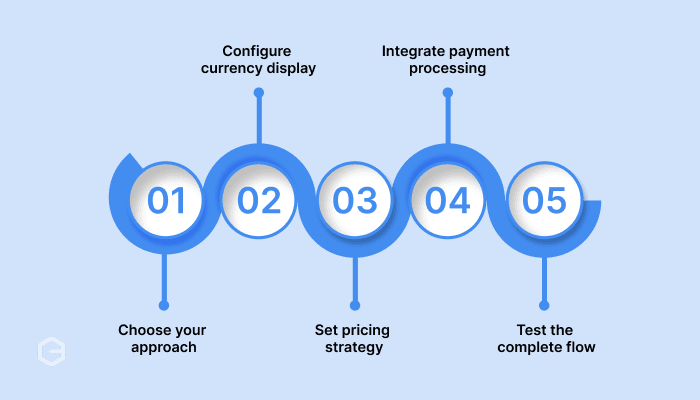
Setup spans three layers: currency display on your store, payment processing through your gateway, and settlement to your bank account. Each needs proper configuration, or buyers hit conversion surprises at checkout.
- Choose your approach. Use a platform-native solution for tight integration, or a third-party gateway for broader currency coverage and settlement flexibility.
- Configure currency display. Enable currencies for your target markets, turn on geo-detection, and add a manual currency switcher.
- Set your pricing strategy. Use real-time conversion, or set custom per-currency prices to protect your margins.
- Integrate payment processing. Connect a gateway that actually accepts your enabled currencies and configure settlement to land in INR.
- Test the full flow. Place test orders in each currency to confirm consistent display from product page through checkout, and that settlements arrive with proper documentation.
A practical limit: do not switch on 100+ currencies at once. Start with your top three to five international markets to keep pricing and tax configuration manageable, then expand.
Get paid globally and settle in INR with PayGlocal
Setting up the display is the easy half. Where many businesses struggle is the payments half: low approval rates, unclear fees, missing compliance documents, and messy reconciliation when the money actually moves.
PayGlocal handles that half. As an RBI-authorised Payment Aggregator (Cross Border, Inward and Outward, PA-CB-I&O; and Online, PA-O) and part of the ICICI Bank Group, it focuses on accepting payments from your international customers and settling clean INR to your account with the compliance paperwork built in.
Here is how it fits a multi-currency store:
- Accept payments in multiple currencies: Collect from customers in 180+ countries and receive settled funds in INR.
- Higher approval rates: Payment orchestration and intelligent routing lift the Payment Success Rate (the share of attempted payments that clear) on international cards, up to 96%, with real merchant deltas from 75% to 95%.
- Instant FIRC on settlement: Compliance documentation is generated automatically with every settlement, with no manual requests.
- Transparent pricing: No hidden fees and no monthly platform cost. You pay only when you transact.
- Complete reporting: One dashboard for payment status, fund movement, and settlement timeline on every transaction.
It integrates with major e-commerce platforms and custom stores through APIs, plugins, and no-code options, so you can set up once and start accepting international payments with documentation from day one.