
Around 40% of all payments in India occur digitally. So it’s important than ever to have the right payment processing system for your Android app.
The payment gateway integration in Android involves connecting your mobile application with third-party payment services to process transactions securely. This integration enables users to pay directly within your app using credit cards, digital wallets, UPI, and other payment methods without redirecting to external websites.
In this guide, we break down everything you need to know about the payment gateway integration in Android apps, from selecting the right provider to implementing secure payment flows that convert browsers into buyers. Let’s get started!
Payment gateway integration in Android refers to the process of connecting your mobile application with payment processing services through Software Development Kits (SDKs) and Application Programming Interfaces (APIs). This integration allows users to complete transactions directly within your app using various payment methods.
For example, when a user purchases a product in your e-commerce app, the payment gateway handles the entire transaction flow, from collecting card details to confirming payment success.
Popular Android payment gateway providers include Stripe, Razorpay, PayU, and PayGlocal, each offering dedicated integration options and different features.
Successful payment gateway integration turns your Android app from a simple interface into a complete business platform capable of generating revenue. Some of the top benefits that make payment gateway integration essential:
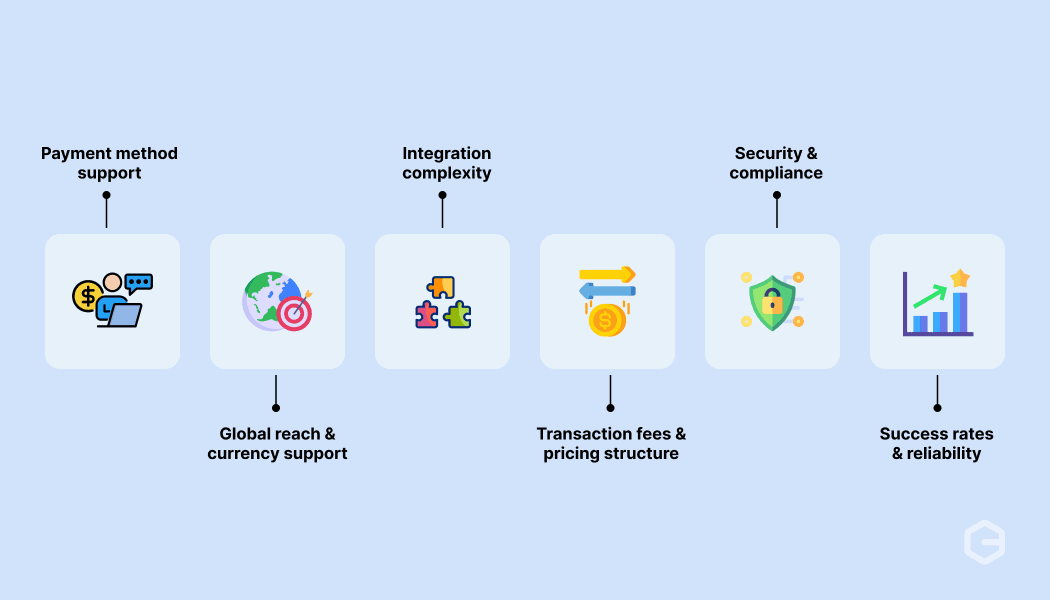
Selecting the appropriate payment gateway significantly impacts your app's success, user satisfaction, and revenue generation. Consider these critical factors when evaluating different providers:
Implementing payment gateway integration in Android requires a structured approach that ensures security, functionality, and optimal user experience. PayGlocal makes this process straightforward with a well-documented setup process and developer-friendly tools. Here's the complete process:
Register with your chosen payment gateway provider and complete the merchant onboarding process. This typically involves business verification, banking details submission, and compliance documentation. Once approved, you'll receive API keys, merchant IDs, and access to developer dashboards for testing and live environments.
With PayGlocal, the onboarding process includes getting your PayGlocal MID (Merchant ID) and access to the GCC Dashboard for managing your integration settings and credentials.
Most payment gateways offer multiple ways to integrate with Android apps. You can choose the method that best fits your technical requirements and development timeline.
PayGlocal provides three integration options:
Once you've selected your integration approach, download the appropriate authentication keys from your provider's dashboard. These keys ensure secure communication between your app and the payment gateway.
For PayGlocal, you can download either an API Key for PayCollect services or an RSA Key for PayDirect services, depending on your chosen integration flow type.
Create user-friendly payment screens within your Android app. Focus on making the checkout process intuitive and trustworthy for users. Include clear payment options, secure input fields, and helpful error messages.
PayGlocal's Dynamic Checkout feature provides flexible payment interface options while supporting multiple payment methods.
Set up the connection between your app and the payment gateway's servers. This involves handling payment requests, processing responses, and managing different payment states like success, failure, and pending.
PayGlocal offers detailed API documentation showing proper setup instructions needed for successful payment processing, making implementation more straightforward.
Implement proper security measures to protect user data during payment processing. This includes using HTTPS for all communications, validating input data, and ensuring sensitive information is never stored locally on the device. Your app should handle authentication tokens securely and clear sensitive data from memory after use.
Build strong error handling to manage various scenarios gracefully. This covers network failures, declined payments, expired sessions, and user cancellations. Provide clear, helpful messages to users when issues occur and offer appropriate next steps like retry options or alternative payment methods.
Use the provider's testing environment to verify your integration works correctly across different scenarios. Test successful payments, failed transactions, and edge cases before going live.
PayGlocal provides API testing and sample payment data, allowing you to validate your integration without processing real money.
After successful testing, switch to live credentials and release your app to users. Keep your authentication keys secure and ensure they're properly configured in your production environment.
Monitor transaction success rates, user feedback, and payment performance metrics regularly after launch. Track key indicators like conversion rates and failure reasons to identify issues and further enhance your payment processes.
Android payment gateway integration presents several technical and business challenges that developers must address for successful implementation:
* Compatibility issues: Different payment gateways may have varying Android version requirements, dependency conflicts, or advanced configuration needs that can cause build failures or runtime crashes.
* Security implementation complexity: Handling sensitive payment data requires careful attention to secure storage, transmission, and processing while maintaining compliance standards.
* User experience optimization: Balancing security requirements with smooth user flows often creates friction. Complex authentication steps or lengthy forms can increase abandonment rates significantly.
* Error handling and edge cases: Payment processing involves multiple failure points, including network issues, insufficient funds, expired cards, and gateway timeouts that require detailed error handling strategies.
* Testing and debugging difficulties: Reproducing payment scenarios in development environments, especially for international payment methods or specific error conditions, can be challenging without proper test data.
Security remains the most essential element when handling payment data in Android applications. Following these best practices protects both your users and your business from potential payment issues:
* Never store payment data locally: Avoid storing credit card numbers or other sensitive information on device storage. Use the tokenization provided by payment gateways to reference payment methods securely.
* Use secure communication protocols: Always use HTTPS for all payment-related network communications. Implement proper SSL/TLS configuration and validate server certificates in your network requests.
* Validate input data thoroughly: Implement client-side and server-side validation for all payment information. Check card number formats, expiry dates, and security codes before sending data to payment gateways.
* Handle sensitive data in memory carefully: Clear sensitive information from memory immediately after use. Avoid logging payment details and use secure string handling practices in your code.
* Implement proper session management: Use secure session tokens for payment processes and implement appropriate timeout mechanisms to prevent unauthorized access to payment sessions.
Thorough testing ensures your payment integration works reliably across different scenarios and user conditions. Implement a testing strategy that covers functionality, security, and user experience aspects.
* Use test environments extensively: All reputable payment gateways provide test environments with sample credentials and test card numbers. Use these environments to verify integration logic without processing real transactions or incurring charges.
* Test multiple payment scenarios: Cover successful payments, declined transactions, network failures, insufficient funds, expired cards, and cancelled payments. Each scenario should display appropriate user feedback and handle errors gracefully.
* Validate different payment methods: Test credit cards, debit cards, digital wallets, and regional payment methods if supported. Verify that each payment method follows the correct flow and displays relevant UI elements.
* Perform security testing: Test for common vulnerabilities like SQL injection, XSS attacks, and data exposure. Verify that sensitive information is properly encrypted and not logged in debug outputs.
* Test on multiple devices and Android versions: Ensure compatibility across different screen sizes, Android API levels, and device manufacturers. Payment flows should work consistently regardless of hardware specifications.
* Implement automated testing: Write unit tests for payment logic, integration tests for API interactions, and UI tests for payment flows. Automated testing helps catch regressions during development cycles.
Building strong payment processing for global markets requires extensive development resources, compliance expertise, and ongoing maintenance. PayGlocal removes these complexities with a payment platform designed specifically for businesses expanding internationally.
Here's how PayGlocal’s payment gateway integration helps your business:
* 40+ global payment methods: Accept credit cards, digital wallets, bank transfers, and regional payment methods through a single integration, removing the need for multiple gateway partnerships.
* Recurring Payments support: Handle subscription billing, recurring charges, and automated payments seamlessly with built-in mandate management features.
* One Platform management: Monitor all transactions, handle refunds, access analytics, and manage payment settings from a single dashboard interface.
* Built-in compliance tools: Automatic FIRC generation and regulatory adherence across different markets reduce your compliance burden significantly.
* Zero setup fees: Pay only for successful transactions with transparent pricing and no hidden charges, making it cost-effective for businesses of all sizes.
Whether you're building a marketplace, subscription service, or e-commerce platform, PayGlocal provides the tools and infrastructure needed to accept payments globally while maintaining the seamless user experience your customers expect.
Payment gateway integration in Android apps has evolved from a technical necessity to a strategic business advantage. Modern users expect seamless, secure payment experiences that work consistently across different devices, networks, and geographic locations.
Successful integration requires careful planning, attention to security best practices, and thorough testing across multiple scenarios. The choice of payment gateway significantly impacts not just technical implementation complexity but also your ability to expand into new markets and serve diverse customer bases effectively.
For businesses building Android apps with global ambitions, partnering with a payment platform like PayGlocal provides the flexibility to adapt to changing market requirements and user preferences.
Ready to manage global payments from one platform with fast and secure payment methods? Get started with PayGlocal today.
Choose gateways supporting UPI, digital wallets, and Indian payment preferences like Razorpay, PayU, or PayGlocal. Consider factors like transaction fees, success rates, and customer support quality when making your decision.
Costs include gateway transaction fees (typically 2-4%), setup fees (varies by provider), and development time. Some providers offer free setup with pay-per-transaction models, while others charge monthly or annual fees.
Implement detailed error handling with user-friendly messages, retry mechanisms for temporary failures, and fallback options when possible. Always log errors for debugging while ensuring no sensitive payment data is logged.
Test successful and failed transactions, network interruptions, different payment methods, various Android versions, and security scenarios. Use test environments extensively before deploying to production with real payment processing.
The payment gateway integration in Android involves connecting your mobile application with third-party payment services to process transactions securely. This integration enables users to pay directly within your app using credit cards, digital wallets, UPI, and other payment methods without redirecting to external websites.
In this guide, we break down everything you need to know about the payment gateway integration in Android apps, from selecting the right provider to implementing secure payment flows that convert browsers into buyers. Let’s get started!
Key Takeaways:
- Complete planning required: Payment gateway integration needs careful planning, implementation, server-side security, and user experience design.
- Provider selection matters: Choose providers based on supported payment methods, global reach, developer documentation, and transaction fees.
- Testing is critical: Testing in sandbox environments and implementing proper error handling are essential for successful deployments.
- PayGlocal offers multiple integration options: PayGlocal provides API, plugin, and no-code integration with support for global payment methods.
What is payment gateway integration in Android?
Payment gateway integration in Android refers to the process of connecting your mobile application with payment processing services through Software Development Kits (SDKs) and Application Programming Interfaces (APIs). This integration allows users to complete transactions directly within your app using various payment methods.
For example, when a user purchases a product in your e-commerce app, the payment gateway handles the entire transaction flow, from collecting card details to confirming payment success.
Popular Android payment gateway providers include Stripe, Razorpay, PayU, and PayGlocal, each offering dedicated integration options and different features.
Why do Android apps need payment gateway integration?
Successful payment gateway integration turns your Android app from a simple interface into a complete business platform capable of generating revenue. Some of the top benefits that make payment gateway integration essential:
- Enhanced user experience: Users complete purchases without leaving your app, reducing cart abandonment and increasing conversion rates significantly.
- Global market access: Accept payments from customers worldwide using local payment methods, expanding your potential customer base beyond geographic boundaries.
- Built-in security compliance: Payment gateways handle PCI DSS compliance, data encryption, and fraud detection, protecting both you and your customers from security threats.
- Multiple payment options: Support credit cards, debit cards, digital wallets, UPI, bank transfers, and regional payment methods preferred by different user segments.
- Real-time transaction tracking: Monitor payment status, handle refunds, and access detailed transaction analytics through dashboards and reporting tools.
- Reduced development complexity: Pre-built SDKs and APIs remove the need to develop payment processing infrastructure from scratch, saving months of development time.
How to choose the right payment gateway for Android integration?
Selecting the appropriate payment gateway significantly impacts your app's success, user satisfaction, and revenue generation. Consider these critical factors when evaluating different providers:
- Payment method support: Ensure the gateway supports payment methods popular in your target markets. For instance, UPI and wallets are essential for Indian users, while credit cards dominate in Western markets.
- Global reach and currency support: If you plan to expand internationally, choose providers offering multi-currency processing and local payment methods in different countries.
- Integration complexity: Evaluate SDK documentation quality, code examples, and developer support. Well-documented SDKs with sample code reduce integration time significantly.
- Transaction fees and pricing structure: Compare processing fees, setup costs, and additional charges for features like refunds, chargebacks, and international transactions.
- Security and compliance: Verify compliance and data protection measures to safeguard user information and maintain trust.
- Success rates and reliability: Research transaction success rates, uptime statistics, and performance metrics to ensure consistent payment processing.
How to integrate a payment gateway in Android?
Implementing payment gateway integration in Android requires a structured approach that ensures security, functionality, and optimal user experience. PayGlocal makes this process straightforward with a well-documented setup process and developer-friendly tools. Here's the complete process:
1. Set up merchant accounts and obtain credentials
Register with your chosen payment gateway provider and complete the merchant onboarding process. This typically involves business verification, banking details submission, and compliance documentation. Once approved, you'll receive API keys, merchant IDs, and access to developer dashboards for testing and live environments.
With PayGlocal, the onboarding process includes getting your PayGlocal MID (Merchant ID) and access to the GCC Dashboard for managing your integration settings and credentials.
2. Choose your integration method
Most payment gateways offer multiple ways to integrate with Android apps. You can choose the method that best fits your technical requirements and development timeline.
PayGlocal provides three integration options:
- API Integration: Suitable for custom implementations.
- Plugin Integration: Suitable for popular e-commerce platforms.
- No-Code Integration: Suitable for quick setup without development work.
3. Download and configure authentication keys
Once you've selected your integration approach, download the appropriate authentication keys from your provider's dashboard. These keys ensure secure communication between your app and the payment gateway.
For PayGlocal, you can download either an API Key for PayCollect services or an RSA Key for PayDirect services, depending on your chosen integration flow type.
4. Design your payment interface
Create user-friendly payment screens within your Android app. Focus on making the checkout process intuitive and trustworthy for users. Include clear payment options, secure input fields, and helpful error messages.
PayGlocal's Dynamic Checkout feature provides flexible payment interface options while supporting multiple payment methods.
5. Implement payment processing logic
Set up the connection between your app and the payment gateway's servers. This involves handling payment requests, processing responses, and managing different payment states like success, failure, and pending.
PayGlocal offers detailed API documentation showing proper setup instructions needed for successful payment processing, making implementation more straightforward.
6. Add security and error handling
Implement proper security measures to protect user data during payment processing. This includes using HTTPS for all communications, validating input data, and ensuring sensitive information is never stored locally on the device. Your app should handle authentication tokens securely and clear sensitive data from memory after use.
Build strong error handling to manage various scenarios gracefully. This covers network failures, declined payments, expired sessions, and user cancellations. Provide clear, helpful messages to users when issues occur and offer appropriate next steps like retry options or alternative payment methods.
7. Test your integration thoroughly
Use the provider's testing environment to verify your integration works correctly across different scenarios. Test successful payments, failed transactions, and edge cases before going live.
PayGlocal provides API testing and sample payment data, allowing you to validate your integration without processing real money.
8. Launch and monitor performance
After successful testing, switch to live credentials and release your app to users. Keep your authentication keys secure and ensure they're properly configured in your production environment.
Monitor transaction success rates, user feedback, and payment performance metrics regularly after launch. Track key indicators like conversion rates and failure reasons to identify issues and further enhance your payment processes.
What are the common challenges in Android payment gateway integration?
Android payment gateway integration presents several technical and business challenges that developers must address for successful implementation:
* Compatibility issues: Different payment gateways may have varying Android version requirements, dependency conflicts, or advanced configuration needs that can cause build failures or runtime crashes.
* Security implementation complexity: Handling sensitive payment data requires careful attention to secure storage, transmission, and processing while maintaining compliance standards.
* User experience optimization: Balancing security requirements with smooth user flows often creates friction. Complex authentication steps or lengthy forms can increase abandonment rates significantly.
* Error handling and edge cases: Payment processing involves multiple failure points, including network issues, insufficient funds, expired cards, and gateway timeouts that require detailed error handling strategies.
* Testing and debugging difficulties: Reproducing payment scenarios in development environments, especially for international payment methods or specific error conditions, can be challenging without proper test data.
What are the best practices for secure Android payment integration?
Security remains the most essential element when handling payment data in Android applications. Following these best practices protects both your users and your business from potential payment issues:
* Never store payment data locally: Avoid storing credit card numbers or other sensitive information on device storage. Use the tokenization provided by payment gateways to reference payment methods securely.
* Use secure communication protocols: Always use HTTPS for all payment-related network communications. Implement proper SSL/TLS configuration and validate server certificates in your network requests.
* Validate input data thoroughly: Implement client-side and server-side validation for all payment information. Check card number formats, expiry dates, and security codes before sending data to payment gateways.
* Handle sensitive data in memory carefully: Clear sensitive information from memory immediately after use. Avoid logging payment details and use secure string handling practices in your code.
* Implement proper session management: Use secure session tokens for payment processes and implement appropriate timeout mechanisms to prevent unauthorized access to payment sessions.
How to test Android payment gateway integration effectively?
Thorough testing ensures your payment integration works reliably across different scenarios and user conditions. Implement a testing strategy that covers functionality, security, and user experience aspects.
* Use test environments extensively: All reputable payment gateways provide test environments with sample credentials and test card numbers. Use these environments to verify integration logic without processing real transactions or incurring charges.
* Test multiple payment scenarios: Cover successful payments, declined transactions, network failures, insufficient funds, expired cards, and cancelled payments. Each scenario should display appropriate user feedback and handle errors gracefully.
* Validate different payment methods: Test credit cards, debit cards, digital wallets, and regional payment methods if supported. Verify that each payment method follows the correct flow and displays relevant UI elements.
* Perform security testing: Test for common vulnerabilities like SQL injection, XSS attacks, and data exposure. Verify that sensitive information is properly encrypted and not logged in debug outputs.
* Test on multiple devices and Android versions: Ensure compatibility across different screen sizes, Android API levels, and device manufacturers. Payment flows should work consistently regardless of hardware specifications.
* Implement automated testing: Write unit tests for payment logic, integration tests for API interactions, and UI tests for payment flows. Automated testing helps catch regressions during development cycles.
Build fast and secure payment flows with PayGlocal
Building strong payment processing for global markets requires extensive development resources, compliance expertise, and ongoing maintenance. PayGlocal removes these complexities with a payment platform designed specifically for businesses expanding internationally.
Here's how PayGlocal’s payment gateway integration helps your business:
* 40+ global payment methods: Accept credit cards, digital wallets, bank transfers, and regional payment methods through a single integration, removing the need for multiple gateway partnerships.
* Recurring Payments support: Handle subscription billing, recurring charges, and automated payments seamlessly with built-in mandate management features.
* One Platform management: Monitor all transactions, handle refunds, access analytics, and manage payment settings from a single dashboard interface.
* Built-in compliance tools: Automatic FIRC generation and regulatory adherence across different markets reduce your compliance burden significantly.
* Zero setup fees: Pay only for successful transactions with transparent pricing and no hidden charges, making it cost-effective for businesses of all sizes.
Whether you're building a marketplace, subscription service, or e-commerce platform, PayGlocal provides the tools and infrastructure needed to accept payments globally while maintaining the seamless user experience your customers expect.
Final thoughts
Payment gateway integration in Android apps has evolved from a technical necessity to a strategic business advantage. Modern users expect seamless, secure payment experiences that work consistently across different devices, networks, and geographic locations.
Successful integration requires careful planning, attention to security best practices, and thorough testing across multiple scenarios. The choice of payment gateway significantly impacts not just technical implementation complexity but also your ability to expand into new markets and serve diverse customer bases effectively.
For businesses building Android apps with global ambitions, partnering with a payment platform like PayGlocal provides the flexibility to adapt to changing market requirements and user preferences.
Ready to manage global payments from one platform with fast and secure payment methods? Get started with PayGlocal today.
FAQs
1. Which payment gateway is best for Android app development in India?
Choose gateways supporting UPI, digital wallets, and Indian payment preferences like Razorpay, PayU, or PayGlocal. Consider factors like transaction fees, success rates, and customer support quality when making your decision.
2. What are the costs involved in Android payment gateway integration?
Costs include gateway transaction fees (typically 2-4%), setup fees (varies by provider), and development time. Some providers offer free setup with pay-per-transaction models, while others charge monthly or annual fees.
3. How do I handle payment gateway failures in Android apps?
Implement detailed error handling with user-friendly messages, retry mechanisms for temporary failures, and fallback options when possible. Always log errors for debugging while ensuring no sensitive payment data is logged.
4. What testing is required for Android payment gateway integration?
Test successful and failed transactions, network interruptions, different payment methods, various Android versions, and security scenarios. Use test environments extensively before deploying to production with real payment processing.