
Ever wonder how India’s massive tax system became simpler? This is when the Goods and Services Tax (GST became a game-changer, unifying multiple indirect taxes into a single, streamlined framework.
India’s GST collections doubled in just five years, reaching ₹22.08 lakh crore in FY 2024‑25. That level of compliance highlights the critical role of precise tax classification, and that’s where the HSN code comes into play. It’s the cornerstone of GST, used across billions of invoices to ensure the correct rates are applied and avoid costly errors.
Whether you’re a business owner managing compliance, a tax consultant supporting clients, or a finance professional handling invoicing, this blog is for you. It will help you understand how to search for and find HSN codes and GST rates in India. You’ll also learn why they’re essential for accurate billing, smooth tax filing, and long-term business success.
The Harmonized System of Nomenclature (HSN) is a globally recognized system used to classify goods in a standardized manner, ensuring consistency in trade and product taxation. India adopted this system under GST to categorize goods and apply relevant tax rates. This system eliminates confusion and discrepancies in the taxation process, making it more straightforward for businesses to declare goods correctly and reduce errors in tax filings.
Businesses must use HSN codes for product classification during GST registration, invoicing, and filing returns. Each product falls under specific sections, chapters, headings, and subheadings based on its nature. A similar system called the SAC (Service Accounting Codes) is used to ensure uniformity in classifying service categories under GST.
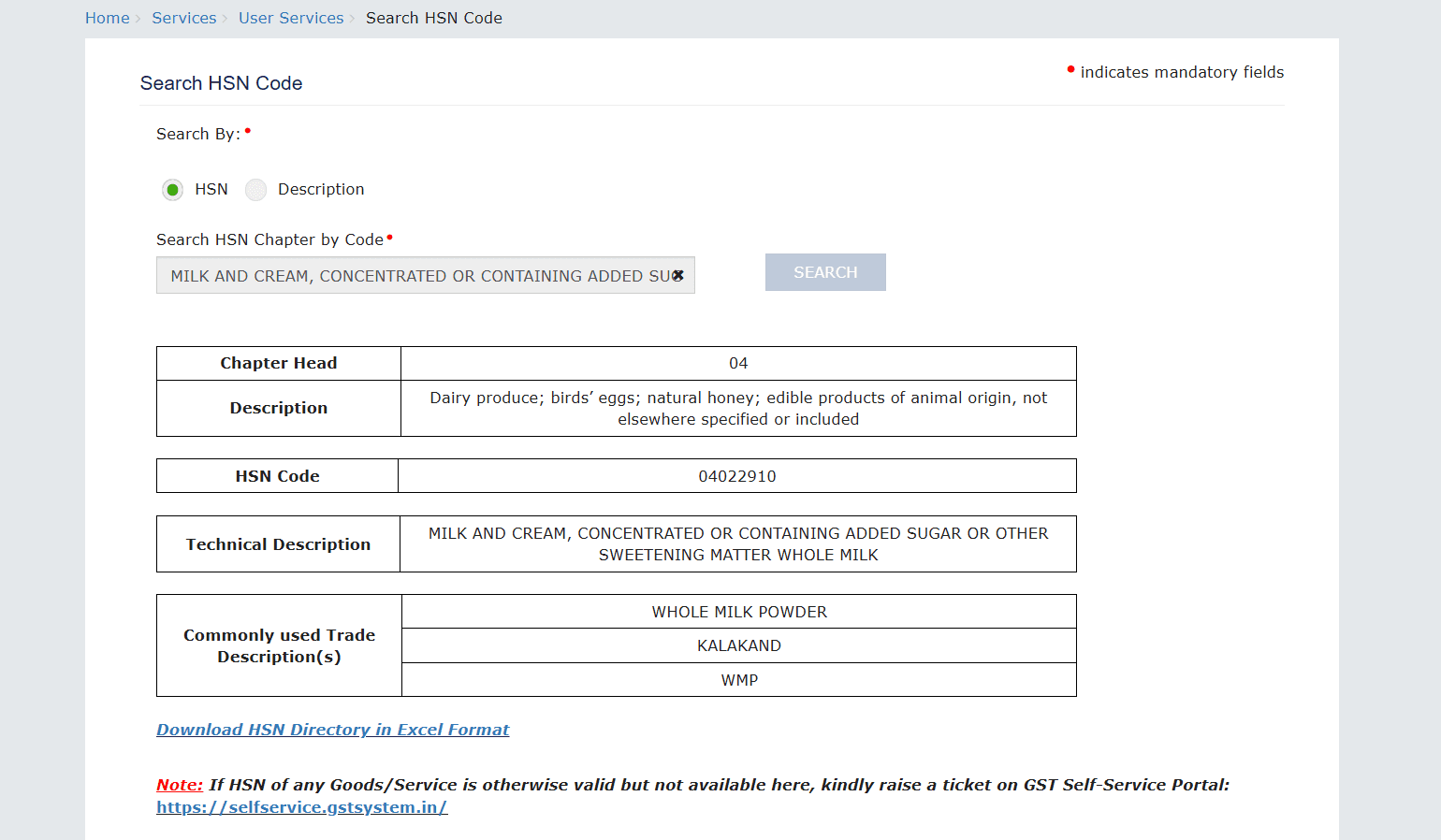
For Example, the HSN code for "Whole milk" is 0402 29 10. Here's how it breaks down:
Furthermore, this code classification ensures that the correct GST rate of 5% is applied to whole milk products in the ‘Other’ category.
HSN codes are crucial for enhancing operational efficiency, particularly when involved in cross-border trade. For example, GST on exports of services is significantly impacted by GST rules, making proper classification even more essential to avoid compliance issues and tax delays. Next, let’s explore why getting HSN codes right is so crucial for businesses.
Misclassifying goods or services can cause serious issues for businesses, including legal troubles, delays in tax filings, and incorrect billing. Here's why using the correct HSN code is essential:
If your business also deals with zero-rated supplies, such as exports, you’ll likely need to furnish a LUT certificate, making accurate HSN codes even more critical.
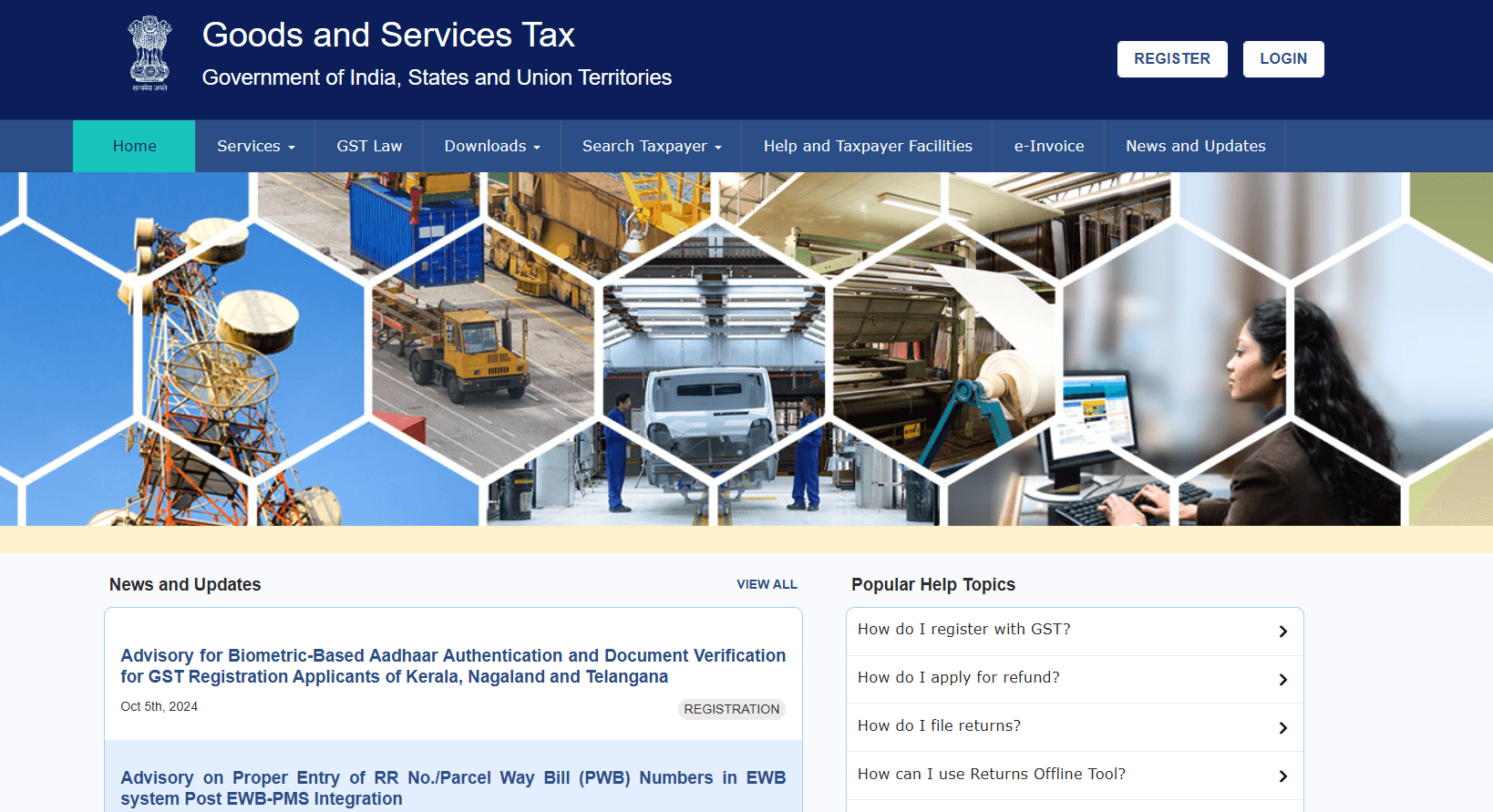
To begin your search for HSN codes, access the GST Portal. The portal provides an intuitive interface that allows taxpayers to search for goods and services by HSN code.
Below is a detailed breakdown of steps to follow for signing up/signing on and taking it further:
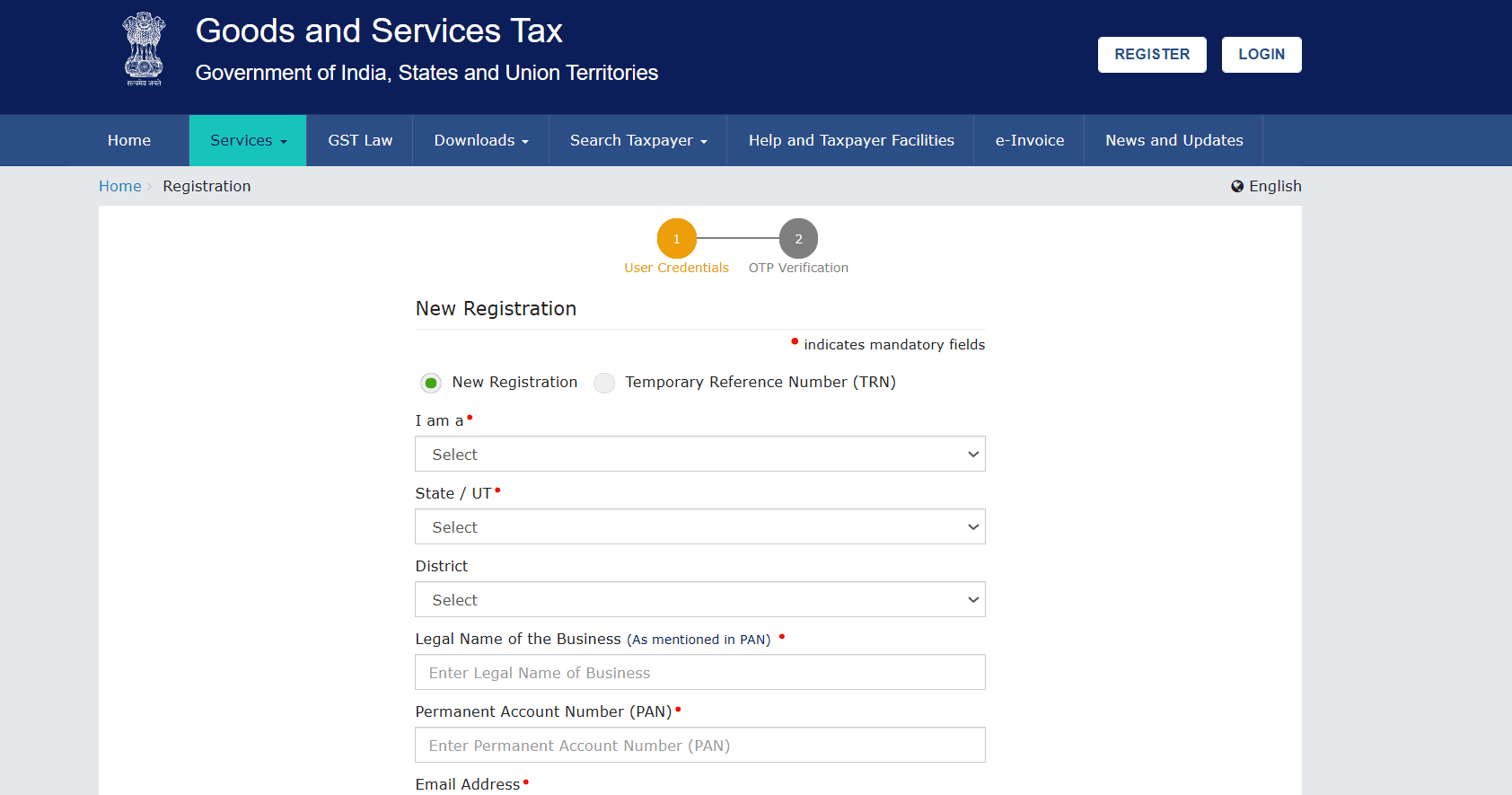
- Choose Taxpayer under the "I am a" dropdown.
- Select your State and District.
- Enter your Business Name and PAN.
- Provide your Email and Mobile Number (ensure they aren't already linked to your PAN).
- Click Proceed.
Complete Part B: Once logged in with your TRN, you can access the draft application. Fill out the necessary details in Part B:
By following these steps, you'll successfully register on the GST portal, allowing you to access essential features, including HSN code searches.
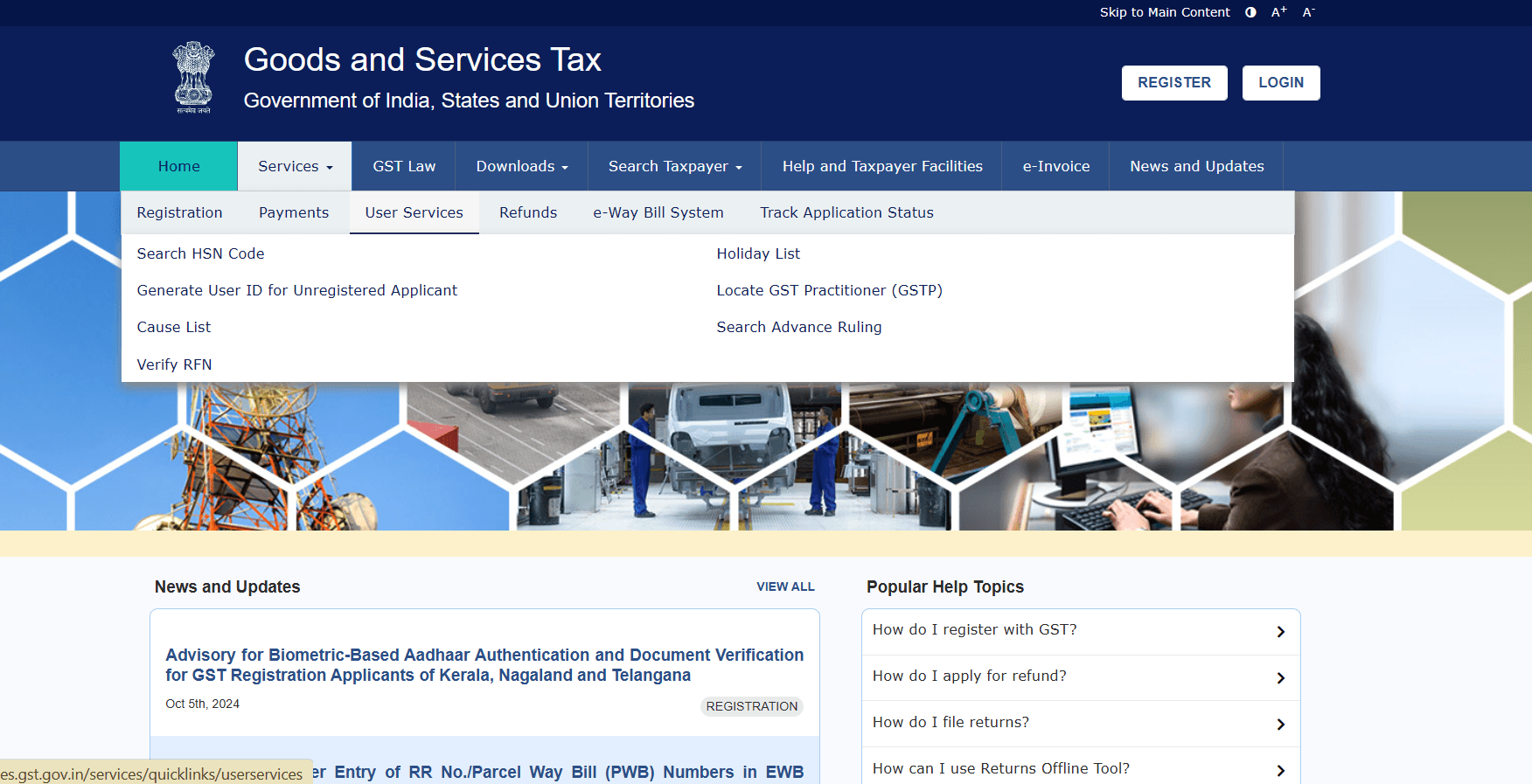
After logging into your GST account, navigate to Services > User Services > Search HSN/SAC Tax Rates.
Image depicts the User Services Module from the Official GST portal. Source: GST.
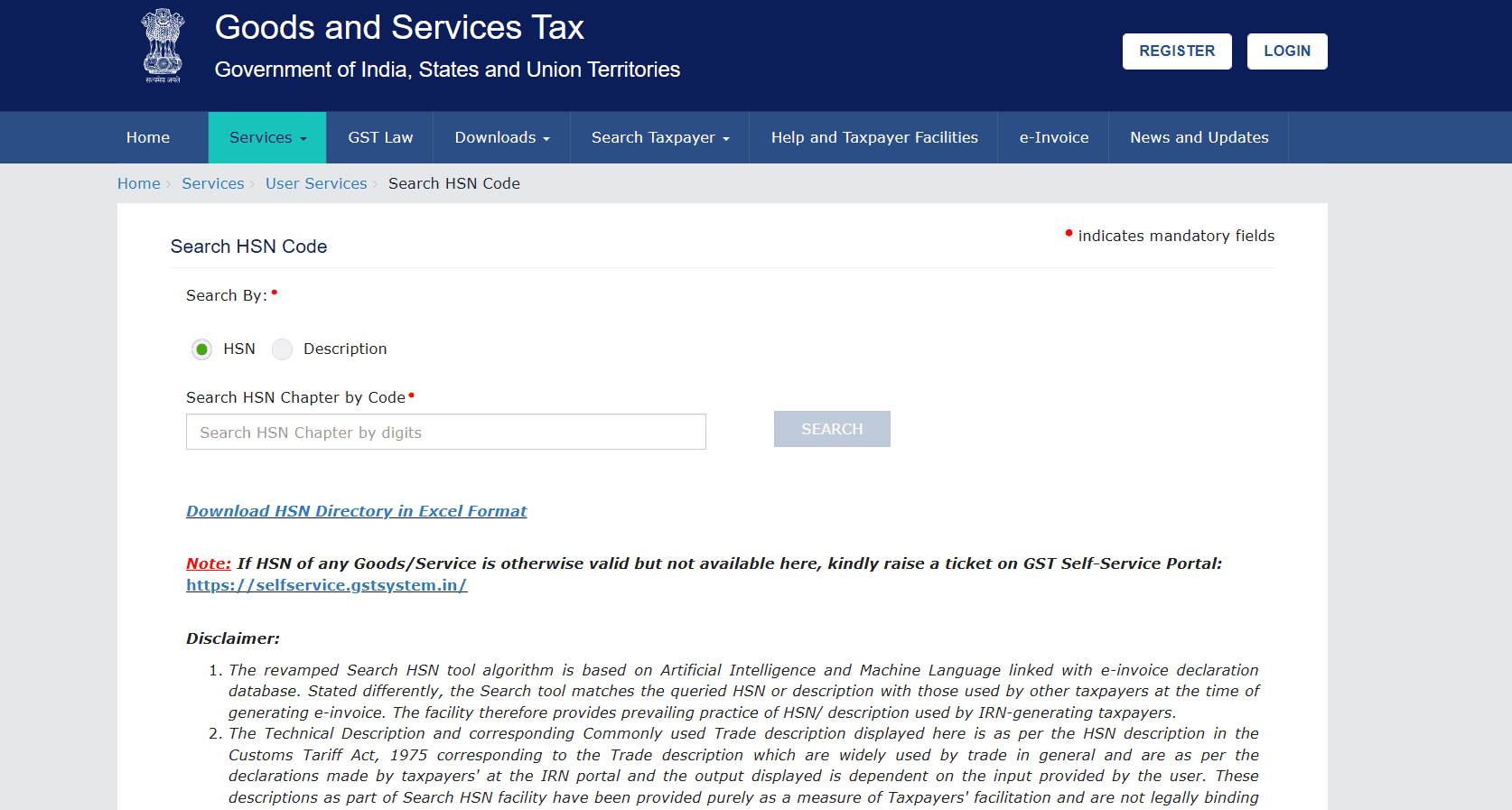
This tool enables you to enter keywords that describe the goods or services, allowing you to locate the correct code along with its corresponding tax rate.
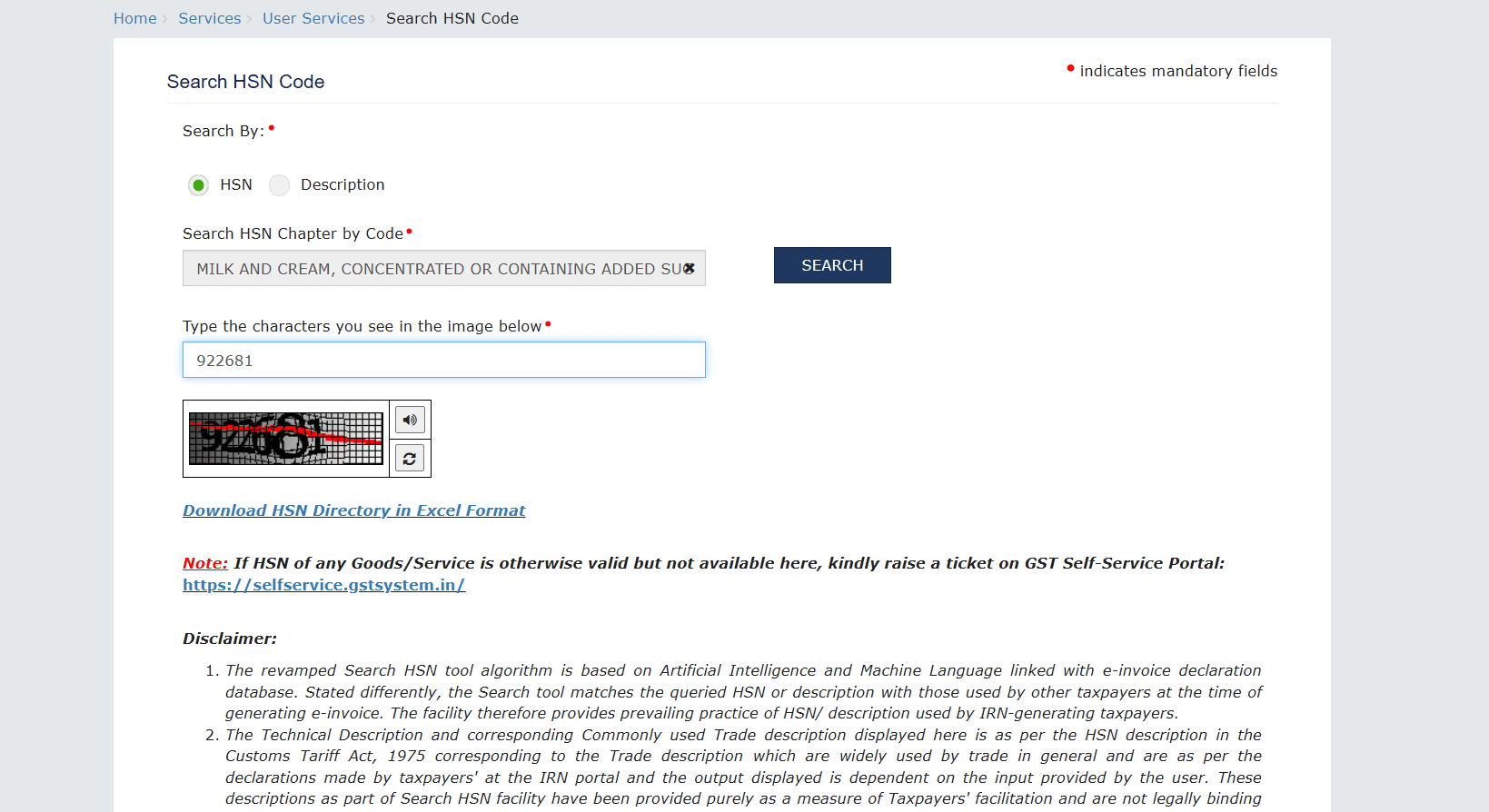
Input your product or service name, and the system will provide you with the relevant HSN or SAC code, along with applicable GST rates. Double-check to ensure the description accurately matches your product.
For frequently used goods and services, download and save HSN and GST rate details. This will help you avoid repeatedly searching for the same information, ensuring you stay compliant and up to date.
Now that you know how to locate HSN codes and their corresponding GST rates, it’s equally important to understand which GST slabs apply to your products or services. This insight helps ensure accurate invoicing and tax compliance, particularly as digital processes such as GST e-invoicing become more widely adopted across various sectors.
GST rates are generally categorized into five major slabs: 0%, 5%, 12%, 18%, and 28%. Each product or service classified under an HSN or SAC code falls within one of these slabs. For instance:
The GST Council frequently revises these rates, so it’s essential to stay informed and check for updates periodically.
Accurate classification of HSN codes not only ensures compliance but also provides several advantages. In this section, we'll discuss the tangible benefits that come with proper HSN code usage:
If your business deals with international customers and suppliers, ensuring GST compliance isn’t just about classifying products under the correct HSN codes. It’s also about making sure your cross-border transactions are timely, traceable, and error-free. That’s where PayGlocal steps in.
PayGlocal offers a unified platform designed to help Indian businesses manage international payments with greater accuracy, transparency, and compliance, so you’re not just GST-ready but globally equipped.
Here’s how PayGlocal addresses the real challenges you face:
In short, with your goods and services accurately categorized using HSN codes, PayGlocal helps you handle the other half of the puzzle, including payment and compliance. It’s your bridge between domestic tax accuracy and seamless international operations.
In a nutshell, learning about HSN codes and GST rates is an investment in your business's success, ensuring you’re equipped to tackle the complexities of tax filing while thriving in a competitive market. With GST being crucial to goods and services taxation, accurate classification using HSN and SAC codes is essential for your business.
By following this guide, you can effortlessly search and find the right HSN code, apply the correct GST rates, and stay compliant. Efficiently using the GST portal will help you save time and avoid costly errors.
With your goods and services accurately categorized using the correct HSN codes and GST rates, let PayGlocal handle your international payments with the same precision. Our robust multi-currency platform minimizes errors and delays, so you can focus on what matters most—growing your business with confidence. Sign up with PayGlocal now.
India’s GST collections doubled in just five years, reaching ₹22.08 lakh crore in FY 2024‑25. That level of compliance highlights the critical role of precise tax classification, and that’s where the HSN code comes into play. It’s the cornerstone of GST, used across billions of invoices to ensure the correct rates are applied and avoid costly errors.
Whether you’re a business owner managing compliance, a tax consultant supporting clients, or a finance professional handling invoicing, this blog is for you. It will help you understand how to search for and find HSN codes and GST rates in India. You’ll also learn why they’re essential for accurate billing, smooth tax filing, and long-term business success.
Key Takeaways
- HSN codes classify goods under GST and are essential for applying the correct tax rates.
- Accurate HSN usage ensures compliance, prevents penalties, and simplifies invoicing and tax filing.
- You can search HSN codes and GST rates directly through the official GST portal using product keywords.
- Standard GST slabs include 0%, 5%, 12%, 18%, and 28%, with each HSN code linked to a specific rate.
- Proper HSN classification enhances operational efficiency and ensures your business is audit-ready.
What are HSN codes, and why do they matter?
The Harmonized System of Nomenclature (HSN) is a globally recognized system used to classify goods in a standardized manner, ensuring consistency in trade and product taxation. India adopted this system under GST to categorize goods and apply relevant tax rates. This system eliminates confusion and discrepancies in the taxation process, making it more straightforward for businesses to declare goods correctly and reduce errors in tax filings.
Businesses must use HSN codes for product classification during GST registration, invoicing, and filing returns. Each product falls under specific sections, chapters, headings, and subheadings based on its nature. A similar system called the SAC (Service Accounting Codes) is used to ensure uniformity in classifying service categories under GST.
For Example, the HSN code for "Whole milk" is 0402 29 10. Here's how it breaks down:
- Section 04: Dairy produce, birds' eggs, natural honey, edible products of animal origin.
- Chapter 02: Milk and cream, concentrated or containing added sugar or sweeteners.
- Heading 29: Other milk and cream (not concentrated or sweetened).
- Subheading 10: Whole milk.
Furthermore, this code classification ensures that the correct GST rate of 5% is applied to whole milk products in the ‘Other’ category.
HSN codes are crucial for enhancing operational efficiency, particularly when involved in cross-border trade. For example, GST on exports of services is significantly impacted by GST rules, making proper classification even more essential to avoid compliance issues and tax delays. Next, let’s explore why getting HSN codes right is so crucial for businesses.
Why is using the correct HSN code necessary for your business?
Misclassifying goods or services can cause serious issues for businesses, including legal troubles, delays in tax filings, and incorrect billing. Here's why using the correct HSN code is essential:
- Accurate GST rates: Ensures that the correct GST rates are applied, preventing both overpayment and underpayment of taxes.
- Consistent invoicing: Promotes precise and uniform invoicing across various industries, reducing confusion and disputes.
- Avoiding penalties: Helps businesses avoid fines or penalties resulting from classification errors.
- Simplified tax reporting: Streamlines the filing of tax returns and prepares for audits, ensuring smooth and efficient reporting processes.
If your business also deals with zero-rated supplies, such as exports, you’ll likely need to furnish a LUT certificate, making accurate HSN codes even more critical.
How to search for HSN code and GST rates?
To begin your search for HSN codes, access the GST Portal. The portal provides an intuitive interface that allows taxpayers to search for goods and services by HSN code.
Below is a detailed breakdown of steps to follow for signing up/signing on and taking it further:
Step 1: How do you register on the GST Portal as a new business owner?
- Visit the GST portal: Go to the official GST registration page.
- Start new registration: Navigate to the Services section.
- Click on the Registration tab, then select New Registration.
- Fill in Part A:
- Choose Taxpayer under the "I am a" dropdown.
- Select your State and District.
- Enter your Business Name and PAN.
- Provide your Email and Mobile Number (ensure they aren't already linked to your PAN).
- Click Proceed.
- Enter OTP: You'll receive an OTP via email and SMS. Enter the OTP to continue.
- Temporary Reference Number (TRN): After successful OTP verification, you'll receive a 15-digit TRN. Note this number, as you'll need it for the next steps.
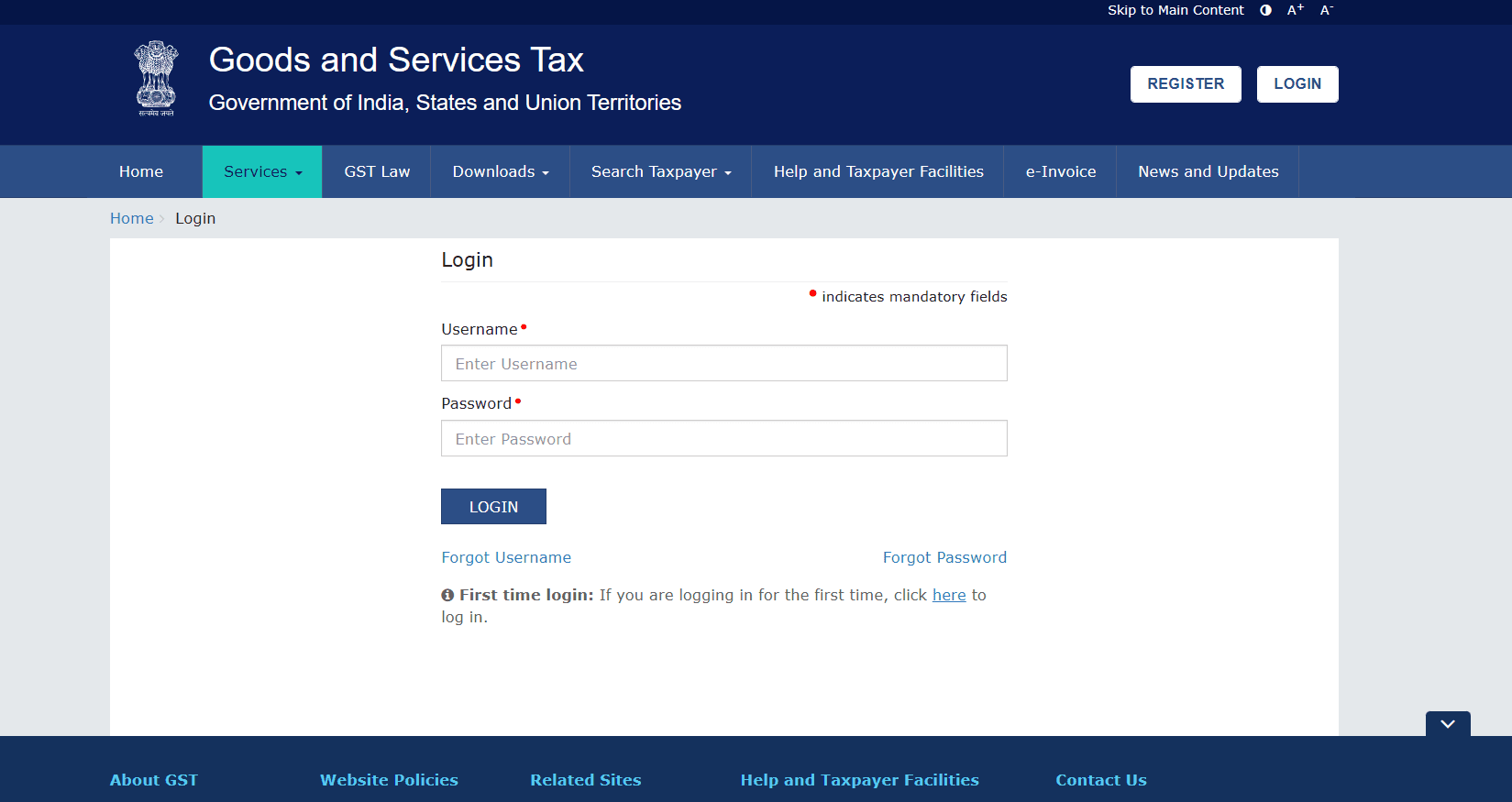
- Continue registration: Return to the GST portal, select 'New Registration,' and enter your TRN.
- Verify using the OTP sent to your registered mobile/email.
Complete Part B: Once logged in with your TRN, you can access the draft application. Fill out the necessary details in Part B:
- Business details: Include trade name, business structure, and whether you opt for the composition scheme.
- Promoters/partners: Enter the personal and contact information for up to 10 promoters or partners.
- Authorized signatory: Include details and documents.
- Principal place of business: Provide address and upload supporting documents.
- Goods and services: List up to 5 goods and five services, along with their respective HSN or SAC codes.
- Bank details: Optionally, you can provide your bank account information.
- State-specific information: Please fill in any additional applicable requirements.
- Verification and submission:
- Review your application and submit it using DSC, e-Sign, or EVC.
- Once submitted, you'll receive an Application Reference Number (ARN) via email and SMS.
By following these steps, you'll successfully register on the GST portal, allowing you to access essential features, including HSN code searches.
Step 2: Use the search function
After logging into your GST account, navigate to Services > User Services > Search HSN/SAC Tax Rates.
Image depicts the User Services Module from the Official GST portal. Source: GST.
This tool enables you to enter keywords that describe the goods or services, allowing you to locate the correct code along with its corresponding tax rate.
Step 3: Find the correct HSN code
Input your product or service name, and the system will provide you with the relevant HSN or SAC code, along with applicable GST rates. Double-check to ensure the description accurately matches your product.
Step 4: Download notifications for future reference
For frequently used goods and services, download and save HSN and GST rate details. This will help you avoid repeatedly searching for the same information, ensuring you stay compliant and up to date.
Now that you know how to locate HSN codes and their corresponding GST rates, it’s equally important to understand which GST slabs apply to your products or services. This insight helps ensure accurate invoicing and tax compliance, particularly as digital processes such as GST e-invoicing become more widely adopted across various sectors.
What are the standard GST rates linked to HSN codes?
GST rates are generally categorized into five major slabs: 0%, 5%, 12%, 18%, and 28%. Each product or service classified under an HSN or SAC code falls within one of these slabs. For instance:
- Basic food items may be exempt from GST.
- Electronics, such as mobile phones, generally fall under the 18% GST slab.
- Luxury items, such as cars and high-end appliances, could be subject to a 28% GST.
The GST Council frequently revises these rates, so it’s essential to stay informed and check for updates periodically.
Accurate classification of HSN codes not only ensures compliance but also provides several advantages. In this section, we'll discuss the tangible benefits that come with proper HSN code usage:
What are the benefits of correct HSN code classification?
- Compliance: Properly classified HSN codes ensure businesses meet legal requirements and avoid compliance risks.
- Efficiency: Streamlined tax filings and faster invoicing processes reduce the time spent on administrative tasks.
- Accuracy: Correctly applying GST rates leads to accurate billing, which helps avoid disputes with clients and tax authorities.
Send Money Worldwide in a Minute with PayGlocal
If your business deals with international customers and suppliers, ensuring GST compliance isn’t just about classifying products under the correct HSN codes. It’s also about making sure your cross-border transactions are timely, traceable, and error-free. That’s where PayGlocal steps in.
PayGlocal offers a unified platform designed to help Indian businesses manage international payments with greater accuracy, transparency, and compliance, so you’re not just GST-ready but globally equipped.
Here’s how PayGlocal addresses the real challenges you face:
- Dynamic Checkout for international buyers: Let global customers pay in their local currency while you get settled in INR. This reduces cart abandonment and ensures tax-compliant invoicing tied to GST returns, ensuring accurate tax reporting and compliance.
- Multi-currency account for faster settlements: Receive payments in multiple currencies and consolidate them efficiently. No more delays or reconciliation errors when matching payments to HSN-classified products or services.
- Recurring payments without manual tracking: Ideal for SaaS, subscriptions, or service-based exports. You can automate payment collection while ensuring GST is applied accurately across billing cycles.
- Built-in sanction screening and fraud protection: Automated compliance checks help you stay clear of international regulatory issues, which is especially important when exporting goods and services under LUT or zero-rated GST.
- One platform for every transaction: Whether it’s card payments, bank transfers, or global wallets,
In short, with your goods and services accurately categorized using HSN codes, PayGlocal helps you handle the other half of the puzzle, including payment and compliance. It’s your bridge between domestic tax accuracy and seamless international operations.
Conclusion
In a nutshell, learning about HSN codes and GST rates is an investment in your business's success, ensuring you’re equipped to tackle the complexities of tax filing while thriving in a competitive market. With GST being crucial to goods and services taxation, accurate classification using HSN and SAC codes is essential for your business.
By following this guide, you can effortlessly search and find the right HSN code, apply the correct GST rates, and stay compliant. Efficiently using the GST portal will help you save time and avoid costly errors.
With your goods and services accurately categorized using the correct HSN codes and GST rates, let PayGlocal handle your international payments with the same precision. Our robust multi-currency platform minimizes errors and delays, so you can focus on what matters most—growing your business with confidence. Sign up with PayGlocal now.