
Cash flow is a key attribute for online businesses that keeps everything moving. Suppose you have made sales and shipped products and are now waiting for the most crucial part: getting paid. That’s where the Amazon seller payment schedule comes into action. Knowing exactly when and how your payments will arrive can help you better plan inventory, whether you're a new seller or an established brand. This helps you manage operational costs and avoid unnecessary cash flow issues.
This blog equips you with a solid understanding of Amazon’s payment schedule and how it helps manage cash flow, which can significantly improve your online business.
So, could faster payouts transform how you run your business? Let’s break it down, starting with various Amazon seller payment terms you will come across:
Amazon follows a straightforward, yet sometimes complex, payout system. Amazon's standard payout schedule is built around a 14-day cycle. That means, as a Professional seller, you’ll receive payments every 14 days for orders delivered at least seven days prior to the payment date.
Why this buffer? Amazon holds onto payments for that period to cover any potential returns or chargebacks. But how does this impact your business in the real world?
Let’s say you’ve just had a successful Prime Day sale, shipping hundreds of orders. You may have received glowing feedback from buyers, but those funds won’t reach you until after the seven-day window. This delay, while necessary for Amazon’s system, could be problematic if you’re running a promotion and need cash to restock inventory. Here’s an understanding of the various terms you will be using:
Here’s a breakdown of each term you will come across in your Amazon payments schedule as a Seller:
Example: If you sold 100 units on October 1st, but your payout date is October 10th, only the orders delivered by October 3rd will count for that payout. The rest will fall into the next cycle.
This cycle can sometimes feel like a bottleneck, especially during high-sales periods. Would a 14-day wait be manageable for your current cash flow? Can your business handle waiting 14 days for payment? The answer depends on several factors. Let’s take a closer look:
While Amazon's standard payout schedule is every two weeks, various factors can delay payment. For instance, if an order is delivered less than seven days before your payout date, those funds won’t be included in the current cycle and will roll over to the next. For example, if you delivered an order just six days before the payout, the balance for that sale will move to the next two-week period.
Amazon typically uses ACH transfers for payments, which can take anywhere from 2 to 5 business days to post to your account. Have you ever waited for funds only to find they’ve been further delayed by your bank’s processing time? This lag can sometimes push your actual payout date even further than anticipated.
In certain cases, Amazon may withhold payments beyond 14 days to cover claims, chargebacks, or account reviews. For example, if your account experiences a sudden spike in customer claims, Amazon might temporarily hold a portion of your funds in reserve, ensuring that there are enough funds to cover potential refunds. This safeguard can lead to a delay in receiving the full payment.
As a seller, you may also have the option to receive payments more frequently, such as daily or weekly. Typically, these expedited payment options become available as you establish a positive selling history and improve your account health.
Let’s get some understanding of various factors to prepare you ahead of time so that you can minimize the impact of payment delays and maintain smoother cash flow for your business:
If waiting for payments is affecting your business’s cash flow, here are some steps you can take to avoid the delays:
However, delays are possible due to factors like delivery times, the customer’s payment method, or issues within the financial transfer process. These standard terms offer a predictable flow of income, but it's crucial to stay informed about potential delays.
Amazon uses different labels depending on how your payments are processed. If you’ve been selling on the platform for a while, you may have noticed payments labeled under Amazon Payments, Inc. or Amazon Services LLC in your bank account. But what does this mean? The key components of the Amazon seller payment schedule ensure that transactions are smooth and transparent, but they also come with nuances that you must understand to manage your business effectively.
Knowing these above distinctions can help you track the source of your income and manage expenses more effectively. After getting a glimpse of the essential elements, let’s now explore what makes you eligible for faster payouts and how to take advantage of them:
Wouldn't it be great to receive payments more frequently than every 14 days? Amazon offers a daily payout option, especially for seasoned sellers. If you've maintained a strong sales record and a healthy account, you may be eligible to switch to faster disbursements.
Sellers who prefer more frequent access to their earnings can request daily payouts, but it’s important to note that this option is not enabled by default. If you’re running a small business with tight cash flow, waiting two weeks for your payout could make managing daily operations more challenging. By switching to daily payouts, you can receive funds every day for orders that have met Amazon’s delivery and processing criteria. However, this requires you to manually adjust your payment settings in Seller Central.
Example: If you're a seller during the holiday season when sales spike, having access to your earnings daily helps you replenish stock faster and avoid losing out on potential sales. Daily payouts can be a lifesaver in high-demand periods, especially when you need quick cash to reinvest in inventory or marketing.
For established Amazon sellers with a strong track record, Amazon offers Next-Day Payouts, which allows funds to be disbursed within 24 hours once an order is marked as shipped and delivered. This provides a faster cash flow compared to the usual payment schedules, which typically take longer due to holding periods.
To qualify for next-day payouts, sellers generally need to meet several criteria:
Example: If you’re a seller with a steady customer base and you’ve been with Amazon for years, next-day payouts can significantly reduce the waiting period between your sales and the time you receive funds. This can be particularly beneficial for larger businesses managing high-volume orders. Imagine being able to access funds from a big weekend sale the very next day, allowing you to cover operational costs or seize a last-minute business opportunity.
Next-day payouts offer quicker reinvestment to fuel business growth. These faster payment methods can significantly improve your business's cash flow, giving you access to funds more quickly, which is especially helpful if you're expanding your product range or increasing inventory.
Sellers based in the U.S. with a local bank account can access Amazon's Express Payout option, which delivers payouts within 24 hours, even on weekends, for transactions below $1 million. This service leverages Amazon's integration with numerous banks to speed up the process.
This setup offers flexibility in managing daily business operations and improving cash flow, helping sellers scale their businesses more efficiently.
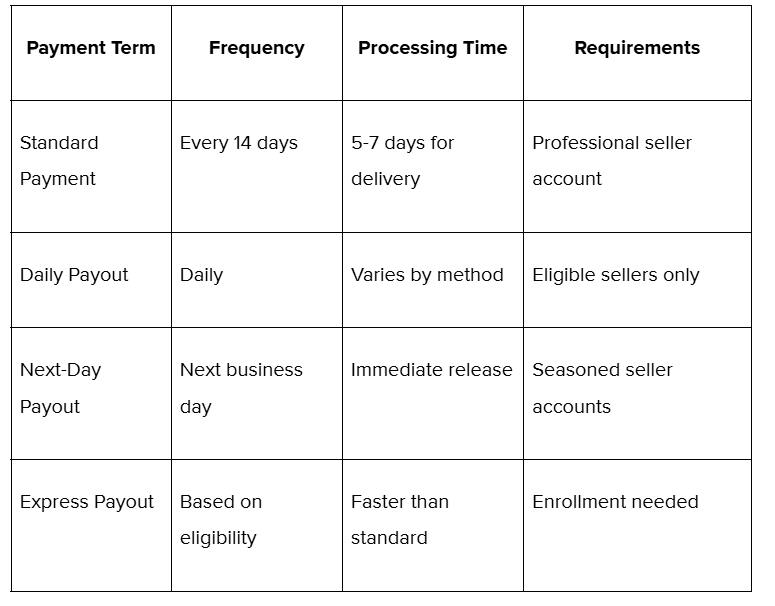
The table depicts various terms used in the Amazon seller payment schedule, their frequency, processing time, and requirements.
Now that we’ve covered the eligibility factors for faster payouts, let’s shift focus to how you can view and manage your payment schedule directly from your Seller Central account:
The Payment Dashboard in your Seller Central account provides a clear view of your expected payout amount and schedule. Accessing and managing your payment schedule is straightforward through Seller Central. From there, you can view pending balances, payment history, and account reserves, as well as manage your bank account details.
To view your Amazon seller payment schedule, follow these steps.
A smart strategy is to monitor this reserve regularly and keep your account in good standing to minimize its effect on your cash flow.
Also Read: What are Global Payment Methods & Why They Matter?
With a better understanding of how to access and manage your payouts, let’s now talk about Amazon’s Account Level Reserve and how it can impact your cash flow:
One of the most misunderstood components of the payment process is the Account Level Reserve. Why does Amazon hold a portion of your funds in an account reserve? This reserve acts as a buffer to protect customers in case of claims, or any refund requests. Plus, this reserve also affects your available funds without warning, and it’s triggered by issues like claims, chargebacks, or suspicious account activity.
Example: You sell high-value electronics, and during a particularly busy holiday season, you notice a large portion of your revenue is being held in reserve. This could be due to a spike in chargebacks or customer claims, even if you’ve done everything right. While frustrating, it’s crucial to understand that this reserve protects you from financial risks in the long run.
Similarly, in another instance, if you’ve processed INR 10,000 in sales but INR 2,000 is held in reserve, this could significantly impact your cash flow. However, once the claims or returns window closes, the funds are released.
How prepared are you to handle temporary holds on your earnings? By keeping an eye on potential triggers and maintaining good account health, you can minimize the impact of the reserve on your cash flow. Amazon may place a reserve on your seller account for several reasons, including:
Understanding what triggers a reserve and working to avoid these triggers can prevent unnecessary delays in getting timely payments.
Also Read: What are the Differences and Similarities between SAC Code and HSN Code?
Now that you know about the reserve and its potential effect on your business, let’s examine strategies you can use to Accelerate Payouts and reduce delays:
To accelerate your payouts, consider Express Payout, which can release funds faster than the standard schedule. However, not all sellers are eligible, and the criteria for enrollment focus on your overall account health.
To take advantage of Amazon's Express Payout service, sellers must meet the following criteria:
If you meet these requirements, getting started with Express Payout is simple. Just visit the Deposit Methods page in Seller Central, log in, and opt in to the service for free.
Also Read: Amazon FBA Fees: What You Should Know?
No matter how well you manage your account, there will always be challenges—whether it’s delayed payments, reserve holds, or cash flow gaps. What can you do to ensure these hiccups don’t impact your operations?
Let’s not forget that even the most reliable systems can experience hiccups, and having backup plans ensures that your business remains stable.
Also Read: Sell and Ship Products Internationally from India using Amazon Global.
With these strategies and insights, you can master your payment schedule and maintain smooth cash flow management for your business’s growth.
Now that you have a toolkit for addressing payment challenges, let’s wrap up by reinforcing how understanding the payment schedule can improve your cash flow and business operations.
The Amazon seller payment schedule is a vital tool for managing your online business’s financial health. As an Amazon seller, understanding the Amazon seller payment schedule isn’t just a matter of knowing when you’ll get paid—it’s about managing your business’s cash flow and staying ahead of the curve. Whether you’re aiming for faster payouts, dealing with reserve holds, or handling payment delays, this knowledge empowers you to make smarter decisions. Familiarizing yourself with the payment cycle, eligibility for faster payouts, and how to access and manage your schedule allows you to optimize cash flow and avoid unexpected delays. By making informed choices, you can turn your Amazon Seller payment schedule from a waiting game into a well-oiled financial machine that keeps your business booming.
Are you prepared to take the next step in securing faster payouts? Enhance your Amazon payout timeline and explore ways to accelerate your cash flow! Visit PayGlocal today and avail our advanced global payment solutions while maintaining a healthy Amazon seller account and keeping track of your financial standing.
We offer you multi-currency accounts for dynamic checkouts and a seamless process for managing card payments and recurring payments made possible from one platform. Enjoy fraud-detection technology and built-in sanction screening to secure your cross-border trade with global payment methods. Visit PayGlocal today!
This blog equips you with a solid understanding of Amazon’s payment schedule and how it helps manage cash flow, which can significantly improve your online business.
So, could faster payouts transform how you run your business? Let’s break it down, starting with various Amazon seller payment terms you will come across:
Standard Amazon Seller Payment Terms
Amazon follows a straightforward, yet sometimes complex, payout system. Amazon's standard payout schedule is built around a 14-day cycle. That means, as a Professional seller, you’ll receive payments every 14 days for orders delivered at least seven days prior to the payment date.
Why this buffer? Amazon holds onto payments for that period to cover any potential returns or chargebacks. But how does this impact your business in the real world?
Let’s say you’ve just had a successful Prime Day sale, shipping hundreds of orders. You may have received glowing feedback from buyers, but those funds won’t reach you until after the seven-day window. This delay, while necessary for Amazon’s system, could be problematic if you’re running a promotion and need cash to restock inventory. Here’s an understanding of the various terms you will be using:
What are the Terms Amazon Sellers Use?
Here’s a breakdown of each term you will come across in your Amazon payments schedule as a Seller:
- Payout cycle: Payments are processed every 14 days.
- Order cutoff: Only orders delivered seven days before the payment cycle ends are eligible.
- Payment method: ACH transfer in the U.S., BACS in the UK, SEPA in the EU, NEFT/IMPS in India, etc.
Example: If you sold 100 units on October 1st, but your payout date is October 10th, only the orders delivered by October 3rd will count for that payout. The rest will fall into the next cycle.
This cycle can sometimes feel like a bottleneck, especially during high-sales periods. Would a 14-day wait be manageable for your current cash flow? Can your business handle waiting 14 days for payment? The answer depends on several factors. Let’s take a closer look:
Factors for Delays Beyond the Standard Period
Payment Timing
While Amazon's standard payout schedule is every two weeks, various factors can delay payment. For instance, if an order is delivered less than seven days before your payout date, those funds won’t be included in the current cycle and will roll over to the next. For example, if you delivered an order just six days before the payout, the balance for that sale will move to the next two-week period.
Payment Method
Amazon typically uses ACH transfers for payments, which can take anywhere from 2 to 5 business days to post to your account. Have you ever waited for funds only to find they’ve been further delayed by your bank’s processing time? This lag can sometimes push your actual payout date even further than anticipated.
Account Level Reserve
In certain cases, Amazon may withhold payments beyond 14 days to cover claims, chargebacks, or account reviews. For example, if your account experiences a sudden spike in customer claims, Amazon might temporarily hold a portion of your funds in reserve, ensuring that there are enough funds to cover potential refunds. This safeguard can lead to a delay in receiving the full payment.
Payment Options
As a seller, you may also have the option to receive payments more frequently, such as daily or weekly. Typically, these expedited payment options become available as you establish a positive selling history and improve your account health.
Let’s get some understanding of various factors to prepare you ahead of time so that you can minimize the impact of payment delays and maintain smoother cash flow for your business:
What are the Strategies to Manage Cash Flow?
If waiting for payments is affecting your business’s cash flow, here are some steps you can take to avoid the delays:
- Stay Aware of Payment Cycles and Variables: Keep track of the Amazon seller payment schedule and any potential delays. Knowing what might slow down your payments allows you to plan ahead.
- Use Tools to Track Payments: Consider using financial tracking tools or apps to monitor your Amazon payouts and account balance. These tools can help you avoid surprises and keep you informed.
- Prepare a Financial Backup Plan: hether it’s maintaining a credit line, diversifying payment sources, or setting up a business loan option, having a backup plan can prevent cash flow issues. When was the last time you reviewed your backup funding sources? By understanding these factors and preparing ahead, you can minimize the impact of payment delays and maintain smoother cash flow for your business.
However, delays are possible due to factors like delivery times, the customer’s payment method, or issues within the financial transfer process. These standard terms offer a predictable flow of income, but it's crucial to stay informed about potential delays.
Key Components of the Amazon Seller Payment Schedule
Amazon uses different labels depending on how your payments are processed. If you’ve been selling on the platform for a while, you may have noticed payments labeled under Amazon Payments, Inc. or Amazon Services LLC in your bank account. But what does this mean? The key components of the Amazon seller payment schedule ensure that transactions are smooth and transparent, but they also come with nuances that you must understand to manage your business effectively.
- Amazon Payments, Inc.: It handles customer payments and disbursements to sellers. If you see this on your bank statement, it reflects customer payments Amazon has processed on your behalf.
- Amazon Services LLC: It indicates payments related to services Amazon provides, such as fulfillment or shipping. For example, have you ever wondered where that service fee comes from in your payout? If you use Fulfillment by Amazon (FBA), you’ll see these services reflected under this label.
Knowing these above distinctions can help you track the source of your income and manage expenses more effectively. After getting a glimpse of the essential elements, let’s now explore what makes you eligible for faster payouts and how to take advantage of them:
Eligibility Factors for Faster Payouts
Wouldn't it be great to receive payments more frequently than every 14 days? Amazon offers a daily payout option, especially for seasoned sellers. If you've maintained a strong sales record and a healthy account, you may be eligible to switch to faster disbursements.
Daily Payouts
Sellers who prefer more frequent access to their earnings can request daily payouts, but it’s important to note that this option is not enabled by default. If you’re running a small business with tight cash flow, waiting two weeks for your payout could make managing daily operations more challenging. By switching to daily payouts, you can receive funds every day for orders that have met Amazon’s delivery and processing criteria. However, this requires you to manually adjust your payment settings in Seller Central.
Example: If you're a seller during the holiday season when sales spike, having access to your earnings daily helps you replenish stock faster and avoid losing out on potential sales. Daily payouts can be a lifesaver in high-demand periods, especially when you need quick cash to reinvest in inventory or marketing.
Next-Day Payouts
For established Amazon sellers with a strong track record, Amazon offers Next-Day Payouts, which allows funds to be disbursed within 24 hours once an order is marked as shipped and delivered. This provides a faster cash flow compared to the usual payment schedules, which typically take longer due to holding periods.
To qualify for next-day payouts, sellers generally need to meet several criteria:
- Account Age: Sellers who have been active for 10 years or more are eligible for faster payments.
- Third-Party Instant Access Solutions: For newer sellers or those who don't meet the 10-year threshold, third-party solutions can help by purchasing receivables owed by Amazon, making 80% of the funds available the following day while holding back 20% for returns and other liabilities.
Example: If you’re a seller with a steady customer base and you’ve been with Amazon for years, next-day payouts can significantly reduce the waiting period between your sales and the time you receive funds. This can be particularly beneficial for larger businesses managing high-volume orders. Imagine being able to access funds from a big weekend sale the very next day, allowing you to cover operational costs or seize a last-minute business opportunity.
Next-day payouts offer quicker reinvestment to fuel business growth. These faster payment methods can significantly improve your business's cash flow, giving you access to funds more quickly, which is especially helpful if you're expanding your product range or increasing inventory.
Express Payout:
Sellers based in the U.S. with a local bank account can access Amazon's Express Payout option, which delivers payouts within 24 hours, even on weekends, for transactions below $1 million. This service leverages Amazon's integration with numerous banks to speed up the process.
This setup offers flexibility in managing daily business operations and improving cash flow, helping sellers scale their businesses more efficiently.
The table depicts various terms used in the Amazon seller payment schedule, their frequency, processing time, and requirements.
Now that we’ve covered the eligibility factors for faster payouts, let’s shift focus to how you can view and manage your payment schedule directly from your Seller Central account:
Viewing and Managing Your Payment Schedule
The Payment Dashboard in your Seller Central account provides a clear view of your expected payout amount and schedule. Accessing and managing your payment schedule is straightforward through Seller Central. From there, you can view pending balances, payment history, and account reserves, as well as manage your bank account details.
To view your Amazon seller payment schedule, follow these steps.
- Visit the Seller Central portal
- Click Reports in the top menu, and select Payments.
- You will come across a Payment Dashboard showing the amount of your payments, as well as any fees that will be deducted.
- Select the Disbursements tab. You will see the payout steps from scheduled payout to acknowledgment by Amazon’s bank provider.
A smart strategy is to monitor this reserve regularly and keep your account in good standing to minimize its effect on your cash flow.
Also Read: What are Global Payment Methods & Why They Matter?
With a better understanding of how to access and manage your payouts, let’s now talk about Amazon’s Account Level Reserve and how it can impact your cash flow:
Amazon Account Level Reserve
One of the most misunderstood components of the payment process is the Account Level Reserve. Why does Amazon hold a portion of your funds in an account reserve? This reserve acts as a buffer to protect customers in case of claims, or any refund requests. Plus, this reserve also affects your available funds without warning, and it’s triggered by issues like claims, chargebacks, or suspicious account activity.
Example: You sell high-value electronics, and during a particularly busy holiday season, you notice a large portion of your revenue is being held in reserve. This could be due to a spike in chargebacks or customer claims, even if you’ve done everything right. While frustrating, it’s crucial to understand that this reserve protects you from financial risks in the long run.
Similarly, in another instance, if you’ve processed INR 10,000 in sales but INR 2,000 is held in reserve, this could significantly impact your cash flow. However, once the claims or returns window closes, the funds are released.
How prepared are you to handle temporary holds on your earnings? By keeping an eye on potential triggers and maintaining good account health, you can minimize the impact of the reserve on your cash flow. Amazon may place a reserve on your seller account for several reasons, including:
- Open A-to-Z Guarantee claims
- A history of poor performance as a seller
- Chargebacks associated with your orders
- Issues with payment information in your bank account
- Compliance with local tax laws in the regions where you sell
Understanding what triggers a reserve and working to avoid these triggers can prevent unnecessary delays in getting timely payments.
Also Read: What are the Differences and Similarities between SAC Code and HSN Code?
Now that you know about the reserve and its potential effect on your business, let’s examine strategies you can use to Accelerate Payouts and reduce delays:
Strategies to Accelerate Payouts
To accelerate your payouts, consider Express Payout, which can release funds faster than the standard schedule. However, not all sellers are eligible, and the criteria for enrollment focus on your overall account health.
To take advantage of Amazon's Express Payout service, sellers must meet the following criteria:
- U.S. Bank Account: You must have an account with a U.S. bank that is part of Amazon’s network. Express Payout is only available to sellers with eligible U.S. bank accounts.
- U.S. Residency: Sellers must reside in one of the 50 states. Unfortunately, sellers based in U.S. territories are not eligible for this service.
- Transaction Limit: Your transactions should total $1 million or less. Express Payout is intended for sellers who are initiating payments with amounts within this limit.
If you meet these requirements, getting started with Express Payout is simple. Just visit the Deposit Methods page in Seller Central, log in, and opt in to the service for free.
Also Read: Amazon FBA Fees: What You Should Know?
Tips for Managing Payment Schedule Challenges
No matter how well you manage your account, there will always be challenges—whether it’s delayed payments, reserve holds, or cash flow gaps. What can you do to ensure these hiccups don’t impact your operations?
- Building a Financial Safety Net: One of the smartest moves is setting aside a percentage of each payout to create a buffer for times when payments are delayed. If you’ve been selling on Amazon for a while, you know that the unexpected can happen—sales spikes, sudden returns, or payment issues. Having that extra cushion ensures that your business can continue operating smoothly even during cash flow gaps.
- Diversifying Income Streams: Why rely solely on Amazon? Many successful sellers branch out by selling on platforms like eBay, Etsy, or their websites. This diversification means that even if there’s a delay in Amazon payouts, your income stream doesn’t completely stop.
- Using Business Credit Resources: Have you ever considered opening a business credit line? Many sellers use credit to bridge the gap when waiting for Amazon payouts, ensuring they can restock inventory or pay for advertising without interruptions.
Let’s not forget that even the most reliable systems can experience hiccups, and having backup plans ensures that your business remains stable.
Also Read: Sell and Ship Products Internationally from India using Amazon Global.
With these strategies and insights, you can master your payment schedule and maintain smooth cash flow management for your business’s growth.
Now that you have a toolkit for addressing payment challenges, let’s wrap up by reinforcing how understanding the payment schedule can improve your cash flow and business operations.
Conclusion
The Amazon seller payment schedule is a vital tool for managing your online business’s financial health. As an Amazon seller, understanding the Amazon seller payment schedule isn’t just a matter of knowing when you’ll get paid—it’s about managing your business’s cash flow and staying ahead of the curve. Whether you’re aiming for faster payouts, dealing with reserve holds, or handling payment delays, this knowledge empowers you to make smarter decisions. Familiarizing yourself with the payment cycle, eligibility for faster payouts, and how to access and manage your schedule allows you to optimize cash flow and avoid unexpected delays. By making informed choices, you can turn your Amazon Seller payment schedule from a waiting game into a well-oiled financial machine that keeps your business booming.
Are you prepared to take the next step in securing faster payouts? Enhance your Amazon payout timeline and explore ways to accelerate your cash flow! Visit PayGlocal today and avail our advanced global payment solutions while maintaining a healthy Amazon seller account and keeping track of your financial standing.
We offer you multi-currency accounts for dynamic checkouts and a seamless process for managing card payments and recurring payments made possible from one platform. Enjoy fraud-detection technology and built-in sanction screening to secure your cross-border trade with global payment methods. Visit PayGlocal today!