
Most Indians now bank from their phones. Data shows 40% of all payments in India happen digitally. From 2019 to 2025, people completed more than 65,000 crore digital transactions amounting to over Rs. 12,000 lakh crore. Today, you can check balances, transfer funds, and manage investments from your device without visiting a branch.
E-banking features give you control over your finances without the wait times and paperwork of traditional banking. For businesses doing international transactions, these features become even more important because they need speed, visibility, and control over every payment.
In this guide, we break down the key e-banking features available today, how they work, and what they mean for your business. Let’s get started.
* Definition of e-banking: Electronic banking lets you access all banking services through the internet, mobile apps, and digital channels without visiting physical branches.
* Different types available: Internet banking, mobile apps, ATMs, direct deposit, electronic fund transfers, bill payments, and online investing each serve different banking needs.
* Core features included: Account management, fund transfers through NEFT/RTGS/UPI, automated bill payments, investment services, and instant transaction alerts work 24/7.
* Time and cost savings: Skip branch visits, reduce transaction fees, get instant confirmations, and access banking anytime.
* International payment solution: PayGlocal provides specialized international payment features, including multi-currency accounts, instant FIRC, global payment methods, and advanced compliance tools.
E-banking refers to banking services you can access electronically through the internet or mobile apps. Instead of visiting a physical branch, you manage your accounts, make payments, and conduct transactions through digital channels.
The system connects your bank's servers to your device, letting you perform banking operations securely from anywhere. When you log into your bank's website or app, you're using e-banking to access your account information and banking tools.
For example, when you transfer money to a supplier from home, you're using e-banking. When you check if a client's payment arrived while traveling, that's e-banking too. The service runs 24/7, which makes it different from traditional banking, which operates only during branch hours.
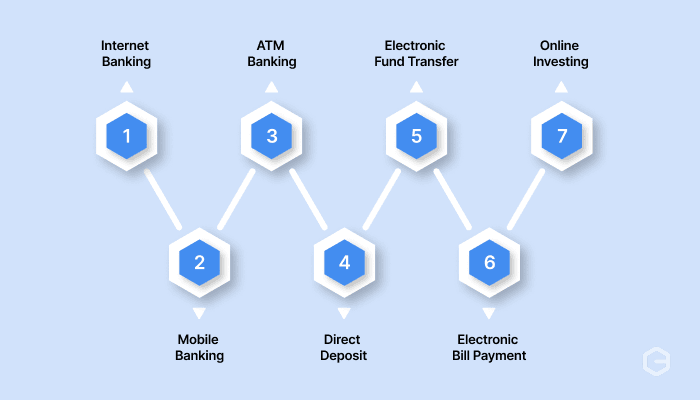
E-banking comes in several forms that serve different needs and situations. Here's how the main types compare:
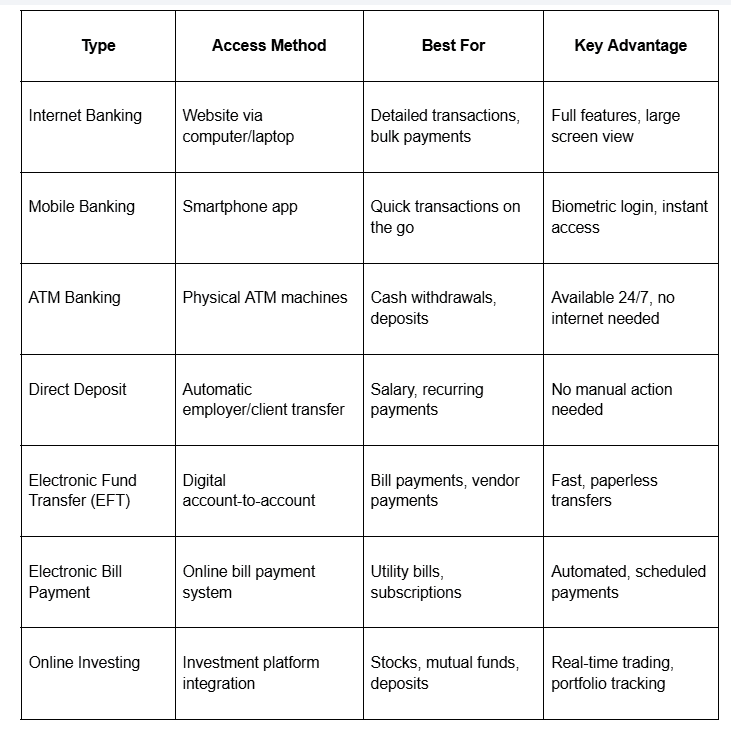
Each type serves specific banking needs based on what you want to do and where you are.
Internet banking lets you access your account through a web browser on your computer or laptop. You log in using your credentials and get the full range of banking features on a larger screen.
This type works well for complex tasks like reviewing detailed statements, making bulk payments to multiple vendors, or downloading transaction reports for accounting. The bigger screen makes it easier to verify details before confirming large transfers.
For instance, if you need to pay 20 different suppliers in one session, internet banking gives you the space to review each payment carefully before processing them together.
Mobile banking brings all banking functions to your smartphone through a dedicated app. You can complete most banking tasks using just your phone, which makes banking possible from anywhere.
The app often includes features designed for phones like QR code scanning for UPI payments, biometric authentication for quick login, and camera-based check deposits.
For example, you can be at a client meeting and still check if their payment cleared, then immediately confirm to them without stepping out or opening a laptop. Mobile banking turns your phone into a complete bank branch that fits in your pocket.
ATM banking gives you access to cash and basic account functions through automated teller machines. You insert your card, enter your PIN, and complete transactions without any internet connection or bank staff.
ATMs work well for withdrawing cash when you need it, depositing checks or cash outside banking hours, and checking your balance quickly. The machines operate 24/7, and you can find them almost anywhere.
For instance, if you're traveling and need local currency at midnight, ATM banking lets you withdraw money immediately without waiting for morning or finding a branch.
Direct deposit automatically transfers money from one account to another on a scheduled basis. Employers commonly use this to deposit salaries directly into employee bank accounts without issuing physical checks.
This method works well for recurring payments like monthly salaries, vendor payments, or client retainers. The money arrives in your account on the scheduled date without any action from you.
For example, if you're a freelancer with a monthly retainer from a US client, they can set up direct deposit so your payment arrives automatically on the first of each month without manual transfers.
An electronic fund transfer moves money between bank accounts electronically without physical cash or checks. You initiate the transfer through your banking platform, and the system handles the rest.
EFT works for various payment types, including vendor payments, bill payments, and sending money to other people. The transfer happens faster than checks and leaves a clear digital record.
For instance, when you pay your office rent through net banking, you're using EFT to move money from your account to your landlord's account electronically.
Electronic bill payment lets you pay recurring bills through automated systems. You set up the biller details once and then schedule automatic payments or pay manually through your banking platform.
This method helps you avoid late fees and maintain good payment records with utility companies, credit card issuers, and service providers. You can schedule payments to go out automatically on due dates.
For example, you can set your electricity bill to auto-pay every month so it gets paid on time even when you're traveling or busy with other work.
Online investing connects your bank account to investment platforms where you can buy stocks, mutual funds, bonds, or open fixed deposits. You manage investments directly through digital interfaces without visiting branch offices or calling brokers.
This type gives you real-time access to markets, instant trade execution, and portfolio tracking from your device. You can open a fixed deposit, start a SIP (Systematic Investment Plan), or buy shares during market hours with just a few clicks.
For instance, if you want to invest surplus business profits in a fixed deposit offering good interest rates, you can open it through internet banking in five minutes instead of visiting a branch.
E-banking platforms pack multiple features that handle different banking needs digitally. These features replace most tasks you previously had to visit a branch to complete. Here are the main capabilities you get:
* Account management: View current balances across all your accounts, check transaction history from past months, download statements in PDF format, and monitor deposits and withdrawals in real time without calling customer service.
* Fund transfers: Send money using NEFT (National Electronic Funds Transfer), RTGS (Real Time Gross Settlement), IMPS (Immediate Payment Service), or UPI (Unified Payments Interface). Each method works for different amounts and timing needs. IMPS and UPI move money instantly, while NEFT takes a few hours, and RTGS works for larger amounts during banking hours.
* Bill payments: Pay utility bills, credit card dues, insurance premiums, and vendor invoices directly from your account. Set up automatic payments for recurring bills so they get paid on time every month without manual action.
* Investment and loan services: Open fixed deposits, apply for loans, track existing investments, and check loan approval status through your banking portal. You can start a recurring deposit or apply for a business loan without visiting a branch or calling anyone.
* Transaction alerts and notifications: Get instant SMS or email alerts for every transaction, login attempt, or account change. These notifications help you catch unauthorized activity immediately and stay informed about your account status.
* Card services and requests: Request new checkbooks, apply for debit or credit cards, set daily spending limits, block lost cards, and activate new cards through the platform. These services work without branch visits or phone calls that eat up your time.
For instance, if you need to pay five different suppliers on payment day, you can add them as beneficiaries once and then complete all five transfers in under ten minutes. Compare this to writing five checks or making five branch visits.
E-banking features solve real problems that come with branch-based banking. The advantages go beyond just skipping the queue. Here's what you gain:
* Save time on banking tasks: Complete transfers, bill payments, and balance checks in minutes instead of hours. No more taking time off work to visit a branch during limited banking hours or waiting in long queues for simple transactions.
* Access your accounts anytime: Banking works 24/7, including weekends and holidays. Check if payments arrived at midnight, transfer funds on Sunday, or pay urgent bills at any hour that suits your schedule.
* Lower transaction costs: Many online transactions cost less than doing them at a branch. Some banks waive fees for NEFT transfers done online while charging for the same transfer at the counter, which saves money on frequent transactions.
* Better record keeping: Download statements instantly for any date range, search transaction history by keywords or amounts, and keep organized digital records. This makes tax filing and accounting much simpler because you have clean data to work with.
* Manage multiple accounts easily: Switch between checking accounts, savings accounts, credit cards, and loans from one screen. See your complete financial picture and move money between accounts without calling different departments.
* Get instant confirmation: Know immediately when transactions are completed successfully. No more wondering if your payment went through or calling to check if funds reached the recipient.
* Reduce manual errors: Digital systems validate account numbers, check IFSC codes, and prevent common mistakes that happen with handwritten forms. This accuracy means fewer failed transactions and less time fixing problems.
Traditional e-banking features work well for domestic transactions, but growing businesses with international clients need more specialized capabilities. Standard bank accounts weren't designed for the speed, transparency, and compliance requirements of cross-border commerce.
PayGlocal builds payment features specifically for businesses collecting from global clients. Here's what you get:
* Multi-currency accounts in USD, GBP, EUR, CAD: Collect payments in your clients' local currencies without forcing them through international wire transfers. Your business looks local to international clients, which improves trust and conversion rates.
* Instant FIRC on settlement: Receive Foreign Inward Remittance Certificates automatically in your inbox after each settlement. No more chasing bank branches for the compliance documentation you need for tax filing.
* Zero fixed costs: Pay only when you transact. No monthly fees, setup charges, or platform fees that eat into your margins before you make a single sale.
* Global Payment Methods: Accept 40+ local payment methods that your international customers prefer, from digital wallets to bank transfers in their countries.
* Sanction Screening: Verify customers and transactions against global sanction lists automatically with advanced technology that keeps your business compliant without manual checks.
PayGlocal helps businesses collect international payments with the same ease as domestic banking. You get specialized tools built for global transactions with full transparency and compliance support.
E-banking features have made routine banking tasks faster and more convenient. You can manage accounts, transfer funds, pay bills, and handle investments without stepping into a branch.
But when your business grows internationally, standard e-banking features show their limits. Collecting from overseas clients, managing multi-currency transactions, and staying compliant with special regulations require an advanced payment infrastructure.
Most businesses expanding internationally stick with inadequate payment solutions too long, losing money due to high exchange rates and slow settlement times. Get started with PayGlocal today to handle all your international payments in one platform and scale globally.
E-banking features give you control over your finances without the wait times and paperwork of traditional banking. For businesses doing international transactions, these features become even more important because they need speed, visibility, and control over every payment.
In this guide, we break down the key e-banking features available today, how they work, and what they mean for your business. Let’s get started.
Key takeaways
* Definition of e-banking: Electronic banking lets you access all banking services through the internet, mobile apps, and digital channels without visiting physical branches.
* Different types available: Internet banking, mobile apps, ATMs, direct deposit, electronic fund transfers, bill payments, and online investing each serve different banking needs.
* Core features included: Account management, fund transfers through NEFT/RTGS/UPI, automated bill payments, investment services, and instant transaction alerts work 24/7.
* Time and cost savings: Skip branch visits, reduce transaction fees, get instant confirmations, and access banking anytime.
* International payment solution: PayGlocal provides specialized international payment features, including multi-currency accounts, instant FIRC, global payment methods, and advanced compliance tools.
What is e-banking?
E-banking refers to banking services you can access electronically through the internet or mobile apps. Instead of visiting a physical branch, you manage your accounts, make payments, and conduct transactions through digital channels.
The system connects your bank's servers to your device, letting you perform banking operations securely from anywhere. When you log into your bank's website or app, you're using e-banking to access your account information and banking tools.
For example, when you transfer money to a supplier from home, you're using e-banking. When you check if a client's payment arrived while traveling, that's e-banking too. The service runs 24/7, which makes it different from traditional banking, which operates only during branch hours.
What are the different types of e-banking?
E-banking comes in several forms that serve different needs and situations. Here's how the main types compare:
Each type serves specific banking needs based on what you want to do and where you are.
Internet banking
Internet banking lets you access your account through a web browser on your computer or laptop. You log in using your credentials and get the full range of banking features on a larger screen.
This type works well for complex tasks like reviewing detailed statements, making bulk payments to multiple vendors, or downloading transaction reports for accounting. The bigger screen makes it easier to verify details before confirming large transfers.
For instance, if you need to pay 20 different suppliers in one session, internet banking gives you the space to review each payment carefully before processing them together.
Mobile banking
Mobile banking brings all banking functions to your smartphone through a dedicated app. You can complete most banking tasks using just your phone, which makes banking possible from anywhere.
The app often includes features designed for phones like QR code scanning for UPI payments, biometric authentication for quick login, and camera-based check deposits.
For example, you can be at a client meeting and still check if their payment cleared, then immediately confirm to them without stepping out or opening a laptop. Mobile banking turns your phone into a complete bank branch that fits in your pocket.
ATM banking
ATM banking gives you access to cash and basic account functions through automated teller machines. You insert your card, enter your PIN, and complete transactions without any internet connection or bank staff.
ATMs work well for withdrawing cash when you need it, depositing checks or cash outside banking hours, and checking your balance quickly. The machines operate 24/7, and you can find them almost anywhere.
For instance, if you're traveling and need local currency at midnight, ATM banking lets you withdraw money immediately without waiting for morning or finding a branch.
Direct deposit
Direct deposit automatically transfers money from one account to another on a scheduled basis. Employers commonly use this to deposit salaries directly into employee bank accounts without issuing physical checks.
This method works well for recurring payments like monthly salaries, vendor payments, or client retainers. The money arrives in your account on the scheduled date without any action from you.
For example, if you're a freelancer with a monthly retainer from a US client, they can set up direct deposit so your payment arrives automatically on the first of each month without manual transfers.
Electronic fund transfer (EFT)
An electronic fund transfer moves money between bank accounts electronically without physical cash or checks. You initiate the transfer through your banking platform, and the system handles the rest.
EFT works for various payment types, including vendor payments, bill payments, and sending money to other people. The transfer happens faster than checks and leaves a clear digital record.
For instance, when you pay your office rent through net banking, you're using EFT to move money from your account to your landlord's account electronically.
Electronic bill payment
Electronic bill payment lets you pay recurring bills through automated systems. You set up the biller details once and then schedule automatic payments or pay manually through your banking platform.
This method helps you avoid late fees and maintain good payment records with utility companies, credit card issuers, and service providers. You can schedule payments to go out automatically on due dates.
For example, you can set your electricity bill to auto-pay every month so it gets paid on time even when you're traveling or busy with other work.
Online investing
Online investing connects your bank account to investment platforms where you can buy stocks, mutual funds, bonds, or open fixed deposits. You manage investments directly through digital interfaces without visiting branch offices or calling brokers.
This type gives you real-time access to markets, instant trade execution, and portfolio tracking from your device. You can open a fixed deposit, start a SIP (Systematic Investment Plan), or buy shares during market hours with just a few clicks.
For instance, if you want to invest surplus business profits in a fixed deposit offering good interest rates, you can open it through internet banking in five minutes instead of visiting a branch.
What are the key features of e-banking?
E-banking platforms pack multiple features that handle different banking needs digitally. These features replace most tasks you previously had to visit a branch to complete. Here are the main capabilities you get:
* Account management: View current balances across all your accounts, check transaction history from past months, download statements in PDF format, and monitor deposits and withdrawals in real time without calling customer service.
* Fund transfers: Send money using NEFT (National Electronic Funds Transfer), RTGS (Real Time Gross Settlement), IMPS (Immediate Payment Service), or UPI (Unified Payments Interface). Each method works for different amounts and timing needs. IMPS and UPI move money instantly, while NEFT takes a few hours, and RTGS works for larger amounts during banking hours.
* Bill payments: Pay utility bills, credit card dues, insurance premiums, and vendor invoices directly from your account. Set up automatic payments for recurring bills so they get paid on time every month without manual action.
* Investment and loan services: Open fixed deposits, apply for loans, track existing investments, and check loan approval status through your banking portal. You can start a recurring deposit or apply for a business loan without visiting a branch or calling anyone.
* Transaction alerts and notifications: Get instant SMS or email alerts for every transaction, login attempt, or account change. These notifications help you catch unauthorized activity immediately and stay informed about your account status.
* Card services and requests: Request new checkbooks, apply for debit or credit cards, set daily spending limits, block lost cards, and activate new cards through the platform. These services work without branch visits or phone calls that eat up your time.
For instance, if you need to pay five different suppliers on payment day, you can add them as beneficiaries once and then complete all five transfers in under ten minutes. Compare this to writing five checks or making five branch visits.
What are the benefits of e-banking?
E-banking features solve real problems that come with branch-based banking. The advantages go beyond just skipping the queue. Here's what you gain:
* Save time on banking tasks: Complete transfers, bill payments, and balance checks in minutes instead of hours. No more taking time off work to visit a branch during limited banking hours or waiting in long queues for simple transactions.
* Access your accounts anytime: Banking works 24/7, including weekends and holidays. Check if payments arrived at midnight, transfer funds on Sunday, or pay urgent bills at any hour that suits your schedule.
* Lower transaction costs: Many online transactions cost less than doing them at a branch. Some banks waive fees for NEFT transfers done online while charging for the same transfer at the counter, which saves money on frequent transactions.
* Better record keeping: Download statements instantly for any date range, search transaction history by keywords or amounts, and keep organized digital records. This makes tax filing and accounting much simpler because you have clean data to work with.
* Manage multiple accounts easily: Switch between checking accounts, savings accounts, credit cards, and loans from one screen. See your complete financial picture and move money between accounts without calling different departments.
* Get instant confirmation: Know immediately when transactions are completed successfully. No more wondering if your payment went through or calling to check if funds reached the recipient.
* Reduce manual errors: Digital systems validate account numbers, check IFSC codes, and prevent common mistakes that happen with handwritten forms. This accuracy means fewer failed transactions and less time fixing problems.
Get paid globally faster and securely with PayGlocal
Traditional e-banking features work well for domestic transactions, but growing businesses with international clients need more specialized capabilities. Standard bank accounts weren't designed for the speed, transparency, and compliance requirements of cross-border commerce.
PayGlocal builds payment features specifically for businesses collecting from global clients. Here's what you get:
* Multi-currency accounts in USD, GBP, EUR, CAD: Collect payments in your clients' local currencies without forcing them through international wire transfers. Your business looks local to international clients, which improves trust and conversion rates.
* Instant FIRC on settlement: Receive Foreign Inward Remittance Certificates automatically in your inbox after each settlement. No more chasing bank branches for the compliance documentation you need for tax filing.
* Zero fixed costs: Pay only when you transact. No monthly fees, setup charges, or platform fees that eat into your margins before you make a single sale.
* Global Payment Methods: Accept 40+ local payment methods that your international customers prefer, from digital wallets to bank transfers in their countries.
* Sanction Screening: Verify customers and transactions against global sanction lists automatically with advanced technology that keeps your business compliant without manual checks.
PayGlocal helps businesses collect international payments with the same ease as domestic banking. You get specialized tools built for global transactions with full transparency and compliance support.
Final thoughts
E-banking features have made routine banking tasks faster and more convenient. You can manage accounts, transfer funds, pay bills, and handle investments without stepping into a branch.
But when your business grows internationally, standard e-banking features show their limits. Collecting from overseas clients, managing multi-currency transactions, and staying compliant with special regulations require an advanced payment infrastructure.
Most businesses expanding internationally stick with inadequate payment solutions too long, losing money due to high exchange rates and slow settlement times. Get started with PayGlocal today to handle all your international payments in one platform and scale globally.