

India’s exports reached a record $825.3 billion in FY25, proving that local businesses are scaling faster than ever. But as you expand into the US, Europe, and Asia, you face a new complexity: dealing with customers and partners who all want to pay in their own currencies, each with its own exchange rate and fee structure.
Without multi-currency management, your expanding global footprint can quickly lead to shrinking profit margins. If you aren't optimized to collect and convert these funds, high bank fees and shifting exchange rates can quietly eat away at the gains from your international sales.
This guide explains how multi-currency management works and how to choose a solution that protects your margins as you grow.
Multi-currency management is how businesses handle transactions in different foreign currencies within their operations. It lets you accept payments, pay vendors, and maintain accounts in multiple currencies without converting everything immediately.
The system tracks each currency separately. If you receive payments in USD and EUR, you can see exactly how much you hold in each currency. When you need to report your finances, the system converts these amounts into your base currency using current or historical exchange rates.
This approach helps businesses working internationally. For example, an India-based SaaS company can invoice US clients in USD and European clients in EUR while paying local salaries in INR. Multi-currency management centralizes these flows, reducing the number of individual bank accounts and conversion steps required.
When you handle foreign currencies properly, you control when conversions happen and how much you pay in fees. This control translates directly into better margins and clearer visibility. Here are the main benefits:
These benefits add up quickly. A company receiving $50,000 monthly from international clients might save thousands in conversion fees alone by managing currencies strategically.
Multi-currency management becomes necessary when manual currency handling, delayed conversions, and poor visibility start costing more than implementing a proper solution. Most businesses cross this threshold sooner than they expect.
Here's who benefits most from these systems:
For instance, an Indian design agency can invoice US clients in USD and European clients in EUR. This allows the agency to hold these funds in separate balances and only convert them to INR when the exchange rate is favorable, rather than being forced into a conversion at the moment of payment.
The platform you choose affects how easily you can accept international payments and how much effort managing them takes. Some systems handle everything from accounting to reconciliation, while others focus specifically on payment collection and currency management with less overhead.
Here's how the main system types compare:
Here's what each system type offers:
ERP platforms build multi-currency into their full business management suite. They handle everything from transactions to complex financial reporting and consolidation across subsidiaries. These work well for enterprises with sophisticated needs but require significant implementation time and ongoing IT support.
Tools like Xero, QuickBooks International, or Tally offer multi-currency as part of their accounting packages. They're easier to implement than full ERPs and work well for businesses that primarily need good bookkeeping and reporting in multiple currencies.
Solutions like PayGlocal focus specifically on accepting and managing international payments. It offers multi-currency accounts, local payment methods, and easy integration without requiring you to replace your entire accounting system. The platforms work well when your main need is collecting payments from international customers efficiently.
Many banks offer multi-currency accounts, but they typically charge higher fees for currency conversion and international transfers. They make sense when you need physical banking services or have specific relationship banking requirements.
Tip: Choose systems that update exchange rates automatically. Manual rate updates create errors and take time you could spend on actual business work.
Your finance team shouldn't have to manually track exchange rates or guess what a payment was worth when it arrived. A multi-currency system follows a set process to keep records clean and reporting accurate. Here's how it works:
For instance, when a UK client pays you £5,000, the system records the payment in GBP, applies the current exchange rate to show the INR equivalent, and updates both your GBP balance and your overall financial position. You see exactly what you received and what it's worth in your operating currency.
Accepting payments in multiple currencies creates operational complexity that goes beyond just handling exchange rates. From unexpected fees hidden in transactions to reconciliation mismatches caused by rate timing differences, these challenges directly impact your revenue if not managed properly.
Here are the main challenges businesses face:
Due to these challenges, it becomes important to choose the right platform and follow good practices essential to getting value from multi-currency management.
It’s essential to focus on capabilities that reduce manual work, lower costs, and integrate smoothly with the tools you're already using daily. Here's what matters the most when choosing the right multi-currency solution:
For example, if you are an Indian exporter, you need a system that provides a USD account for your American clients, automatically generates your compliance data for the bank, and syncs that data directly into your accounting software.
The cheapest platform isn't always the best value, and the most feature-rich option might include complexity you don't need. Match the solution to your actual transaction patterns and operational requirements, not to what sounds good in marketing materials. Here's what to evaluate:
Run the numbers for your typical monthly volume across all these factors to see which platform actually costs less and works better for your specific situation.
Poor setup creates problems that take months to fix in your accounting and reporting. Getting the configuration right from the start means clean data, accurate reports, and no scrambling to reconcile mismatched transactions later. Here's how to set up effectively:
The easier the setup process, the faster you can start accepting international payments without operational disruptions.
Having the right system matters, but how you use it determines your actual results. Small habits like regular reconciliation and rate monitoring prevent the costly mistakes that show up months later in your financial statements. Here's what works best:
Tip: Test the platform with a small volume of transactions before moving all your international payments. This reveals any workflow issues before they affect your main operations.
Handling multiple currencies shouldn't slow down your growth or drain your resources through excessive fees and manual work. When you're accepting payments from clients worldwide, you need a platform that handles the complexity while keeping costs transparent and operations smooth.
PayGlocal helps businesses collect international payments and manage multi-currency transactions without the usual friction. Here's what you get:
With PayGlocal, you can focus on growing your business while the platform handles currency acceptance, conversion, and compliance. Businesses using the platform see better payment success rates and lower costs compared to traditional banking routes.
Multi-currency management helps businesses handle international transactions more efficiently. It reduces costs through strategic currency conversion, improves cash flow visibility across currencies, and reduces the manual work involved in reconciliation and reporting.
The right solution depends on your transaction volume, the currencies you work with most, and how well it integrates with your existing systems. Look for platforms offering transparent pricing, the specific currencies you need, and features that actually solve your operational challenges.
Your international payment infrastructure directly affects how smoothly you can grow globally. Poor currency management means higher costs, delayed payments, and frustrated customers. The right platform changes that equation completely.
Don't let currency complexity slow down your global expansion. PayGlocal gives you the tools to accept payments worldwide with the same ease as local transactions. Get started with PayGlocal today to see how we can support your international growth.
Without multi-currency management, your expanding global footprint can quickly lead to shrinking profit margins. If you aren't optimized to collect and convert these funds, high bank fees and shifting exchange rates can quietly eat away at the gains from your international sales.
This guide explains how multi-currency management works and how to choose a solution that protects your margins as you grow.
Key takeaways
- Multi-currency management: It lets you transact, record, and report in multiple currencies from one system, with automated exchange rate handling.
- Who needs it: Exporters, importers, SaaS companies, freelancers, and any business accepting international payments.
- Different approaches exist: From ERP-integrated systems to standalone payment platforms, each type serves different business needs and complexity levels.
- Common challenges: Exchange rate volatility, hidden fees, complex reconciliation, and compliance requirements affect multi-currency operations.
- The right platform makes a difference: PayGlocal helps businesses accept payments in multiple currencies with local accounts in major markets and instant compliance documentation.
What is multi-currency management?
Multi-currency management is how businesses handle transactions in different foreign currencies within their operations. It lets you accept payments, pay vendors, and maintain accounts in multiple currencies without converting everything immediately.
The system tracks each currency separately. If you receive payments in USD and EUR, you can see exactly how much you hold in each currency. When you need to report your finances, the system converts these amounts into your base currency using current or historical exchange rates.
This approach helps businesses working internationally. For example, an India-based SaaS company can invoice US clients in USD and European clients in EUR while paying local salaries in INR. Multi-currency management centralizes these flows, reducing the number of individual bank accounts and conversion steps required.
Why is multi-currency management essential for your business?
When you handle foreign currencies properly, you control when conversions happen and how much you pay in fees. This control translates directly into better margins and clearer visibility. Here are the main benefits:
- Lower transaction costs: You pay fees only when you actually convert currencies, not on every transaction. Holding funds in the original currency until you need to convert saves money on unnecessary exchanges.
- Better exchange rate control: You can choose when to convert currencies based on favorable rates instead of being forced to convert immediately at whatever rate is available.
- Faster payment collection: Customers prefer paying in their local currency. When you offer USD to American clients or EUR to European ones, they're more likely to complete transactions quickly.
- Clearer financial visibility: See exactly how much you hold in each currency and track your true international cash flow without confusion from constant conversions.
- Easier reconciliation: Automated systems match payments to invoices across currencies, reducing the manual work your finance team does each month.
- Improved compliance: The system maintains proper records for each currency, making tax reporting and audits more straightforward.
- Reduced exchange rate risk: By holding multiple currencies, you can manage exposure to fluctuations instead of being fully exposed in a single currency.
These benefits add up quickly. A company receiving $50,000 monthly from international clients might save thousands in conversion fees alone by managing currencies strategically.
Is multi-currency management right for your business?
Multi-currency management becomes necessary when manual currency handling, delayed conversions, and poor visibility start costing more than implementing a proper solution. Most businesses cross this threshold sooner than they expect.
Here's who benefits most from these systems:
- Exporters and importers: Companies shipping goods internationally need to invoice customers in their local currencies and pay suppliers in various foreign currencies.
- SaaS and subscription businesses: Software companies serving global customers can offer localized pricing in USD, EUR, GBP, and other currencies to improve conversion rates.
- Freelancers and agencies: Independent professionals working with international clients need efficient ways to collect payments in foreign currencies without losing money to conversion fees.
- E-commerce businesses: Online stores selling globally can reduce cart abandonment by letting customers pay in their familiar local currency.
- Companies with international teams: Businesses paying employees, contractors, or vendors in different countries need to manage multiple currency obligations efficiently.
- Growing businesses planning expansion: Even if you're primarily domestic now, setting up multi-currency capabilities early makes international growth smoother when opportunities arrive.
For instance, an Indian design agency can invoice US clients in USD and European clients in EUR. This allows the agency to hold these funds in separate balances and only convert them to INR when the exchange rate is favorable, rather than being forced into a conversion at the moment of payment.
What are the different types of multi-currency management systems?
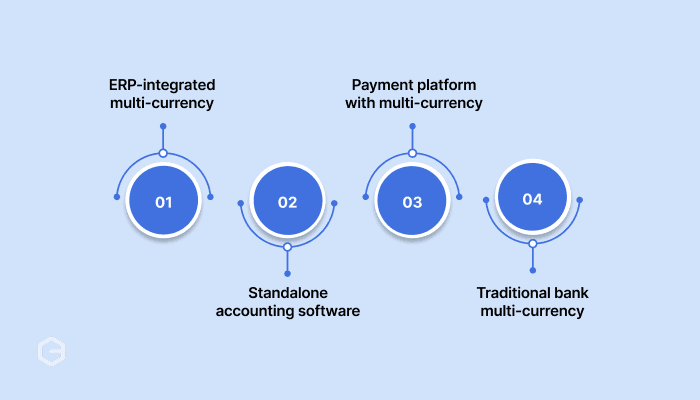
The platform you choose affects how easily you can accept international payments and how much effort managing them takes. Some systems handle everything from accounting to reconciliation, while others focus specifically on payment collection and currency management with less overhead.
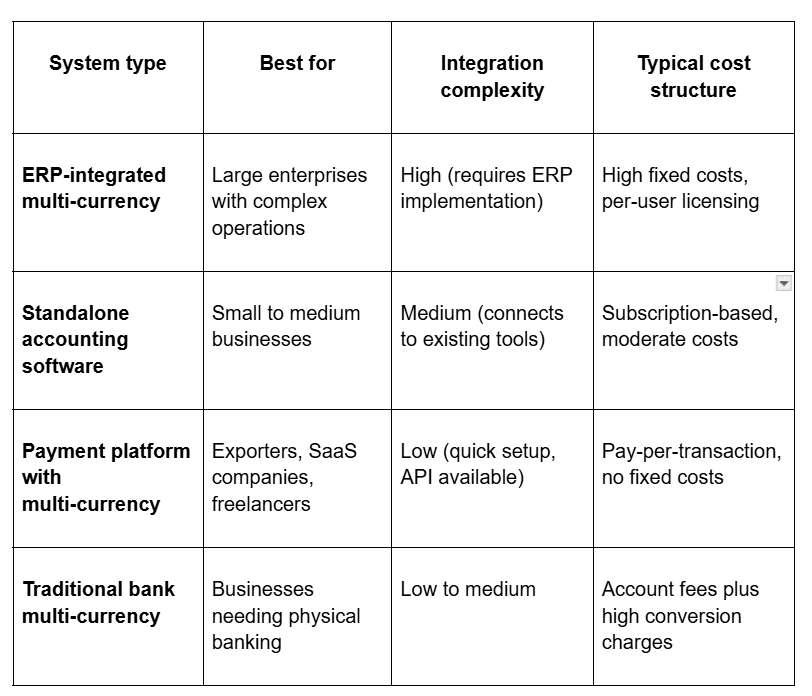
Here's how the main system types compare:
Here's what each system type offers:
ERP-integrated systems
ERP platforms build multi-currency into their full business management suite. They handle everything from transactions to complex financial reporting and consolidation across subsidiaries. These work well for enterprises with sophisticated needs but require significant implementation time and ongoing IT support.
Standalone accounting software
Tools like Xero, QuickBooks International, or Tally offer multi-currency as part of their accounting packages. They're easier to implement than full ERPs and work well for businesses that primarily need good bookkeeping and reporting in multiple currencies.
Payment platforms
Solutions like PayGlocal focus specifically on accepting and managing international payments. It offers multi-currency accounts, local payment methods, and easy integration without requiring you to replace your entire accounting system. The platforms work well when your main need is collecting payments from international customers efficiently.
Traditional bank solutions
Many banks offer multi-currency accounts, but they typically charge higher fees for currency conversion and international transfers. They make sense when you need physical banking services or have specific relationship banking requirements.
Tip: Choose systems that update exchange rates automatically. Manual rate updates create errors and take time you could spend on actual business work.
How does multi-currency management work?
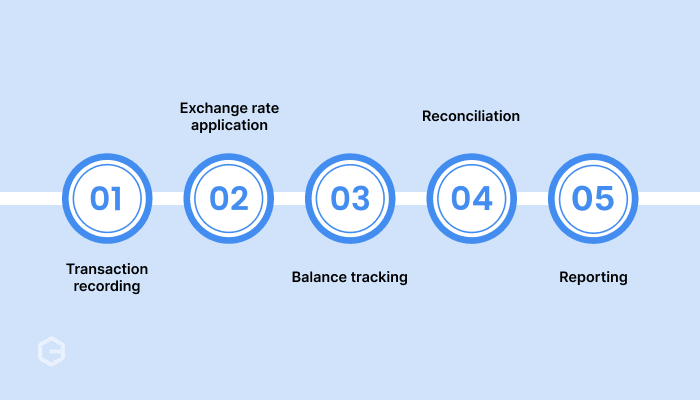
Your finance team shouldn't have to manually track exchange rates or guess what a payment was worth when it arrived. A multi-currency system follows a set process to keep records clean and reporting accurate. Here's how it works:
- Transaction recording: When you receive a payment in a foreign currency, the system records it in that original currency and converts it to your base currency for reporting.
- Exchange rate application: The system applies exchange rates automatically, either at the transaction date or using rates you specify for consistency.
- Balance tracking: You can see separate balances for each currency you hold, plus consolidated reports in your base currency.
- Reconciliation: The system matches incoming payments with invoices across different currencies, reducing manual matching work.
- Reporting: Financial reports show data in your base currency while maintaining the original currency information for audit trails.
For instance, when a UK client pays you £5,000, the system records the payment in GBP, applies the current exchange rate to show the INR equivalent, and updates both your GBP balance and your overall financial position. You see exactly what you received and what it's worth in your operating currency.
What are the challenges of multi-currency management?
Accepting payments in multiple currencies creates operational complexity that goes beyond just handling exchange rates. From unexpected fees hidden in transactions to reconciliation mismatches caused by rate timing differences, these challenges directly impact your revenue if not managed properly.
Here are the main challenges businesses face:
- Exchange rate fluctuations: Currency values change constantly, affecting the actual value of your holdings. What you receive in EUR today might be worth more or less in INR tomorrow, creating gains or losses you need to track and report.
- Hidden transaction costs: Beyond advertised rates, you might face spread markups, transfer fees, intermediary bank charges, and monthly account fees. These can add up significantly if you're not careful about choosing providers.
- Complex reconciliation: Matching payments to invoices gets harder when amounts differ due to exchange rate timing. Your invoice might show one converted amount, but the actual payment arrives at a different rate, requiring careful reconciliation.
- Compliance requirements: Different countries have different rules for foreign currency reporting, tax treatment of exchange gains and losses, and documentation requirements for international transactions.
- Liquidity management: Deciding how much to hold in each currency versus converting to your base currency requires balancing immediate needs, expected payments, and exchange rate predictions.
- Manual errors in conversion: When systems require manual exchange rate entry or currency selection, human errors create accounting problems that take time to identify and fix.
Due to these challenges, it becomes important to choose the right platform and follow good practices essential to getting value from multi-currency management.
What key features to look for in multi-currency solutions?
It’s essential to focus on capabilities that reduce manual work, lower costs, and integrate smoothly with the tools you're already using daily. Here's what matters the most when choosing the right multi-currency solution:
- Multiple currency support: The system should handle all currencies you transact in, plus common ones you might need as you expand.
- Real-time exchange rates: Automatic rate updates keep your reporting accurate without manual data entry.
- Local currency accounts: Some platforms offer actual local accounts in major currencies, making you appear local to international clients.
- Automated reconciliation: The system should match incoming payments with invoices automatically, even across different currencies.
- Flexible reporting: You need reports in both individual currencies and your base currency, with clear exchange rate information.
- Integration capabilities: The solution should connect with your accounting software, payment gateways, and other business tools you already use.
- Transparent fee structure: Know exactly what you'll pay for currency conversion, international transfers, and account maintenance.
- Compliance documentation: Automatic generation of required paperwork for international transactions saves time and reduces errors.
For example, if you are an Indian exporter, you need a system that provides a USD account for your American clients, automatically generates your compliance data for the bank, and syncs that data directly into your accounting software.
How to choose the right multi-currency management solution?
The cheapest platform isn't always the best value, and the most feature-rich option might include complexity you don't need. Match the solution to your actual transaction patterns and operational requirements, not to what sounds good in marketing materials. Here's what to evaluate:
- Assess your transaction patterns: Look at how many currencies you work with regularly. Count your monthly international transactions and identify your highest-volume currency pairs. This tells you what capabilities you actually need versus what sounds nice to have.
- Evaluate integration requirements: Check how the solution connects with your current accounting software, payment processors, and banking systems. Smooth integration means less manual data transfer and fewer errors. Ask about API availability if you have custom systems.
- Compare cost structures: Look beyond advertised rates. Calculate total costs, including transaction fees, currency conversion charges, monthly fees, and setup costs. Some platforms charge less per transaction but have high fixed costs. Others have no monthly fees but higher per-transaction rates.
- Check currency coverage: Make sure the platform supports all currencies you need now and likely will need soon. If you're expanding into new markets, verify that those currencies are available. Ask about local account options in your key markets.
- Review support and reliability: With international payments, you can't wait for slow support responses. Check what support hours are available and how quickly they respond to issues. Look at uptime guarantees and what happens if systems go down.
- Test before committing: Run a small volume of transactions through the platform before moving all your international payments. This reveals any workflow issues before they affect your main operations.
Run the numbers for your typical monthly volume across all these factors to see which platform actually costs less and works better for your specific situation.
How to set up multi-currency management
Poor setup creates problems that take months to fix in your accounting and reporting. Getting the configuration right from the start means clean data, accurate reports, and no scrambling to reconcile mismatched transactions later. Here's how to set up effectively:
- Define your base currency: Choose your primary operating currency (typically INR for Indian businesses). All other currencies will be reported in relation to this base currency for consolidated financial statements.
- Enable required currencies: Activate only the currencies you actually transact in. Adding unnecessary currencies creates clutter without benefit. You can always add more later as you expand.
- Configure exchange rate sources: Set up automatic exchange rate updates from reliable sources. Decide whether to use daily rates, real-time rates, or fixed rates for specific periods based on your reporting needs.
- Set up currency accounts: Create separate accounts in your chart of accounts for each currency. This lets you track actual holdings in USD, EUR, and GBP separately from your INR accounts.
- Configure revaluation rules: Decide how and when the system revalues foreign currency holdings based on exchange rate changes. This affects how you report unrealized gains and losses.
- Integrate with existing systems: Connect your multi-currency platform to your accounting software, invoicing tools, and payment processors. Test the data flow to make sure transactions sync correctly.
- Test with small transactions: Before going live fully, run test transactions in each currency to verify that exchange rates apply correctly, reconciliation works, and reports show accurate information.
The easier the setup process, the faster you can start accepting international payments without operational disruptions.
What are the best practices and tips for multi-currency management?
Having the right system matters, but how you use it determines your actual results. Small habits like regular reconciliation and rate monitoring prevent the costly mistakes that show up months later in your financial statements. Here's what works best:
- Reconcile regularly: Match payments to invoices at least weekly, not just monthly. This catches discrepancies from exchange rate timing before they become large problems.
- Monitor exchange rates: Keep an eye on rate movements for your main currency pairs. This helps you decide when to convert funds and alerts you to unusual volatility that might affect your business.
- Document conversion decisions: Keep notes on why you converted currencies at specific times. This helps during audits and improves your decision-making over time by tracking what worked.
- Set revaluation schedules: Revalue your foreign currency holdings at consistent intervals (monthly or quarterly) to properly account for unrealized gains and losses in your financial statements.
- Maintain audit trails: Make sure your system keeps detailed records of original currency amounts, exchange rates used, and converted values for every transaction.
- Review fees quarterly: Check what you're actually paying in total fees every few months. Compare to other providers to make sure you're still getting competitive rates as your volume grows.
- Train your team: Make sure everyone who handles international transactions knows how to use the system properly. Poor data entry creates reconciliation headaches later.
Tip: Test the platform with a small volume of transactions before moving all your international payments. This reveals any workflow issues before they affect your main operations.
Manage multi-currency payments in one platform with PayGlocal
Handling multiple currencies shouldn't slow down your growth or drain your resources through excessive fees and manual work. When you're accepting payments from clients worldwide, you need a platform that handles the complexity while keeping costs transparent and operations smooth.
PayGlocal helps businesses collect international payments and manage multi-currency transactions without the usual friction. Here's what you get:
- Multi-currency accounts: Accept payments in 33+ currencies from 180+ countries, with local accounts in USD, GBP, EUR, and CAD that let clients pay you the same way they pay local businesses.
- Transparent pricing: Pay only when you transact, with no setup fees, platform charges, or hidden costs eating into your margins.
- Instant compliance: Receive Foreign Inward Remittance Certificate (FIRC) documentation directly after settlement, keeping your exports compliant without paperwork delays.
- Real-time tracking: Get notifications at every stage of the payment process and download transaction reports whenever you need them.
- One platform: Manage all international payments, view reports, and handle reconciliation from a single dashboard instead of juggling multiple systems.
With PayGlocal, you can focus on growing your business while the platform handles currency acceptance, conversion, and compliance. Businesses using the platform see better payment success rates and lower costs compared to traditional banking routes.
Final thoughts
Multi-currency management helps businesses handle international transactions more efficiently. It reduces costs through strategic currency conversion, improves cash flow visibility across currencies, and reduces the manual work involved in reconciliation and reporting.
The right solution depends on your transaction volume, the currencies you work with most, and how well it integrates with your existing systems. Look for platforms offering transparent pricing, the specific currencies you need, and features that actually solve your operational challenges.
Your international payment infrastructure directly affects how smoothly you can grow globally. Poor currency management means higher costs, delayed payments, and frustrated customers. The right platform changes that equation completely.
Don't let currency complexity slow down your global expansion. PayGlocal gives you the tools to accept payments worldwide with the same ease as local transactions. Get started with PayGlocal today to see how we can support your international growth.