
You set up your online store, list your products, and a customer in the US is ready to buy. Then the payment fails. No error message, no clear reason; just a lost sale and a frustrated customer.
In the wake of India’s MSME export surge, which hit ₹12.39 lakh crore in recent years, this is a multi-billion-rupee problem. Selling across borders requires more than a simple checkout; it requires a processing setup that handles global currencies and strict RBI compliance effortlessly.
This guide simplifies online payment processing for small businesses, explaining how the system works, how to avoid common failure points, and how to choose a provider that turns global clicks into settled INR.
Online payment processing is the system that lets your customers pay you through the internet. When someone buys from your website or clicks a payment link, the payment processor handles the work between their bank and yours.
For a small business, this usually involves three parts. A payment gateway (the checkout screen your customer sees), a payment processor (the service that sends transaction data between banks), and a merchant account (where your funds settle before reaching your bank). For instance, when a customer in London pays with a credit card on your Shopify store, all three parts work together to move that money to your account in India.
You do not need to build any of this from scratch. Most providers today bundle the gateway, processor, and merchant account into one platform. That means you sign up, connect your website, and start accepting payments.
A payment that fails at checkout does not just cost you one order. It costs you a customer who may never come back. For small businesses, every transaction counts.
Here's why getting this right matters from day one:
The payment system you use shapes how customers experience your brand. It is worth spending time on the right solution instead of defaulting to the first option you find.
Tip: Start by listing where your customers are located and how they prefer to pay. This one step narrows your provider options quickly.
Most small business owners never see what happens after a customer clicks the Pay button. But knowing the basic flow helps you spot where things can go wrong. Here's what happens in a typical online payment, step by step:
1. Customer enters payment details: The buyer fills in their card number, selects a wallet, or picks a bank transfer option on your checkout page.
2. Gateway encrypts and sends the data: The payment gateway encrypts the details and sends them to the payment processor for verification.
3. Processor contacts the card network and bank: The processor sends the request to the card network (like Visa or Mastercard), which forwards it to the customer's bank for approval.
4. Bank approves or declines: The customer's bank checks the account balance, fraud signals, and card limits. It sends back an approval or a decline.
5. Confirmation reaches the customer: If approved, the customer sees a success message. If declined, they see an error.
6. Settlement happens later: The approved amount moves through the network and reaches your merchant account, usually within 1 to 3 business days.
Each step takes seconds, but a breakdown at any point causes a payment failure. Common reasons include incorrect card details, currency mismatches, or weak fraud screening that blocks real customers.
Note: International payments involve extra steps like currency conversion and cross-border routing. These steps add fees and increase the chance of failure if your provider is not built for global transactions.
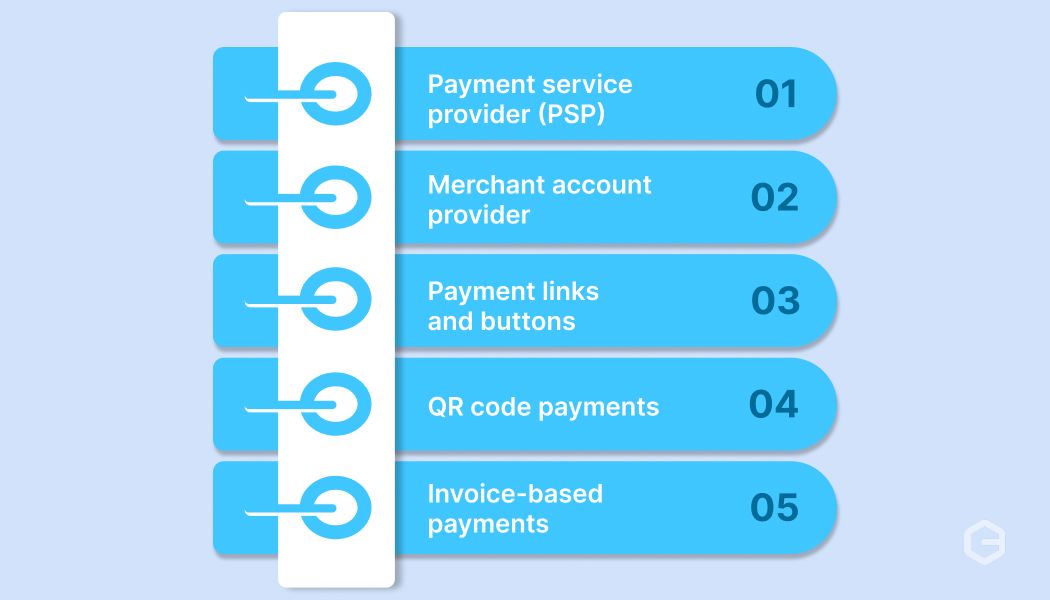
Different small business collects payments in various ways. The system you pick should match how your customers buy and how your team operates day to day. Here's a quick comparison of the most common types:
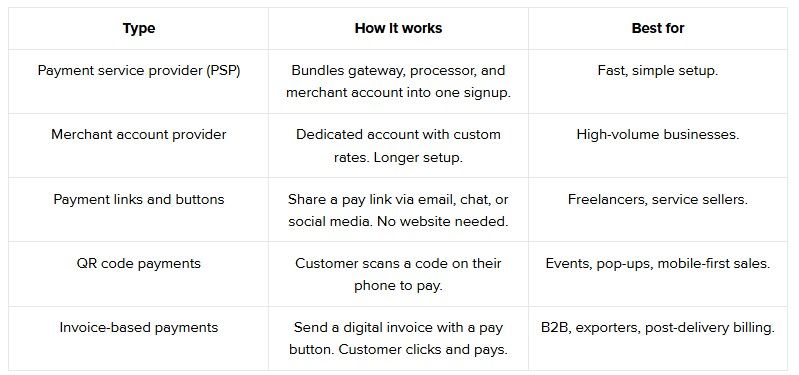
Each type solves a different problem. Here's how they work in practice.
A PSP gives you everything in one place. You sign up, connect your store, and start accepting payments. There is no separate merchant account to open or paperwork to file with a bank. For instance, if you run a Shopify store and want to accept international cards, a PSP handles the gateway, processing, and settlement in one go. This is the most common starting point for small businesses.
A merchant account provider sets up a dedicated account just for your business. You get custom rates based on your volume, which can save money if you process a large number of transactions each month. The trade-off is a longer setup process with more documentation. This option makes sense once your monthly transaction volume is high enough to negotiate better fees.
You do not need a website to collect payments. A payment link is a URL you send to a customer via email, WhatsApp, or social media. They click, enter their details, and pay. For instance, a freelancer sending a payment link after finishing a project can get paid the same day without building a checkout page.
A QR code payment works by generating a scannable code tied to a specific amount or your payment page. The customer scans it with their phone camera or a payment app, confirms the amount, and pays instantly. This works well for businesses that sell in-person at stores, exhibitions, or on platforms where sharing a visual code is faster than typing out a link.
If your business bills customers after delivering a product or service, invoice-based payments are the right fit. You send a digital invoice with a built-in pay button. The customer opens it, clicks, and pays online. This works well for exporters, consultants, and B2B sellers where the buyer expects a formal invoice before paying.
Most small businesses start with a PSP because it is the fastest way to go live. As your volume grows, you can evaluate whether a dedicated merchant account or a mix of methods gives you better rates.
Tip: You do not have to pick just one. Many businesses use a PSP for their website and payment links for one-off orders or social media sales.
Picking a payment provider based only on brand name or listed price leaves too much to chance. Here's what to check before you commit to any particular solution:
Tip: Ask providers for a test environment before going live. A trial run shows you how the checkout feels for your customers and how the dashboard works for your team.
Two providers can look identical on paper and perform very differently in practice. The best payment gateway for a small business is the one that fits your specific setup, not the one with the biggest name.
Here's a simple way to make this decision:
Note: Do not sign a long-term contract with your first provider. Start with a pay-as-you-go plan, run it for a few months, and switch if the success rates or costs do not meet your expectations.
Most payment problems start small and become expensive before anyone notices. Knowing these mistakes upfront saves you time and revenue. Here are the ones that come up most often:
Tip: Set up automatic alerts for failed payments and delayed settlements. Catching issues early keeps your cash flow on track.
Small payment issues do not show up with a warning. They build up over weeks until one day your checkout numbers look worse than last month, and you are not sure why. Here are some of the best practices that can help you prevent those issues:
The businesses that get the most from their payment setup are the ones that treat it like any other part of operations, not something they set up once and forget.
Delays between choosing a provider and going live cost you real sales. Every day your payment setup is incomplete is a day customers cannot pay you. Here's how to go from signup to your first transaction:
1. Pick your provider based on your checklist: Use the criteria from earlier (currencies, fees, success rates, fraud tools) and narrow down to one or two options.
2. Sign up and verify your business: Most providers ask for your business registration details and bank account information. For instance, if you export services, keep your import export code (IEC) ready to speed things up.
3. Connect to your website or store: If you use Shopify, WooCommerce, or a similar platform, most providers have a plugin you can install in a few clicks. For custom websites, your developer will need the provider's application programming interface (API) documentation.
4. Run a test transaction: Before going live, process a small payment to check that the checkout works, the confirmation email goes out, and the money shows up in your dashboard.
5. Go live and monitor the first week closely: Watch your success rates, check if any payment methods are failing, and make sure settlements are arriving on time.
Getting live is not the finish line. The first few weeks tell you a lot about whether the provider actually works for your customers and your workflow.
Finding a payment system that checks every box is hard, especially when you sell to international customers. Most small businesses end up using two or three tools together just to accept payments, track settlements, and stay compliant.
PayGlocal brings all of that into one platform, making international payments simple and easy for small businesses selling globally. Here's what you get:
PayGlocal gives you one platform to easily manage payments, track settlements, and handle compliance.
Your payment setup impacts everything from how fast you get paid to how many customers finish checkout. The provider you choose, the methods you offer, and the fees you accept all add up over time.
Start with the criteria that matter most for your business. Compare providers on real numbers like success rates and total fees.
If your customers are in other countries, you need a provider that was built specifically for international payments. PayGlocal helps businesses collect global payments with higher approval rates and transparent pricing.
The sooner your payment setup is live, the sooner you stop losing sales at checkout. Get started with PayGlocal today.
1. What are the typical fees for online payment processing?
Fees usually include a percentage of each transaction (typically 1.5% to 3.5%) plus possible charges for currency conversion, chargebacks, and refunds. Always check the full fee breakdown before signing up.
2. Do I need a separate merchant account to accept online payments?
Not always. Many modern payment providers bundle the merchant account into their service. You sign up, connect your store, and start accepting payments without setting up a separate account.
3. How can a small business reduce payment failures at checkout?
Offer more payment methods, use a provider with high approval rates, and make sure your checkout page loads fast. Also, check that your fraud filters are not blocking real customers by mistake.
4. Is it safe to accept online payments on a small business website?
Yes, as long as your payment provider uses encryption and fraud protection. Look for providers that are payment card industry data security standard (PCI DSS) compliant, which means they meet global security standards for handling card data.
5. What payment methods should a small business offer besides credit cards?
Debit cards, digital wallets (like Apple Pay or Google Pay), bank transfers, and local payment options for your target markets. The more relevant options you offer, the fewer buyers you lose at checkout.
In the wake of India’s MSME export surge, which hit ₹12.39 lakh crore in recent years, this is a multi-billion-rupee problem. Selling across borders requires more than a simple checkout; it requires a processing setup that handles global currencies and strict RBI compliance effortlessly.
This guide simplifies online payment processing for small businesses, explaining how the system works, how to avoid common failure points, and how to choose a provider that turns global clicks into settled INR.
Key takeaways
- Online payment processing: The system that moves money from your customer's payment method to your bank account when they buy from you online.
- How the process works: Each transaction goes through authorization, processing, and settlement before the funds reach your account.
- Choosing the right provider: Look beyond pricing. Check success rates, supported currencies, fraud protection, and how easy it is to get started.
- Cross-border needs are different: If you sell globally, you need a provider built for international payments.
- PayGlocal fits growing businesses: It supports 40+ payment methods, and gives Indian businesses a single platform to collect global payments.
What is online payment processing for a small business?
Online payment processing is the system that lets your customers pay you through the internet. When someone buys from your website or clicks a payment link, the payment processor handles the work between their bank and yours.
For a small business, this usually involves three parts. A payment gateway (the checkout screen your customer sees), a payment processor (the service that sends transaction data between banks), and a merchant account (where your funds settle before reaching your bank). For instance, when a customer in London pays with a credit card on your Shopify store, all three parts work together to move that money to your account in India.
You do not need to build any of this from scratch. Most providers today bundle the gateway, processor, and merchant account into one platform. That means you sign up, connect your website, and start accepting payments.
Why does online payment processing matter for small businesses?
A payment that fails at checkout does not just cost you one order. It costs you a customer who may never come back. For small businesses, every transaction counts.
Here's why getting this right matters from day one:
- Fewer lost sales: A fast, smooth checkout reduces the number of people who leave before paying. Even a small improvement in success rates adds up over months.
- Access to global buyers: The right payment system lets you accept cards, wallets, and bank transfers from customers in other countries. Without it, you are limited to your local market.
- Predictable cash flow: When payments settle on time, and fees are transparent, you can plan your spending and inventory with more confidence.
- Fewer manual tasks: Automatic payment confirmations, invoices, and reconciliation save hours every week.
- Customer trust: A clean, professional checkout page builds confidence. If the payment experience feels unreliable, buyers hesitate.
The payment system you use shapes how customers experience your brand. It is worth spending time on the right solution instead of defaulting to the first option you find.
Tip: Start by listing where your customers are located and how they prefer to pay. This one step narrows your provider options quickly.
How does online payment processing work?
Most small business owners never see what happens after a customer clicks the Pay button. But knowing the basic flow helps you spot where things can go wrong. Here's what happens in a typical online payment, step by step:
1. Customer enters payment details: The buyer fills in their card number, selects a wallet, or picks a bank transfer option on your checkout page.
2. Gateway encrypts and sends the data: The payment gateway encrypts the details and sends them to the payment processor for verification.
3. Processor contacts the card network and bank: The processor sends the request to the card network (like Visa or Mastercard), which forwards it to the customer's bank for approval.
4. Bank approves or declines: The customer's bank checks the account balance, fraud signals, and card limits. It sends back an approval or a decline.
5. Confirmation reaches the customer: If approved, the customer sees a success message. If declined, they see an error.
6. Settlement happens later: The approved amount moves through the network and reaches your merchant account, usually within 1 to 3 business days.
Each step takes seconds, but a breakdown at any point causes a payment failure. Common reasons include incorrect card details, currency mismatches, or weak fraud screening that blocks real customers.
Note: International payments involve extra steps like currency conversion and cross-border routing. These steps add fees and increase the chance of failure if your provider is not built for global transactions.
What are the types of online payment processing systems for small businesses?
Different small business collects payments in various ways. The system you pick should match how your customers buy and how your team operates day to day. Here's a quick comparison of the most common types:
Each type solves a different problem. Here's how they work in practice.
1. Payment service providers (PSPs)
A PSP gives you everything in one place. You sign up, connect your store, and start accepting payments. There is no separate merchant account to open or paperwork to file with a bank. For instance, if you run a Shopify store and want to accept international cards, a PSP handles the gateway, processing, and settlement in one go. This is the most common starting point for small businesses.
2. Merchant account providers
A merchant account provider sets up a dedicated account just for your business. You get custom rates based on your volume, which can save money if you process a large number of transactions each month. The trade-off is a longer setup process with more documentation. This option makes sense once your monthly transaction volume is high enough to negotiate better fees.
3. Payment links and buttons
You do not need a website to collect payments. A payment link is a URL you send to a customer via email, WhatsApp, or social media. They click, enter their details, and pay. For instance, a freelancer sending a payment link after finishing a project can get paid the same day without building a checkout page.
4. QR code payments
A QR code payment works by generating a scannable code tied to a specific amount or your payment page. The customer scans it with their phone camera or a payment app, confirms the amount, and pays instantly. This works well for businesses that sell in-person at stores, exhibitions, or on platforms where sharing a visual code is faster than typing out a link.
5. Invoice-based payments
If your business bills customers after delivering a product or service, invoice-based payments are the right fit. You send a digital invoice with a built-in pay button. The customer opens it, clicks, and pays online. This works well for exporters, consultants, and B2B sellers where the buyer expects a formal invoice before paying.
Most small businesses start with a PSP because it is the fastest way to go live. As your volume grows, you can evaluate whether a dedicated merchant account or a mix of methods gives you better rates.
Tip: You do not have to pick just one. Many businesses use a PSP for their website and payment links for one-off orders or social media sales.
What to look for in a payment system for a small business?
Picking a payment provider based only on brand name or listed price leaves too much to chance. Here's what to check before you commit to any particular solution:
- Supported payment methods: Make sure the provider accepts the methods your customers actually use. For instance, if you sell to buyers in Europe, supporting local wallets and alternative payment methods alongside cards is important.
- Currency support: If you accept payments from multiple countries, check how many currencies the provider supports and whether conversion charges apply.
- Fee structure: Look at the full cost, not just the base rate. Transaction fees, settlement charges, chargeback fees, and currency conversion charges all add up.
- Payment success rate: A provider with a higher approval rate means fewer declined transactions and more completed sales. Ask for this number before you sign up.
- Fraud protection: Good fraud screening blocks bad transactions without stopping real customers. This is especially important for cross-border sales, where chargeback fraud is more common.
- Setup and integration: Check if the provider supports your platform (Shopify, WooCommerce, custom website) and how long it takes to go live.
- Dashboard and reporting: You need clear visibility into your payments, settlements, refunds, and disputes from one place.
Tip: Ask providers for a test environment before going live. A trial run shows you how the checkout feels for your customers and how the dashboard works for your team.
How to choose the best payment gateway for a small business?
Two providers can look identical on paper and perform very differently in practice. The best payment gateway for a small business is the one that fits your specific setup, not the one with the biggest name.
Here's a simple way to make this decision:
- Map your customer locations: Write down the top 3 to 5 countries your customers are in. Then check if the provider supports those currencies and local payment methods.
- Compare total fees, not headline rates: A provider charging 3% with no hidden fees can be cheaper than one charging 2.5% plus currency conversion, plus settlement charges. Do the math on a real transaction amount.
- Check cross-border readiness: If you sell internationally, your provider should handle SWIFT transfers, multi-currency acceptance, and compliance documentation like a foreign inward remittance certificate (FIRC).
- Read real reviews from similar businesses: A gateway that works well for a large enterprise may not suit a business doing 50 to 100 transactions a month. Look for reviews from businesses of your size.
- Test the support team: Send a question before you sign up. How fast and helpful the reply is tells you what to expect when you have a real issue.
Note: Do not sign a long-term contract with your first provider. Start with a pay-as-you-go plan, run it for a few months, and switch if the success rates or costs do not meet your expectations.
What are some common mistakes to avoid with online payment processing?
Most payment problems start small and become expensive before anyone notices. Knowing these mistakes upfront saves you time and revenue. Here are the ones that come up most often:
- Offering only one payment method: If you only accept credit cards, you miss customers who prefer wallets, bank transfers, or local payment options. More methods mean more completed purchases.
- Ignoring transaction failure rates: A 70% success rate means 3 out of every 10 payments fail. Track this number monthly and hold your provider accountable.
- Overlooking currency conversion costs: Some providers charge a separate fee every time they convert a payment from one currency to another. For international sellers, this adds up quickly.
- Skipping fraud protection setup: Default fraud settings are rarely enough. Customize your fraud rules based on your average order value, customer locations, and common transaction types.
- Not reviewing settlements regularly: Delayed or missing settlements go unnoticed when you do not check your reconciliation reports. Set a weekly review routine.
Tip: Set up automatic alerts for failed payments and delayed settlements. Catching issues early keeps your cash flow on track.
What are the best practices of online payment processing for small businesses?
Small payment issues do not show up with a warning. They build up over weeks until one day your checkout numbers look worse than last month, and you are not sure why. Here are some of the best practices that can help you prevent those issues:
- Review your success rate every month: If your approval rate drops even by a few points, it means lost sales. Track this number and bring it up with your provider when it dips.
- Offer at least three payment options: Cards, a digital wallet, and a local method for your top market. For instance, if you sell to buyers in the UK, adding a local bank transfer option can improve checkout completion.
- Keep your checkout short: Every extra step between "Add to cart" and "Payment complete" gives the buyer a reason to leave. Aim for the fewest possible clicks.
- Match your fraud rules to your business: A clothing brand and a SaaS company face different fraud patterns. Set your filters based on your average order size, customer locations, and fraud prevention needs.
- Reconcile settlements weekly: Do not wait until month-end to check if all payments reached your account. A weekly check using your net banking dashboard catches problems early.
The businesses that get the most from their payment setup are the ones that treat it like any other part of operations, not something they set up once and forget.
How to set up online payment processing for your business?
Delays between choosing a provider and going live cost you real sales. Every day your payment setup is incomplete is a day customers cannot pay you. Here's how to go from signup to your first transaction:
1. Pick your provider based on your checklist: Use the criteria from earlier (currencies, fees, success rates, fraud tools) and narrow down to one or two options.
2. Sign up and verify your business: Most providers ask for your business registration details and bank account information. For instance, if you export services, keep your import export code (IEC) ready to speed things up.
3. Connect to your website or store: If you use Shopify, WooCommerce, or a similar platform, most providers have a plugin you can install in a few clicks. For custom websites, your developer will need the provider's application programming interface (API) documentation.
4. Run a test transaction: Before going live, process a small payment to check that the checkout works, the confirmation email goes out, and the money shows up in your dashboard.
5. Go live and monitor the first week closely: Watch your success rates, check if any payment methods are failing, and make sure settlements are arriving on time.
Getting live is not the finish line. The first few weeks tell you a lot about whether the provider actually works for your customers and your workflow.
Why PayGlocal is the best all-in-one payment processing solution for small businesses
Finding a payment system that checks every box is hard, especially when you sell to international customers. Most small businesses end up using two or three tools together just to accept payments, track settlements, and stay compliant.
PayGlocal brings all of that into one platform, making international payments simple and easy for small businesses selling globally. Here's what you get:
- Multi-currency accounts: Your buyers pay in their own currency across 120+ currencies from 180+ countries, with no platform or setup fees on your end.
- Global payment methods: You offer 40+ ways to pay, including Apple Pay, so customers pick the option they already trust.
- One platform: You track payments, settlements, and compliance documents like FIRC from one place instead of juggling between tools.
- Dynamic checkout: Built-in fraud protection flags risky transactions without turning away real customers at the payment page.
- Recurring payments: If you run subscriptions, charges go through automatically on schedule using saved international card details.
PayGlocal gives you one platform to easily manage payments, track settlements, and handle compliance.
Final thoughts
Your payment setup impacts everything from how fast you get paid to how many customers finish checkout. The provider you choose, the methods you offer, and the fees you accept all add up over time.
Start with the criteria that matter most for your business. Compare providers on real numbers like success rates and total fees.
If your customers are in other countries, you need a provider that was built specifically for international payments. PayGlocal helps businesses collect global payments with higher approval rates and transparent pricing.
The sooner your payment setup is live, the sooner you stop losing sales at checkout. Get started with PayGlocal today.
FAQs
1. What are the typical fees for online payment processing?
Fees usually include a percentage of each transaction (typically 1.5% to 3.5%) plus possible charges for currency conversion, chargebacks, and refunds. Always check the full fee breakdown before signing up.
2. Do I need a separate merchant account to accept online payments?
Not always. Many modern payment providers bundle the merchant account into their service. You sign up, connect your store, and start accepting payments without setting up a separate account.
3. How can a small business reduce payment failures at checkout?
Offer more payment methods, use a provider with high approval rates, and make sure your checkout page loads fast. Also, check that your fraud filters are not blocking real customers by mistake.
4. Is it safe to accept online payments on a small business website?
Yes, as long as your payment provider uses encryption and fraud protection. Look for providers that are payment card industry data security standard (PCI DSS) compliant, which means they meet global security standards for handling card data.
5. What payment methods should a small business offer besides credit cards?
Debit cards, digital wallets (like Apple Pay or Google Pay), bank transfers, and local payment options for your target markets. The more relevant options you offer, the fewer buyers you lose at checkout.