
Recent data shows India processed over 18,000 crore digital transactions in 2024-25. That's a huge transaction volume, all moving instantly through UPI apps, bank transfers, and card networks. This convenience comes with speed, but speed sometimes means mistakes happen before you can stop them.
You enter the wrong UPI ID, mistype an account number, or select the wrong contact from your payment app. Within seconds, your money is gone to an unintended recipient. The panic sets in immediately. Can you get it back? Who do you contact first? What should you do now?
In this guide, we cover every action you need to take after a wrong transaction. Find out how to contact the recipient, file complaints with your bank or payment app, escalate to NPCI (National Payments Corporation of India), and prevent future mistakes.
Key takeaways
What is a wrong transaction?
A wrong transaction occurs when you send money to an unintended recipient due to entering incorrect payment details. This can happen through UPI apps, bank transfers, credit or debit card payments, or other digital payment methods.
Common causes include entering the wrong UPI ID, selecting the wrong contact from your saved list, entering an incorrect account number, mistyping the IFSC code, or sending money to an outdated beneficiary. For instance, you might intend to pay a vendor but accidentally send funds to a customer with a similar name in your contacts.
The challenge with wrong transactions is that most payment systems process transfers instantly. Once the money leaves your account and reaches the recipient's account, reversal becomes complicated. Unlike declined transactions or failed payments that bounce back automatically, successful wrong transactions require intervention from the recipient, your bank, or regulatory bodies to recover funds.
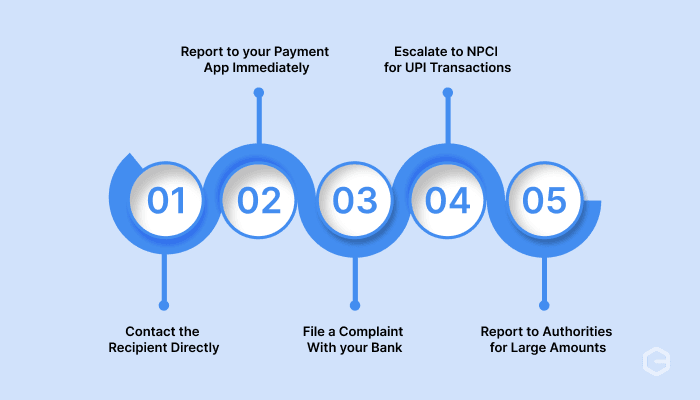
Speed matters when recovering funds from a wrong transaction. The sooner you act, the better your chances of getting your money back. Here are the practical steps you need to take:
1. Contact the recipient directly
If you can identify who received the money, reach out immediately. Check if the payment app shows the recipient's details or if you have their contact information saved. Call or message them politely, explain the mistake, and request a return payment.
For example, if you sent money to a saved contact by accident, a quick phone call often resolves the issue within hours.
Many people cooperate when approached directly, especially if you're courteous and provide proof of the wrong transaction. Send them screenshots showing the transaction details and explain why you need the money returned.
2. Report to your payment app immediately
Open your payment app and locate the wrong transaction in your transaction history. Most apps like Google Pay, PhonePe, and Paytm have a "Report Issue" or "Help" button directly on the transaction page. Tap this option and select the category for wrong or incorrect payments.
Fill out the complaint form with accurate details, including the transaction ID, date, time, amount, and recipient information. Upload any supporting documents, like screenshots or proof of the correct intended recipient. The app's support team will review your case and help you address the issue.
3. File a complaint with your bank
Contact your bank's customer service through their helpline, mobile app, or by visiting a branch. Provide them with your transaction reference number (also called UTR or Unique Transaction Reference), account details, recipient account information, and the exact amount transferred. Banks have dedicated teams to handle wrong transaction complaints and can initiate chargebacks in some cases.
For UPI transactions, your bank can coordinate with the recipient's bank through the UPI network. For NEFT or RTGS transfers, they'll follow interbank complaint procedures. Banks typically acknowledge complaints within 24-48 hours and provide you with a complaint reference number for tracking.
4. Escalate to NPCI for UPI transactions
If your bank or payment app doesn't resolve the issue within a reasonable time, escalate your complaint to NPCI. This applies specifically to UPI transactions. You can file a complaint on the NPCI website or call their toll-free helpline number.
NPCI acts as the governing body for UPI transactions in India and can mediate between banks. Provide them with your original complaint reference number from your bank or app, transaction details, and any response you received from initial complaints.
5. Report to authorities for large amounts
For significant amounts or suspected fraud, file a complaint with your local consumer protection forum or finance department authorities. Provide all documentation, including transaction records, communication with the recipient, and complaint reference numbers from your bank and payment app. Official intervention can expedite recovery, especially if the recipient refuses to cooperate.
You can also file complaints through government consumer portals. For amounts above a certain threshold, consult with a financial advisor or professional consultant about sending a formal written request to the recipient demanding return of funds.
Having the right information speeds up your complaint process and increases your chances of recovery. Payment apps and banks need specific details to investigate and take action.
Here's what you should gather before filing your complaint:
Store all this information in one place, either as a digital folder or printed documents. You'll need to reference it multiple times throughout the recovery process.
Most wrong transactions happen during routine payment activities when you're making the payments in a rush. The good news is that a few simple checks before hitting send can stop errors before they cost you money and recovery time. Here's how to protect yourself:
Wrong transactions happen because manual payment processes lack verification safeguards and real-time tracking. For businesses collecting payments from customers or clients, especially across borders, these errors can cost you time, money, and client trust.
PayGlocal offers a complete payment solution designed to minimize errors and maximize transparency for businesses handling international transactions. Here's how PayGlocal helps:
Whether you're a freelancer receiving client payments, an exporter managing international invoices, or a SaaS company processing subscriptions, PayGlocal gives you the tools to collect payments accurately and efficiently.
Wrong transactions cause immediate stress, but recovery is possible when you act quickly and follow proper procedures. Contact the recipient first if possible, then file formal complaints with your payment app or bank, and escalate to NPCI if needed. Keep detailed records of all transactions and communications throughout the process.
Prevention matters more than recovery. Double-check recipient details, use saved beneficiaries, enable transaction alerts, and start with test payments for new recipients. These simple habits protect you from costly mistakes and time-consuming recovery processes.
For businesses handling multiple payments, especially international transactions, manual processes increase wrong transactions risks. PayGlocal provides the tracking, verification, and transparency you need to process payments confidently and accurately. Get started with PayGlocal today and grow your business with a secure payment infrastructure.
You enter the wrong UPI ID, mistype an account number, or select the wrong contact from your payment app. Within seconds, your money is gone to an unintended recipient. The panic sets in immediately. Can you get it back? Who do you contact first? What should you do now?
In this guide, we cover every action you need to take after a wrong transaction. Find out how to contact the recipient, file complaints with your bank or payment app, escalate to NPCI (National Payments Corporation of India), and prevent future mistakes.
Key takeaways
- Act immediately: Contact the recipient and your bank or payment app within minutes of realizing the mistake to improve recovery chances.
- Gather documentation: Keep transaction IDs, screenshots, timestamps, and all communication records as evidence for your complaint.
- File formal complaints: Use the complaint features in your payment app or contact your bank's customer service with complete transaction details.
- Prevention is essential: Check recipient details, use saved beneficiaries, enable transaction alerts, and consider payment solutions with built-in verification.
- Secure business payment system: Companies handling international payments benefit from platforms like PayGlocal that offer transparent tracking, instant notifications, and secure multi-currency transactions that reduce error risk.
What is a wrong transaction?
A wrong transaction occurs when you send money to an unintended recipient due to entering incorrect payment details. This can happen through UPI apps, bank transfers, credit or debit card payments, or other digital payment methods.
Common causes include entering the wrong UPI ID, selecting the wrong contact from your saved list, entering an incorrect account number, mistyping the IFSC code, or sending money to an outdated beneficiary. For instance, you might intend to pay a vendor but accidentally send funds to a customer with a similar name in your contacts.
The challenge with wrong transactions is that most payment systems process transfers instantly. Once the money leaves your account and reaches the recipient's account, reversal becomes complicated. Unlike declined transactions or failed payments that bounce back automatically, successful wrong transactions require intervention from the recipient, your bank, or regulatory bodies to recover funds.
How to recover money from a wrong transaction?
Speed matters when recovering funds from a wrong transaction. The sooner you act, the better your chances of getting your money back. Here are the practical steps you need to take:
1. Contact the recipient directly
If you can identify who received the money, reach out immediately. Check if the payment app shows the recipient's details or if you have their contact information saved. Call or message them politely, explain the mistake, and request a return payment.
For example, if you sent money to a saved contact by accident, a quick phone call often resolves the issue within hours.
Many people cooperate when approached directly, especially if you're courteous and provide proof of the wrong transaction. Send them screenshots showing the transaction details and explain why you need the money returned.
2. Report to your payment app immediately
Open your payment app and locate the wrong transaction in your transaction history. Most apps like Google Pay, PhonePe, and Paytm have a "Report Issue" or "Help" button directly on the transaction page. Tap this option and select the category for wrong or incorrect payments.
Fill out the complaint form with accurate details, including the transaction ID, date, time, amount, and recipient information. Upload any supporting documents, like screenshots or proof of the correct intended recipient. The app's support team will review your case and help you address the issue.
3. File a complaint with your bank
Contact your bank's customer service through their helpline, mobile app, or by visiting a branch. Provide them with your transaction reference number (also called UTR or Unique Transaction Reference), account details, recipient account information, and the exact amount transferred. Banks have dedicated teams to handle wrong transaction complaints and can initiate chargebacks in some cases.
For UPI transactions, your bank can coordinate with the recipient's bank through the UPI network. For NEFT or RTGS transfers, they'll follow interbank complaint procedures. Banks typically acknowledge complaints within 24-48 hours and provide you with a complaint reference number for tracking.
4. Escalate to NPCI for UPI transactions
If your bank or payment app doesn't resolve the issue within a reasonable time, escalate your complaint to NPCI. This applies specifically to UPI transactions. You can file a complaint on the NPCI website or call their toll-free helpline number.
NPCI acts as the governing body for UPI transactions in India and can mediate between banks. Provide them with your original complaint reference number from your bank or app, transaction details, and any response you received from initial complaints.
5. Report to authorities for large amounts
For significant amounts or suspected fraud, file a complaint with your local consumer protection forum or finance department authorities. Provide all documentation, including transaction records, communication with the recipient, and complaint reference numbers from your bank and payment app. Official intervention can expedite recovery, especially if the recipient refuses to cooperate.
You can also file complaints through government consumer portals. For amounts above a certain threshold, consult with a financial advisor or professional consultant about sending a formal written request to the recipient demanding return of funds.
What information do you need to file a wrong transaction complaint?
Having the right information speeds up your complaint process and increases your chances of recovery. Payment apps and banks need specific details to investigate and take action.
Here's what you should gather before filing your complaint:
- Transaction ID or reference number: Every digital payment generates a unique identifier. Find this in your transaction history or confirmation message.
- Date and time of transaction: Note the exact timestamp when the wrong payment was processed.
- Amount transferred: Specify the exact sum sent, including any transaction fees if applicable.
- Recipient details: Collect the UPI ID, account number, phone number, or any identifying information of the person who received the money.
- Your account information: Have your account number, UPI ID, or payment app-registered mobile number ready.
- Intended recipient details: If you meant to pay someone else, provide their correct information to prove the error.
- Screenshots: Capture images of the wrong transaction confirmation, your transaction history, and any communication with the recipient.
- Previous complaint numbers: If you already contacted your bank or app, keep those reference numbers accessible for escalation.
Store all this information in one place, either as a digital folder or printed documents. You'll need to reference it multiple times throughout the recovery process.
How can you prevent wrong transactions?
Most wrong transactions happen during routine payment activities when you're making the payments in a rush. The good news is that a few simple checks before hitting send can stop errors before they cost you money and recovery time. Here's how to protect yourself:
- Verify recipient details twice: Before confirming any payment, check the recipient's name, UPI ID, or account number against your intended payee. Most payment apps show recipient names once you enter UPI IDs, giving you a chance to catch errors.
- Use saved beneficiaries: Add frequent recipients to your saved beneficiary list after verifying their details once. This reduces typing errors on repeat payments.
- Enable transaction alerts: Set up SMS and app notifications for all outgoing payments. Immediate alerts help you catch mistakes within seconds of sending money.
- Start with small test payments: For new recipients or large amounts, send a small test payment first to confirm the details are correct. Once verified, send the remaining amount.
- Avoid payment rushes: Take your time when making payments, especially during busy periods. Rushing increases the chance of selecting the wrong contacts or mistyping numbers.
- Keep your contact list organized: Remove outdated beneficiaries and maintain clear naming conventions for saved contacts to avoid confusion.
- Use payment platforms with verification: Business payment solutions like PayGlocal include built-in verification, transaction tracking, and confirmation steps that reduce wrong transaction risks.
Manage global payments easily using a secure payment system with PayGlocal
Wrong transactions happen because manual payment processes lack verification safeguards and real-time tracking. For businesses collecting payments from customers or clients, especially across borders, these errors can cost you time, money, and client trust.
PayGlocal offers a complete payment solution designed to minimize errors and maximize transparency for businesses handling international transactions. Here's how PayGlocal helps:
- Multi-currency accounts: Accept payments in 33+ currencies from 180+ countries with dedicated local accounts in USD, GBP, EUR, and CAD, reducing the need for complex manual transfers.
- End-to-end payment tracking: Track every transaction from initiation to settlement with real-time status updates and notifications at each step, so you always know the status of your funds.
- Instant compliance documentation: Receive FIRC (Foreign Inward Remittance Certificate) automatically in your inbox after settlement, eliminating manual compliance work and documentation errors.
- Advanced fraud protection: Built-in risk management and fraud detection systems protect your business from payment errors and suspicious transactions.
- Sanction screening: Automated compliance checks verify recipients against global sanctions lists, ensuring secure transactions and regulatory adherence with privacy-first technology.
Whether you're a freelancer receiving client payments, an exporter managing international invoices, or a SaaS company processing subscriptions, PayGlocal gives you the tools to collect payments accurately and efficiently.
Final thoughts
Wrong transactions cause immediate stress, but recovery is possible when you act quickly and follow proper procedures. Contact the recipient first if possible, then file formal complaints with your payment app or bank, and escalate to NPCI if needed. Keep detailed records of all transactions and communications throughout the process.
Prevention matters more than recovery. Double-check recipient details, use saved beneficiaries, enable transaction alerts, and start with test payments for new recipients. These simple habits protect you from costly mistakes and time-consuming recovery processes.
For businesses handling multiple payments, especially international transactions, manual processes increase wrong transactions risks. PayGlocal provides the tracking, verification, and transparency you need to process payments confidently and accurately. Get started with PayGlocal today and grow your business with a secure payment infrastructure.