
Indian businesses are growing faster than ever. According to the latest data, the Indian POS market is expected to more than double, growing from just $5.86 billion in 2023 to up to $11.60 billion in 2032.
Whether you run a small retail store or manage an online business, knowing about POS transactions can help you choose the right payment method for your business. It lets you accept multiple payment methods from customers and enhances your entire payment collection process.
In this guide, we break down everything you need to know about POS transactions, from basic definitions to their types, benefits, and advanced payment strategies that can help your business collect payments more efficiently and scale globally.
A POS (Point of Sale) transaction is the moment when a customer completes a payment for goods or services at the specific location where the exchange occurs. This location can be a physical store counter, an online checkout page, or even a mobile payment terminal at your customer's location.
POS transactions involve the customer presenting their chosen payment method and the business processing that payment through their POS system. The system then verifies the payment, completes the transaction, and generates a receipt for both parties.
Here are some common examples of POS transactions:
POS transactions follow a structured process that ensures secure and reliable payment processing for both businesses and customers. The transaction workflow involves these key steps:
Modern businesses need to accept various payment types to serve diverse customer preferences and maximize revenue opportunities. Here are some of the common POS transaction types:
Different payment methods offer unique advantages for both businesses and customers, from instant UPI transfers to secure credit card processing.
Here are the main payment methods businesses can accept through POS systems:
The location and method of transaction processing affect security requirements, processing speed, and customer experience across different business scenarios.
Different transaction environments need specific processing approaches and security measures:
POS transactions offer significant advantages that directly impact business operations and customer satisfaction.
Despite their benefits, POS transactions can present several operational and technical challenges that businesses need to handle for smooth payment processing.
Setting up an effective POS transaction system requires careful planning and the right combination of hardware, software, and payment processing partnerships. Follow these essential steps to establish reliable POS transaction processing:
Traditional POS solutions work well for local transactions, but fall short when businesses need to accept payments from international customers. Complex setup processes, high transaction fees, and limited currency support create unnecessary barriers to global growth.
PayGlocal solves these challenges with a complete payment platform designed for businesses ready to scale globally while maintaining local operations.
PayGlocal helps businesses collect from global customers while settling locally, making international payments fast and efficient.
POS transactions form the foundation of modern business revenue collection, enabling secure and efficient payment processing across multiple channels and payment methods.
The evolution toward digital and contactless payments continues accelerating, making it essential for businesses to use flexible payment solutions. PayGlocal offers an all-in-one global payment platform that helps businesses of all sizes accept international payments, manage multi-currency transactions, and scale easily.
Ready to upgrade your payment acceptance capabilities and start collecting from customers worldwide? Get started with PayGlocal today.
Whether you run a small retail store or manage an online business, knowing about POS transactions can help you choose the right payment method for your business. It lets you accept multiple payment methods from customers and enhances your entire payment collection process.
In this guide, we break down everything you need to know about POS transactions, from basic definitions to their types, benefits, and advanced payment strategies that can help your business collect payments more efficiently and scale globally.
Key Takeaways
- Payment completion process: POS transactions refer to the final step where customers pay for goods or services at the point of sale, using various payment methods including cards, digital wallets, and cash.
- Multiple transaction types: POS systems support various payment methods from traditional card swipes to modern contactless payments, UPI transfers, and mobile wallet transactions.
- Business efficiency: Proper POS transaction management reduces payment failures, improves customer experience, and provides real-time tracking of all revenue streams.
- Global payment solutions: Modern businesses need global payment platforms like PayGlocal that offer multi-currency payment acceptance to collect from global customers and settle in local currency with zero setup fees.
What is a POS transaction?
A POS (Point of Sale) transaction is the moment when a customer completes a payment for goods or services at the specific location where the exchange occurs. This location can be a physical store counter, an online checkout page, or even a mobile payment terminal at your customer's location.
POS transactions involve the customer presenting their chosen payment method and the business processing that payment through their POS system. The system then verifies the payment, completes the transaction, and generates a receipt for both parties.
Here are some common examples of POS transactions:
- Retail store purchase: Buying clothes at a mall and paying with your debit card at the checkout counter, where the cashier scans items and processes your card payment.
- Restaurant billing: Ordering food at a restaurant and paying the bill using UPI by scanning a QR code displayed at your table.
- Online shopping: Purchasing products from an e-commerce website and completing payment using your credit card or digital wallet like Paytm.
- Petrol station payment: Filling fuel at a petrol pump and paying through card swipe or mobile wallet at the payment terminal.
How do POS transactions work?
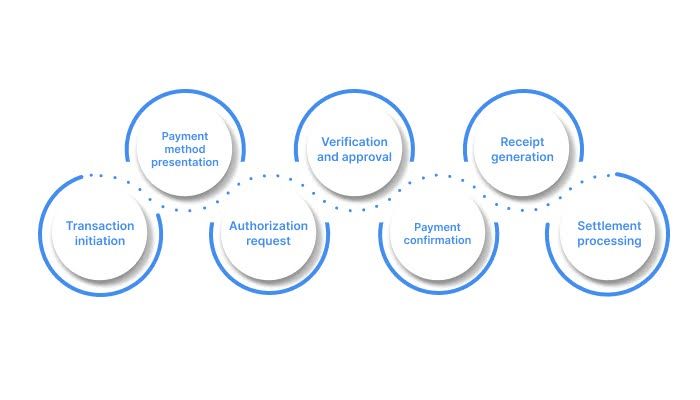
POS transactions follow a structured process that ensures secure and reliable payment processing for both businesses and customers. The transaction workflow involves these key steps:
- Transaction initiation: Customer selects products or services and proceeds to payment, either at a physical terminal or online checkout page.
- Payment method presentation: Customer provides their payment information through card insertion, contactless tap, mobile wallet scan, or manual entry for online transactions.
- Authorization request: The POS system sends payment details to the payment processor, which contacts the customer's bank or card issuer for approval.
- Verification and approval: The issuing bank checks account balance, credit limit, and fraud indicators before approving or declining the transaction.
- Payment confirmation: Both customer and merchant receive immediate confirmation of successful payment processing.
- Receipt generation: Digital or printed receipts are provided for record-keeping and potential returns or exchanges.
- Settlement processing: Funds are transferred from customer accounts to merchant accounts.
What are the types of POS transactions?
Modern businesses need to accept various payment types to serve diverse customer preferences and maximize revenue opportunities. Here are some of the common POS transaction types:
Payment method-based transactions
Different payment methods offer unique advantages for both businesses and customers, from instant UPI transfers to secure credit card processing.
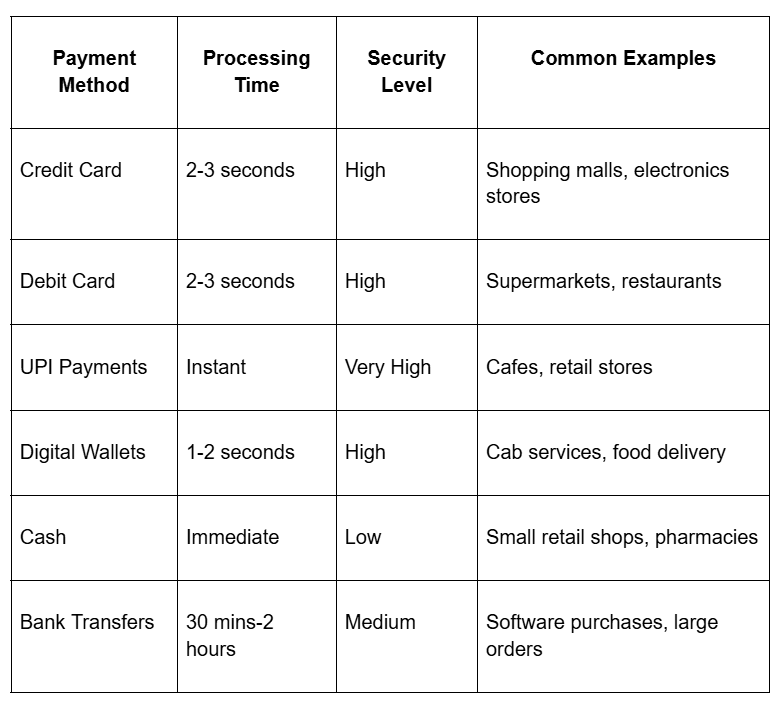
Here are the main payment methods businesses can accept through POS systems:
- Credit card transactions: Customers use their credit cards to make purchases. The card company pays the merchant first, then collects payment from the customer later.
- Debit card transactions: Money comes directly from the customer's bank account when they use their debit card. Businesses typically pay lower fees for debit card transactions compared to credit card transactions.
- Digital wallet payments: Mobile apps like Google Pay, PhonePe, Paytm, and Amazon Pay store customer payment details. These apps utilize stored wallet funds or withdraw money from linked bank accounts and cards.
- UPI transactions: Customers send money directly from their bank account using mobile numbers or QR codes. No bank details are shared between the customer and the merchant during the transaction.
- Cash transactions: Traditional paper money and coin payments happen between the customer and merchant. Many small businesses and customers still prefer cash for everyday purchases.
- Bank transfer payments: Customers send money directly from their bank account to the business account. These transfers work through NEFT, RTGS, or IMPS systems and suit larger payment amounts.
Transaction environment types
The location and method of transaction processing affect security requirements, processing speed, and customer experience across different business scenarios.
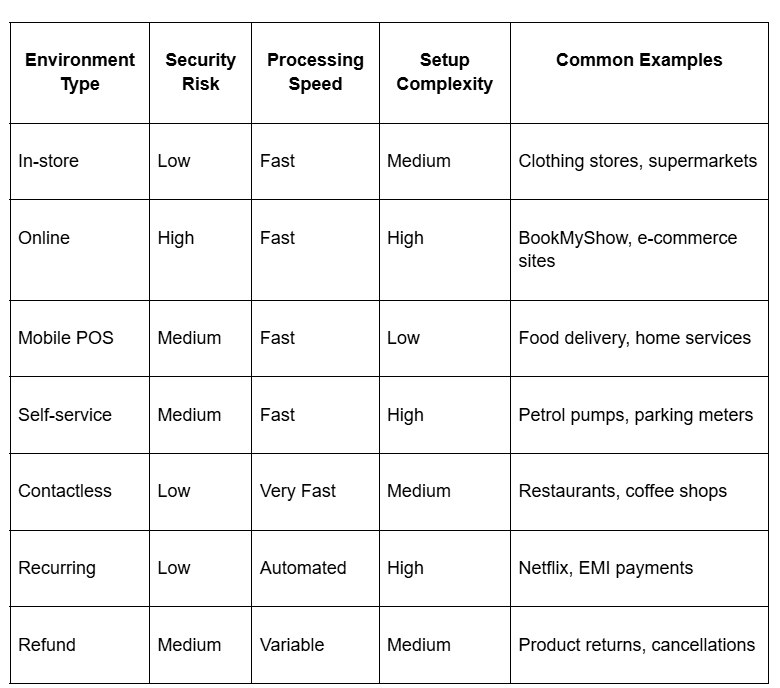
Different transaction environments need specific processing approaches and security measures:
- In-store transactions: Customers visit physical business locations and pay using card readers, cash registers, or mobile payment devices. Both the customer and merchant stay in the same location during payment.
- Online transactions: Customers make payments through business websites or mobile apps by entering their payment information. Customers and businesses stay in different locations during the purchase.
- Mobile POS transactions: Businesses use smartphones or tablets with card readers to accept payments anywhere with internet access. This setup works well for businesses that move around or deliver services.
- Self-service POS transactions: Customers operate payment terminals themselves without staff help. These machines guide customers through each payment step.
- Contactless transactions: Customers tap their cards or phones on payment terminals to complete the purchase. Payment happens through short-range wireless technology.
- Recurring transactions: Payments happen automatically at regular intervals without customer action each time. Businesses charge saved payment methods on scheduled dates.
- Refund transactions: Money returns to customers when they bring back products or cancel services. Refunds usually go back to the original payment method customers used.
What are the benefits of POS transactions?
POS transactions offer significant advantages that directly impact business operations and customer satisfaction.
- Faster payment processing: Digital POS transactions are completed within seconds compared to traditional cash counting or check processing, reducing customer wait times and improving throughput during busy periods.
- Enhanced security features: Modern POS systems include encryption, tokenization, and fraud detection that protect both customer data and business finances from unauthorized access or fraudulent transactions.
- Automatic record keeping: Every POS transaction creates digital records for accounting, inventory management, and tax reporting, eliminating manual bookkeeping errors and saving administrative time.
- Customer convenience: Multiple payment options accommodate different customer preferences, from contactless payments for speed to installment options for larger purchases.
- Real-time inventory updates: Integrated POS systems automatically adjust stock levels with each sale, preventing overselling and helping maintain optimal inventory levels.
- Detailed analytics: Transaction data provides insights into customer behavior, peak sales periods, and product performance that inform business decisions and marketing strategies.
- Reduced cash handling: Digital payments minimize the security risks and administrative overhead associated with managing physical currency.
What are the common POS transaction challenges?
Despite their benefits, POS transactions can present several operational and technical challenges that businesses need to handle for smooth payment processing.
- Technical system failures: Network outages, software crashes, or hardware malfunctions can interrupt payment processing during peak business hours, leading to lost sales and frustrated customers.
- High processing fees: Transaction charges, especially for credit cards and international payments, can significantly impact profit margins for businesses with high transaction volumes or low-value sales.
- Security vulnerabilities: Payment fraud, data breaches, and skimming attacks pose constant threats that require ongoing investment in security measures and staff training.
- Integration complexity: Connecting POS systems with existing inventory management, accounting software, and customer databases often requires technical expertise and ongoing maintenance.
- Customer payment disputes: Chargebacks, refund requests, and payment disputes create administrative overhead and can result in lost revenue plus additional processing fees.
How to set up POS transactions for your business?
Setting up an effective POS transaction system requires careful planning and the right combination of hardware, software, and payment processing partnerships. Follow these essential steps to establish reliable POS transaction processing:
- Choose appropriate hardware: Select card readers, payment terminals, or mobile devices that support your preferred payment methods and integrate with your chosen POS software solution.
- Partner with payment processors: Research and compare transaction fees, settlement times, and security features from different payment processors to find the best fit for your business model.
- Configure security settings: Implement PCI DSS compliance measures, enable encryption for all payment data, and set up fraud detection rules to protect your business and customers.
- Train your staff: Provide comprehensive training on processing different payment types, handling failed transactions, and following security protocols to ensure consistent service quality.
- Test all payment methods: Conduct thorough testing of card payments, digital wallets, UPI transactions, and any other payment options before going live to identify and resolve potential issues.
Get paid faster and grow globally with PayGlocal
Traditional POS solutions work well for local transactions, but fall short when businesses need to accept payments from international customers. Complex setup processes, high transaction fees, and limited currency support create unnecessary barriers to global growth.
PayGlocal solves these challenges with a complete payment platform designed for businesses ready to scale globally while maintaining local operations.
- Multi-currency acceptance: Collect payments in 130+ global currencies from customers in 180+ countries, with automatic conversion and settlement in local currency for simplified accounting.
- Dynamic checkout: Easily integrate multiple checkout options based on your business needs, and ensure every customer can pay using their preferred payment method.
- Instant compliance documentation: Receive automated FIRC generation upon settlement, removing manual paperwork and ensuring regulatory compliance for international transactions.
- Zero setup costs: Start accepting global payments immediately with no upfront fees, platform charges, or monthly minimums. Pay only when you successfully process transactions.
- Real-time payment tracking: Monitor every transaction from initiation to settlement with detailed status updates and transparent reporting that integrates with your existing financial systems.
PayGlocal helps businesses collect from global customers while settling locally, making international payments fast and efficient.
Final thoughts
POS transactions form the foundation of modern business revenue collection, enabling secure and efficient payment processing across multiple channels and payment methods.
The evolution toward digital and contactless payments continues accelerating, making it essential for businesses to use flexible payment solutions. PayGlocal offers an all-in-one global payment platform that helps businesses of all sizes accept international payments, manage multi-currency transactions, and scale easily.
Ready to upgrade your payment acceptance capabilities and start collecting from customers worldwide? Get started with PayGlocal today.